Product Thinking and Solution Design
Chapter Overview
What You Will Learn
In summary, you will learn the basics of building an application: where ideas come from → how ideas become applications → how applications go from usable to great → how to use AI in applications → how to find users after completion.
- I want to build an application, where do reliable ideas come from?
- Once I have an idea, how do I break it down into something that can be built?
- After building it, how do I judge and polish it into a "good application"?
- At which step and how do I reasonably use AI to amplify value?
- After having an application, how do I find the first batch of real users from zero?
1. I Want to Build an Application, Where Do Reliable Ideas Come From?
Many people, when mentioning building an application, their first reaction is: I need to think of a creative idea that's memorable enough. So they browse rankings every day, read reports, study various hot products, staring at others' success stories, hoping one day they'll encounter a particularly unique idea.
But the reality is, many people actually have no ideas at all, just anxious because they don't have ideas; some set a very high threshold from the start: if it's not interesting enough, don't start, thinking ordinary equals failure. But when you really walk a stretch of the road, you'll find that applications that can go far and steady are mostly not thought up in some late night brainstorm, but grow bit by bit in specific life scenarios, around real problems.
So, this chapter wants to solve a starting point problem: How can I have an idea? Is this idea reliable? Is it worth your time and energy to turn it into a real application?
1.1 What is an Idea
Let's start with a most basic but often overlooked question: what exactly counts as an idea.
In daily conversation, what people often call an idea is often a very subjective excitement. You might see a video on the street and instantly think this direction is so cool, so a sentence pops up in your mind: I can make something similar too. Or at a party chat, everyone complains about a product being hard to use, and you casually add: if only there was something that could automatically handle all this for me. At this moment, you do have a hazy thought, but it's still far from something that can be made.
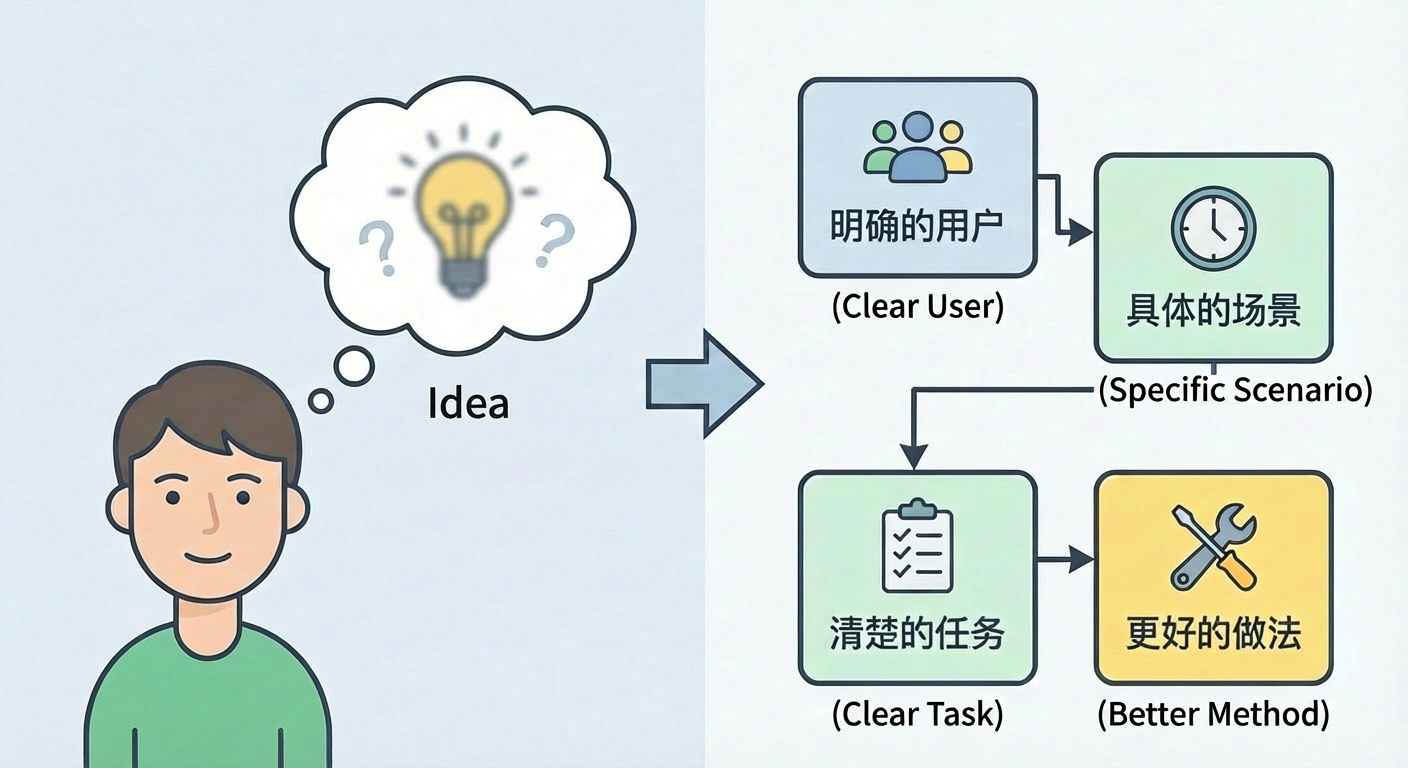
Here, let's set a slightly more rigorous standard for ourselves. Only when a thought meets at least the following things, do we call it an idea:
First, it must target a clear type of user. Not vaguely saying everyone, but being able to clearly say who this is mainly for. Is it college students, workplace newcomers, parents with kids, or independent developers, e-commerce merchants, small business owners. Different people care about completely different things in the same matter. If you haven't even determined the crowd, then all subsequent judgments will be floating in the air.
Second, it needs to be rooted in a specific scenario. When is this application used by users, is it on the morning commute subway, during work breaks, before sleep, or on weekends when organizing materials. Even seemingly abstract tools, like notes and task management, if you observe carefully, the part that's actually used frequently is definitely tied very tightly to certain scenarios.
Third, it needs to help users complete a clear task. The task doesn't have to be big, but it needs to be expressible. Like organizing the day's to-do list, condensing a long article into a few key points, generating a structured meeting minute for a meeting, or generating a feasible route for a city weekend trip. The more specifically you can state the task, the easier it will be to design features and evaluate value later.
Fourth, it provides a better approach or tool than the current situation. How did users originally complete this task, was it by memory, paper notes, Excel, screenshot collections, or switching back and forth between different applications. If you can provide a clearly more effortless, more stable, more pleasant way, then this idea truly starts to have value.
If you can't think clearly about the above, it doesn't matter. Now is the AI era, you can organize the above content into a complete prompt, then write your thoughts, target users and usage scenarios together, and hand it to a large model to help you complete and refine. Treat the model as an always-online product partner, repeatedly dialogue, question, modify, and you can turn a vague concept into something concrete.
1.2 Ideas and User Needs: The First Line of Defense Against Self-Indulgence
Many people, when building an application for the first time, most easily fall into the trap of self-indulgence. Self-indulgence means you're incredibly excited about your own creative idea, thinking this is a world-disrupting direction, but when you explain it to ordinary users, their reaction is often calm, even somewhat confused, just politely nodding and saying "sounds pretty good." However, after the product launches, they neither download nor use it long-term.
To avoid this situation, you must separate ideas from user needs.
Let's first talk about what user needs are. It can be summarized in a relatively simple sentence: in a specific scenario, the various costs users hope to reduce, or various values they hope to increase, to achieve a certain goal. The costs here include not just money, but also time, energy, mental burden, risk of making mistakes, and even social pressure. For example, a newcomer just entering the workplace might be willing to spend money on a set of templates, just to be less nervous during their first report; a parent with children might be willing to pay a bit more, as long as they can guarantee half an hour for themselves every day.
Understanding this, you'll find that pure coolness doesn't constitute a need. Many creative ideas are indeed novel enough, but if it doesn't make users more effortless, more at ease, more confident on some specific goal, then it's hard to support a truly sustainable application.
There's an often-overlooked gap between ideas and needs. Ideas represent your subjective judgment rather than data support - what you think is fun, interesting, looks avant-garde. Needs represent what users are actually experiencing and what they're worrying about. You might think an automatic poetry generation feature is very cool, but for most users, a tool that can save them ten minutes a day on repetitive organizing work might be more attractive. Unless you're like Jobs or have very good design aesthetic level, making everyone think "automatic poetry generation feature" is very cool and spontaneously want to follow you, but this has certain difficulty.
When judging a thought, there's a simple way to distinguish whether it's more like a real need or a fake need. A clear characteristic of real needs is that even without your application now, users are actively trying to solve this problem. Even if the current approach is clumsy, they're still willing to spend time, energy, even money to fill this gap. For example, some people write their own scripts just to reduce some repetitive labor for themselves. In these scenarios, if you can provide a friendlier, more universal solution, there's often an opportunity to stand firm.
The typical situation of fake needs is exactly the opposite. If you don't actively bring it up, most people won't realize that's a problem, and won't even feel it must be solved. The usage scenarios you describe exist more in your imagination than in users' daily lives. After hearing your introduction, they'll just think this thing is good, quite interesting, but won't pay, and might even turn around and forget. Such ideas are okay for writing stories, but very dangerous for making products.
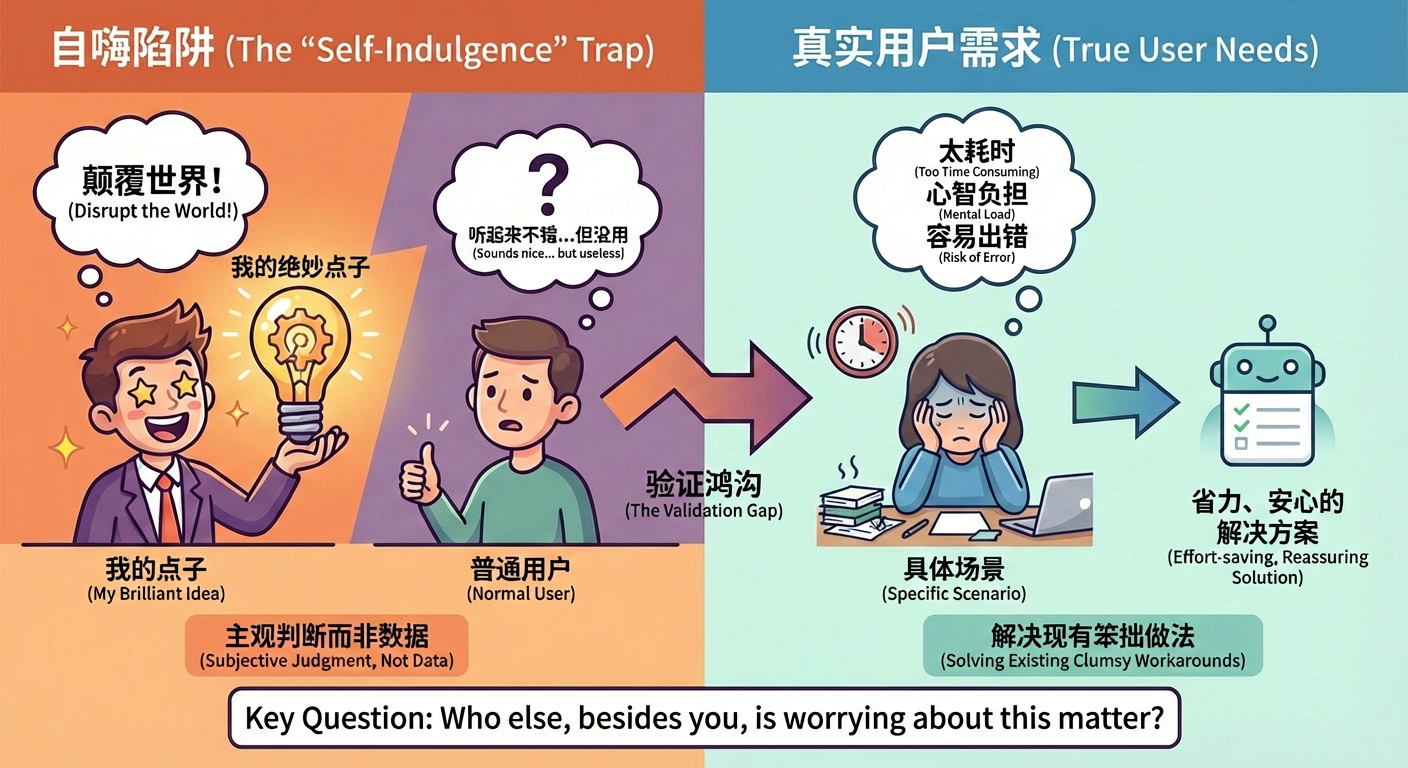
So, the first line of defense against self-indulgence is understanding user needs. From the beginning, you need to force yourself to answer a seemingly simple but very critical question: besides myself, who else is seriously worrying about this matter. You can go to forums, communities, comment sections, or directly ask a few people around you who might become users. If you rarely hear complaints with real emotion like "I get stuck on this every time" or "the current approach is really too troublesome," then it means this idea is still some distance from real needs.
1.3 Why Good Ideas Are Good Ideas
Not all ideas have the same fate. Some ideas, even if you only spend a few days making a rough but working version, will naturally attract a small group of real users who are willing to stay and patiently give you feedback. Other ideas, even if you desperately pile on features, spend money on ads, and do a lot of promotion on various platforms, can only briefly pile up some data through external force, and soon return to silence.
The most essential difference behind this is whether the idea itself has stepped on some key problem point.
A good idea naturally welcomes growth: Even appearing in a very crude form, with only a few simple buttons, as long as it can solve a specific small trouble for users, it can achieve a certain degree of natural growth. For example, a small tool that can quickly convert speech to text, at first might just be a webpage with a few simple buttons, but as long as the recognition quality is good enough and the function conversion is particularly natural, many people will be willing to forward the link to friends, because this simply saves them time.
A bad idea is often destined from the start to rely on external force to drive. Even if your appearance is particularly good, the core displays particularly high-end, you need to keep pushing, keep shouting, keep explaining, but once your recruitment action slows down, usage data will slide straight down. You keep throwing resources in, pulling partnerships, doing activities, but always feel like you're going against the current. The problem isn't that you didn't execute well enough, but that the point itself didn't hit a real enough pain point.
Of course, the above situations aren't absolute. For example, in early markets, users might not realize value has some lag. For example, when there are competing products, we also need to consider appearance, operation difficulty, brand characteristics, etc., but these are deeper content, not considered for now.
So, when we discuss whether to continue investing in an idea, what we should really focus on isn't how flashy the creativity itself is, but whether it can naturally grow a path from problem to solution. We make ideas not just to prove to others how creative we are, but to find a valuable starting point, along which we can slowly polish a small tool into a truly useful application.
Choice is more important than effort.
1.4 Where Good Ideas Come From: Four Sources and Specific Examples
Many people, when mentioning thinking of ideas, the picture that comes to mind is a person stuck at a desk, staring at the ceiling, hoping one day inspiration will suddenly fall and hit them. Real good ideas, however, mostly don't come this way. They more often come from small observations in life, repeated questions in communities, piles of complaints on the internet, and being sifted out bit by bit from existing products.
These four sources below, if you're willing to seriously do them, are easy to dig out directions you can start with.
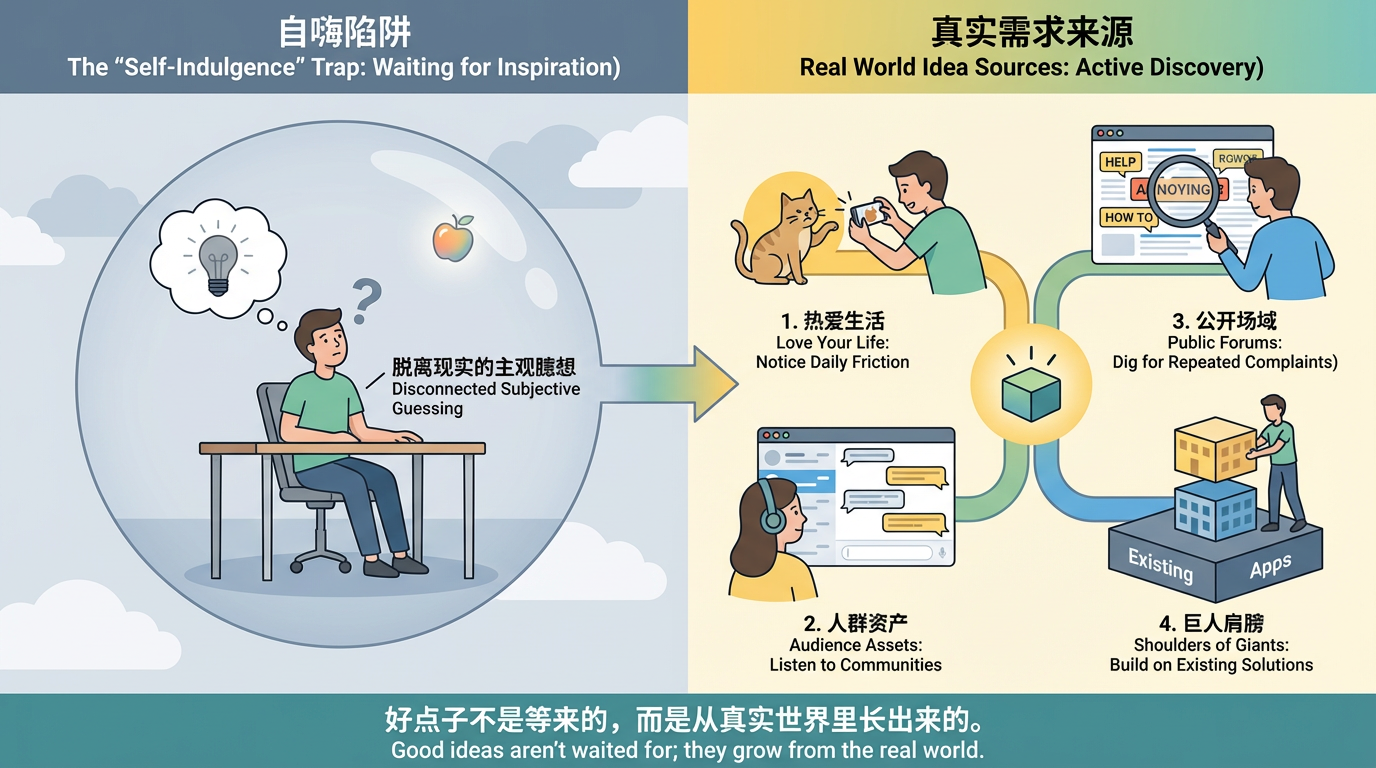
Love Your Own Life
A very simple but effective principle is: the more participatory you are in life, the easier it is to discover problems, and the more capable you are of judging what problems are worth solving. So-called participatory means you're not watching others live through a screen, but personally experiencing, trying, and making mistakes. The more seriously you treat your hobbies, the more likely they'll become fertile ground for ideas to grow.
For example, if you particularly love raising cats, a day you live with a cat yourself often has more information value than scrolling through a hundred "cat raising tips." You'll know where cats are most likely to knock things over, remember what time every day they're most active, in which situations they're most easily stressed, and personally experience details like cleaning litter boxes, brushing fur, trimming nails, and vet visits. Every slightly unsmooth experience is actually a potential product clue.
Like taking photos of your cat: many people have encountered the situation where you're holding your phone up, but the cat just won't look at the lens, either lowering its head to lick paws or staring at some other corner. Could there be a small tool that makes your phone or tablet screen show an automatically moving red dot, feather, or bug animation, specifically attracting the cat's attention? When you press the photo button, it automatically waves around near the front camera, "tricking" the cat's gaze toward the lens, and conveniently takes several consecutive shots, helping you pick out the clear and good-looking one. Thinking one step further, this app could also record which color and movement trajectory each cat is most interested in, next time automatically using its "exclusive" teasing mode to increase success rate.

If you enjoy makeup or skincare, every bottle on your cabinet represents a lot of trial and error and decision-making. You might already be used to taking photos of each makeup look with your phone album, but every time you look back, you have to recall bit by bit which lipstick and which eyeshadow palette you used that day. Could these pieces of information be systematically recorded to create your own makeup look collection? The app could even help you count which makeup looks you use most in what occasions, which combinations perform best in photos, so you don't have to think from scratch every time you choose makeup.
More specifically, many people have this scenario: morning time is tight, you open the album wanting to find "that successful commuter makeup from last time," but after scrolling for ages, you still can't remember which products you actually used. Could there be a small feature where after taking a makeup photo, you just casually say to your phone: "Today is interview makeup, used #01 orange-brown eyeshadow palette and bean paste color lipstick," and the app automatically recognizes and generates a "makeup recipe" bound to the photo? Next time you just search "interview," "orange-brown eyeshadow," "bean paste," and you can instantly see all related makeup looks, and even automatically generate a "today only show commuter-suitable, five-minute-complete makeup" recommendation list. Those few minutes you save every morning are actually a very specific "solved problem."
If you like city walks or various forms of slow travel, you might already be piecing together your experience with various tools: map software recording routes, notes listing cafes to visit, photos and thoughts scattered in albums. Could there be an app that combines routes, check-in points, photos, and text into a walking log with timeline and story? Even further, share your route with friends with one click, letting them walk out different versions in the same city.
You could also dig into a more daily detail: many people during city walks have the frustration of "feeling this corner is beautiful in the moment, but completely unable to find that spot on the map after going home." Could there be a super lightweight feature: when you walk to a corner that feels right, just hold down your earphone button and say "mark this, it's a road suitable for date walks," and the app instantly drops a voice-tagged marker at your current location, automatically recording time, weather, and noise level. Later, you or your friends, just by opening this city's map, can see these "pedestrian-tested atmosphere points": where's good for spacing out alone, where's good for night views, where's good for walking and chatting with friends. Those small intersections that would have been "forgotten after walking past" slowly grow into a textured city experience database.
These examples actually want to illustrate just one thing: you need to love your life, life is your best source of ideas. Every confusion encountered, temporary workarounds invented, those places you feel are a bit troublesome but have been tolerating - as long as you're willing to look a bit more, ask whether it's possible to use a small tool to change it a bit, they all have the potential to become future product prototypes.
Dig From Your Crowd Assets
So-called crowd assets, simply put, are a group of people you can already reach. It could be your readers, communities you operate, your company's internal colleague group, or an interest community you've long participated in. As long as you have channels to stably hear what some people are talking about, worrying about, and expecting every day, then you have a big advantage over someone starting completely from scratch.
Take a very common example. If you're an organizer of a designer community, what you can see in the group every day is actually an extremely precious pool of needs. Some complain about clients always revising drafts repeatedly, some are dissatisfied with certain material websites' charging methods, some feel wasting too much time adjusting between different size specifications. Behind every complaint hides a potential product clue. For example, you could make a simple size adaptation tool that generates one design into various common platform size ratios with one click; or make a small tool that can save and reuse common components, helping designers complete repetitive work with less time.
If you're in an exam preparation community, the group might long be filled with similar topics: today's state isn't good, the plan was delayed again, what materials to read more efficiently, how to persist in check-ins. You don't need to imagine out of thin air, just observe for a while, organize the several common difficulties repeatedly mentioned by everyone, and you can roughly outline the initial functional direction of a learning application: like more reasonable goal breakdown, more humanized check-in feedback, more realistic progress visualization.
In these scenarios, you don't have to try to make a big and comprehensive product for everyone from the start. You just need to admit one thing: this small circle of people in your hands is your best starting point. The deeper you understand them, the more you know those spoken and unspoken small annoyances in their real lives, the more opportunity you have to make something truly used.
Dig Needs From Public Spaces
Even if you temporarily don't have any community or reader group of your own, don't worry at all. Every day countless people on the internet are loudly telling their difficulties and dissatisfaction on various platforms. These voices in public spaces are themselves a huge treasure trove, just that most people never seriously listen.
You can select several platforms related to industries you're interested in, regularly search for keywords with emotional colors. For example, so annoying, any recommendations, how to solve, really troublesome, any better way. Then patiently look through those posts and comments, focusing on two types of information.
One type is certain problems being mentioned repeatedly over a long period. For example, in job hunting sections, every so often someone comes to ask how to write a resume, how to prepare self-introduction, how to follow up on interview results; in parent groups, confusion about complementary food combinations, sleep schedule adjustment, and parent-child communication repeatedly appears; in small merchant exchange communities, everyone might always be worrying about inventory management, cash flow, and employee scheduling. These long-existing repeated problems are systematic pain points repeatedly exposed by an industry.
The other type is in certain scenarios, users are barely coping in very clumsy ways. For example, some people write all to-do items on paper, then take photos to upload to the cloud; some copy and paste back and forth between different applications, just to convert content from one format to another; some manually organize data from different channels into one table. In these places, as long as you observe carefully, you'll find many small cuts that can be proceduralized and toolized.
Digging for needs in public spaces is actually training an ability: turning yourself from a bystander into a catcher. When you habitually search these keywords, habitually record cases, your brain will slowly accumulate a set of sensitivity to real problems, this sensitivity will help you again and again in your subsequent product design process.
Standing on the Shoulders of Giants
Another often-overlooked source of ideas is existing products and projects. Many capable people have already explored paths before us. You do not need to start from a blank page every time. You can stand where others have already reached and move one step further.
At places like hackathons, product innovation competitions, and startup demo days, many interesting mini-projects appear. They often share two traits: tight time and limited resources. That is very similar to your own early-stage app situation. So when you review award-winning projects, ask two questions: if this product only served a narrower segment, would it land more easily? If half or even two-thirds of the features were cut, keeping only the core loop, would it become clearer?
Likewise, tools listed on product rankings, open-source projects, and tool directories can all be starting points for thinking. Pick some that interest you and break them down one by one: who they help, what problem they solve, what clear gaps remain in the current form, and what changes if moved to another scenario or country. This is not about copying. It is practice for understanding the relationship between problems and solutions.
The offline world is the same. When you queue for registration at hospitals, wait for tables in restaurants, fill repeated fields in government halls, or repeatedly write the same information on paper forms, pause and ask: is there room here for systematization, digitization, and automation? Messy, repetitive, low-efficiency scenarios are often the soil where future tools grow.
If you keep mining material from these four paths over time, you will find that ideas are not sudden miracles. They are by-products of long-term interaction with life, people, and the information world.
1.5 Summarize a Good Idea in One Sentence: The Art of Less Is More
Once you roughly know where ideas come from, the next key exercise is trying to explain your idea in one sentence. It sounds simple, but it is strict, because it forces you to face a fact: does your idea actually have a clear core?
People rarely remember others because they are good at everything. Usually they remember one clear trait: a signature style, a stable speaking tone, or one key sentence in discussions. Products are the same. Instead of forcing people to remember ten features, let them form one simple but clear impression.
A common mistake when writing that sentence is being too broad. For example: “This is an app that helps users improve English.” It seems correct, but says almost nothing. Who is it for: beginners, students, or professionals? How: vocabulary drills, listening practice, speaking correction, or writing review? How much effort is needed and what change can be expected? All key information is diluted.
A better version is much more specific. For example: “A vocabulary app that helps commuters memorize 100 core words in one month with 10 minutes a day.” This already says at least three things: controllable usage cost (10 minutes daily), visible expected outcome (100 words in one month), and clear scenario (commuting time). Users can quickly judge whether it helps them.
This one-sentence exercise is really forcing yourself to answer three questions repeatedly: who exactly you help, in what scenario you want them to think of you, and what result you help them get within what time. Only when you are willing to combine these details, even at the cost of fancy wording, does your idea become understandable and spreadable.
You can also apply this training to your own future. Try writing one sentence about your next three years: who you mainly serve, what type of problem you solve, and what visible outcomes you have produced. This helps decision-making: what must be held tightly and what can be released. Learning to give up is often harder and more correct than learning to add.
If you do not know where to learn this style, it is simple: read copy that competes for user attention every day. Check one-line app-store descriptions, hero headlines on game/tool homepages, and core copy on landing pages. Copy them, analyze structure, and ask AI to draft a version for your own idea.
1.6 Use AI to Diverge Thinking and Find Differentiation
In the past, ideation mostly relied on personal thinking. With AI, you effectively gain an on-demand brainstorming partner. Used well, it can greatly expand your idea space.
When you are stuck and only cycling through the same few thoughts, describe your current idea to AI as clearly as possible and ask it to help with specific tasks. For example: for the same core task, list 20 different user groups; or reframe usage for students, freelancers, parents, and small merchants; or ask AI to respond from product, operations, marketing, and engineering perspectives.
You will see scenarios you would not have thought of yourself. Your task is not to accept everything, but to pick the small area where you have stronger understanding and resource advantage. For example, AI may list many industries, but if you resonate most with education and content creation scenarios, prioritize deeper decomposition in those directions.
Another important principle: common ideas are not necessarily invalid ideas. Many beginners try to avoid anything “common,” assuming if others did it, no chance remains. Reality is more nuanced. Vocabulary tools, to-do apps, bookkeeping, and habit tracking remain popular because the underlying problems are real and persistent. In such spaces, competition is often not “who has a completely new big idea,” but who understands a specific subgroup better and executes details closer to their real life.
You can list typical beginner ideas first, such as vocabulary helper, daily check-in app, reading-note assistant, resume generator, and habit-building tool. Then for each one, run a dedicated AI breakdown and ask three questions:
- If I only serve a very specific group (for example designers, lawyers, new mothers, graduate students), how would this idea look different?
- If I only target one fixed scenario (commuting, 10-minute lunch break, 30 minutes before sleep), can function and presentation be more focused?
- If I optimize result delivery to the extreme (easier to share, print, or import into other systems), would that alone create differentiation?
AI’s value here is not replacing your decision, but turning a narrow path into a broader map. You can quickly see where others are already deeply established and which corners remain relatively open. But final path choice still returns to an old question: where do you truly care, truly understand, and are willing to invest long term?
One bottom line again: all discussion about ideas and creativity must eventually return to user needs. AI can accelerate variation generation, but after any number of brainstorming rounds, the final criterion remains: does this idea truly respond to real pain for a specific group, and does it move one step forward on a problem they are already repeatedly trying to solve?
Summary
Use simple dimensions to check whether an idea is clear enough. Distinguish what you think is cool from what users truly need. Understand that good ideas are good because they hit a real pain point early. Learn to continuously mine clues from your life, your reachable groups, public information, and existing products. Practice explaining your idea in one sentence. Treat AI as a partner to expand thinking, not a tool to replace judgment.
When you already have one to three such ideas and can describe each in one sentence (who it serves, in what scenario, with what expected result), stop chasing new ideas and shift attention to the next step: how to break one of them into a product that can actually be built and actually used by real users.
What if the idea is rough? That is fine. Rough at the beginning is normal. Done is always more important than perfect. You need to start before you can have an ending.
📚 Assignments
Please complete the following based on the above content:
- Combine your own interests and use AI to generate several app ideas.
- Ask AI to evaluate whether each idea is a real need or fake need, and provide need insights plus suggestions.
- Choose one or two of the four sources (or ask AI to generate more ideas) and extract ideas.
- From all ideas above, pick your favorite three and summarize each in one information-dense sentence.
2. Once You Have an Idea, How Do You Break It into an App You Can Actually Build?
In the previous chapter, we solved the starting question: what kind of idea is worth taking seriously.
The real challenge starts now. Many people fail here: in their minds the blueprint seems complete, but once they start, it feels too complex to begin. Too many features, too many pages, scary-looking tech stack. So they procrastinate and finally comfort themselves with:
“It’s okay, maybe I’ll build it someday...”

Don’t delay. Start now. This chapter teaches a practical decomposition method from idea to buildable version. You will see that going from zero to one does not depend on genius, but on a repeatable action sequence: diverge, converge, decompose, refine, benchmark, ask. Following this order, even without a team or abundant time, you can turn an idea into a runnable app demo.
2.1 From Idea to Solution: Use the Double Diamond from Divergence to Convergence
After you start sketching ideas, another common problem appears quickly: too many ideas. You write many scenarios and features on whiteboard, draw many page variants, and it feels productive. But when you need to build, it becomes harder, because everything looks important.
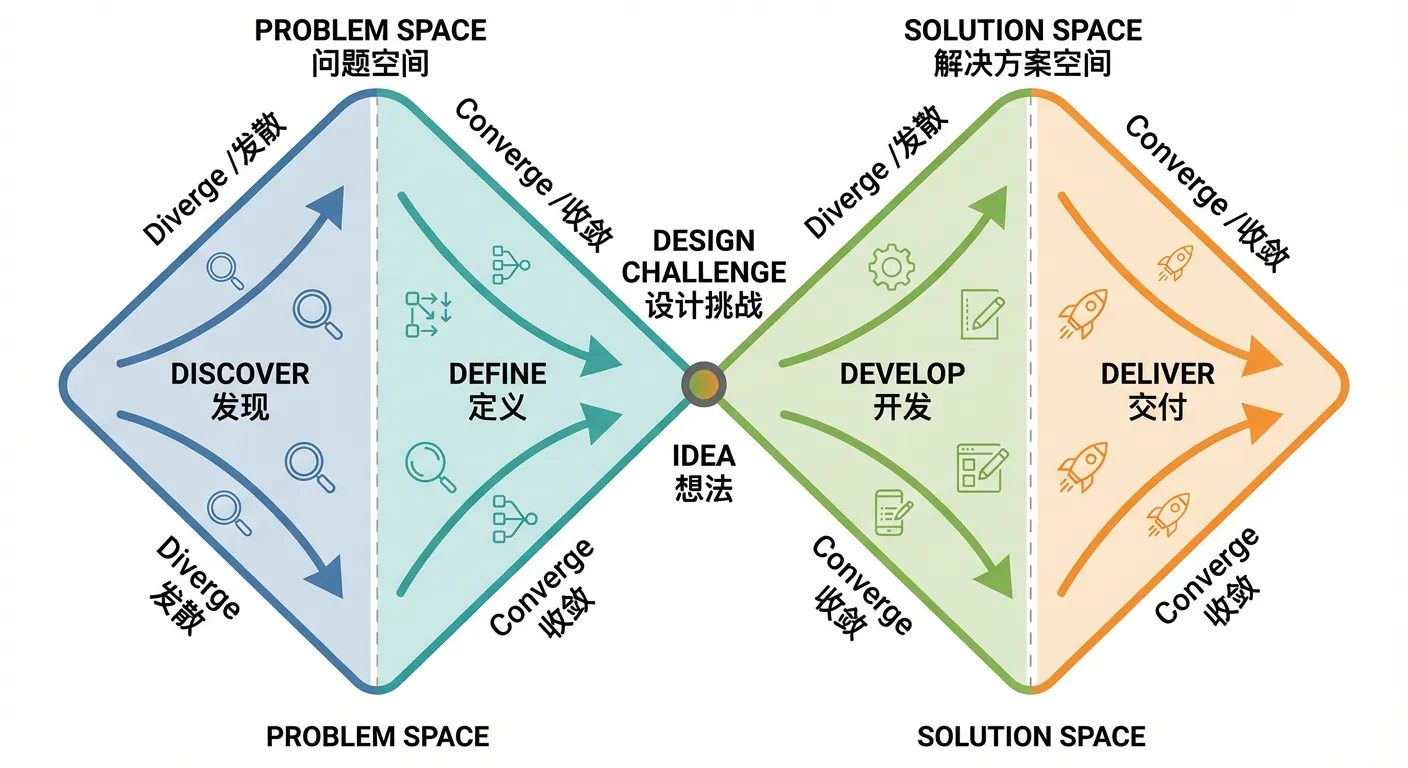
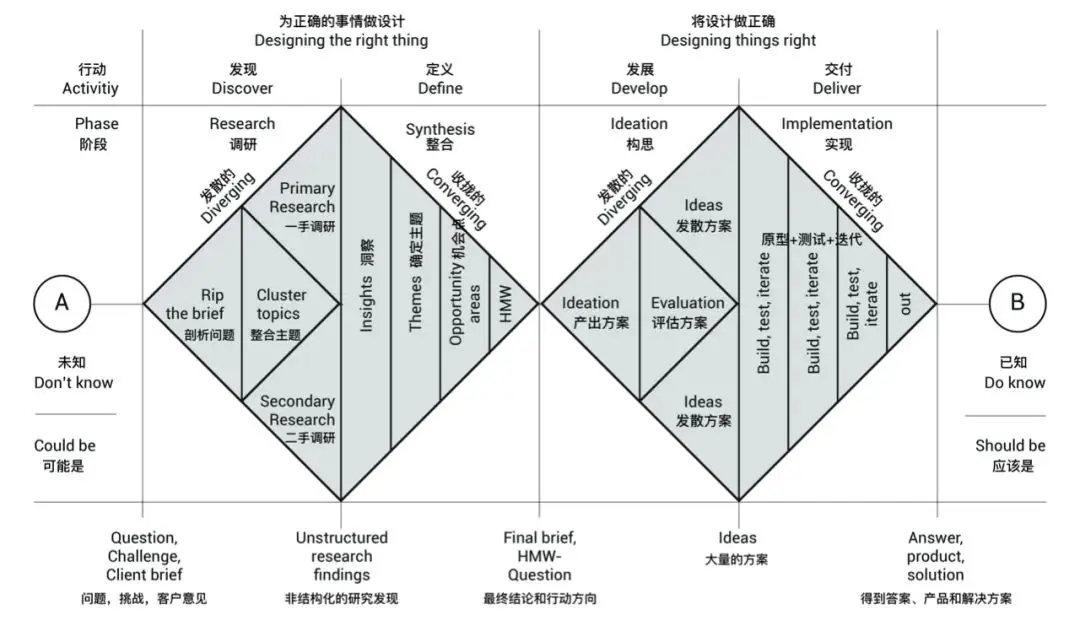
This is where a classic and easy framework helps: the Double Diamond. Its meaning is simple: in many phases, you should diverge first, then converge, rather than trying to finish everything at once from the beginning.
What Is the Double Diamond?
The Double Diamond, proposed by the UK Design Council, describes innovation/design as two connected diamonds.
- The first diamond goes from discovering problems to defining a clear problem. It emphasizes broad exploration and user understanding first, then convergence to the real core problem.
- The second diamond goes from developing solutions to delivering solutions. It starts with bold exploration of possible approaches and prototypes, then converges by selecting and polishing the most feasible option.
Its core principle: both the “problem phase” and “solution phase” should go through diverge -> converge. This prevents jumping to solutions too early and improves innovation quality and success rate.
First Diamond: Understand the Problem (Diverge from a Point, Converge to a Core)
In the Double Diamond, the first diamond is about the problem itself. You start with fuzzy cognition, diverge into related situations and possibilities, then converge to the one problem worth solving first.
For your app, that means:
- In divergence, list as many possible user scenarios, frictions, and desired outcomes as possible. Do not judge yet; spread all relevant thoughts.
- In convergence, force yourself to choose one or two of the most frequent and painful scenarios.
For example, in a document-processing app, you might list scenarios like commuting, pre-meeting preparation, pre-report writing, and postmortem review. You may list concerns such as inaccurate summaries, messy structure, or missing key points. Users may want to quickly understand what a long document says and what parts are relevant to them.
Then in convergence, if the most repeated pain is “receiving a long work document and needing to quickly grasp core conclusions,” define first-version goal as: helping users understand the core meaning of one long document within five minutes, instead of solving all document-related problems at once.
At the end of the first diamond, you should clearly know what exact problem you solve and why its priority is higher than surrounding problems.
Second Diamond: Design the Solution (From Rough Ideas to Executable Plan)
The second diamond is about generating solutions. After you know the target problem, generate as many approaches as possible, then filter for the best first version.
In divergence here, keep adding possibilities: more functions, finer scenarios, possible interaction patterns. For long-document summarization, you might imagine different summary granularity, different output formats, optional voice playback, user highlight support, multiple summary styles, etc. No immediate decision is required.
In convergence, use a simple practical evaluation lens:
User Value x Feasibility x Time Cost
Score ideas roughly (for example 1-5 on each dimension), and prioritize high combined score with controllable time cost as MVP components.
For example, voice playback may have decent value but higher integration cost; plain-text summary plus key-point extraction may provide similar value with higher feasibility and lower time cost, so they fit first version better.
Keep reminding yourself: the first version goal is not a perfect product, but a real usable version. It does not need everything; it needs to perform well enough on one specific task.
You can add a time boundary, such as delivering a usable version within one month. Then any idea requiring several months can go into a “later” list. This prevents early stagnation caused by over-ambition.
Once you get used to organizing with Double Diamond, tangled thinking becomes clearer. You know when to think broadly and when to cut decisively. You stop trying to solve all problems in one shot and learn to switch between divergence and convergence.
2.2 Get Executable Steps: Learn to Go from Abstract to Concrete
Getting ideas is easy after divergence; getting executable steps is hard. Statements like “I want an efficiency tool” or “I want an app for creators” sound grand, but provide little execution help. Daily execution is always concrete: which small part to build first, which pages are required, whether login is needed, whether payment is needed.
The key ability here is decompose and refine: turning abstract goals into minimum actionable items you can execute immediately. This matters not only in product work but in life as well.

Start with a Life Example: What Does “I Want a Burger” Really Mean?
Take a simple example: “I want a burger.” It sounds trivial, but if decomposed, many branches emerge.
First is motivation and core inner need. Do you really want burger taste, a quick meal, social time with friends, or just reacting to an image? This affects choices. If social, environment matters; if rushed, speed matters more than flavor.
Second is action scope. What burger type, what time, standalone or combo (drink/fries/dessert), how full do you want to be, maybe even buy extra for tomorrow breakfast.
Third is execution path. Dine-in, delivery, or home-made. Each implies different action chains: route/time for dine-in; platform/price/time comparison for delivery; ingredients/tools/recipe for home cooking.
After decomposition, “I want a burger” becomes concrete executable steps: open delivery app, search a known store, choose a combo, remove drink, add no-sauce note, place order. Tiny actions, but immediately executable. AI can also turn such decomposition into a programmable plan.
That is exactly why decomposition/refinement matters: it moves from abstract desire to concrete executable list.
App Example: Where to Start for “Improve Document Processing Efficiency”
Now a layered product example: “I want to build an app that improves document-processing efficiency.” Direction is valid, but if you stop there, you cannot start. You do not know first page to draw, first version scope, or how to explain your concept.
Use the same decomposition method step by step. Due to scope, we demonstrate two layers.
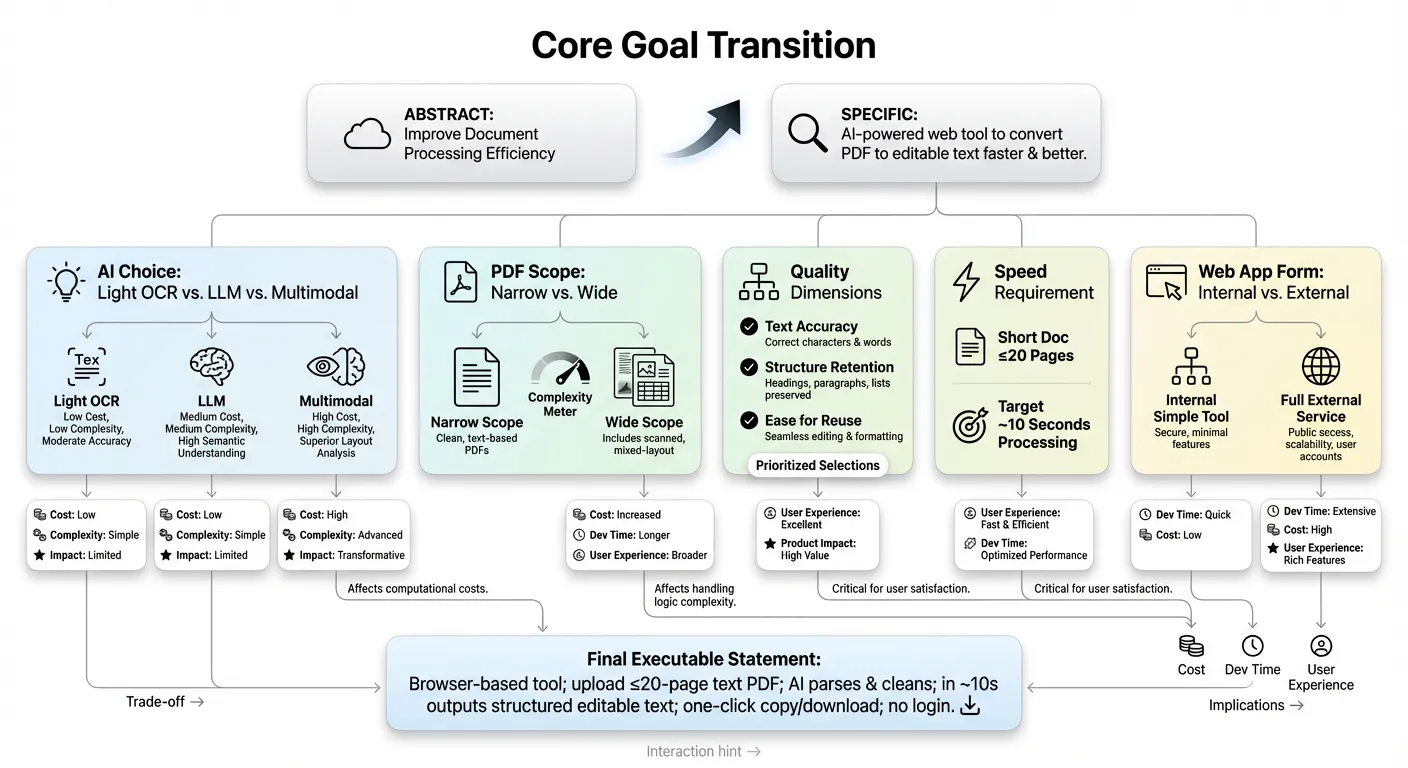
First-Layer Decomposition
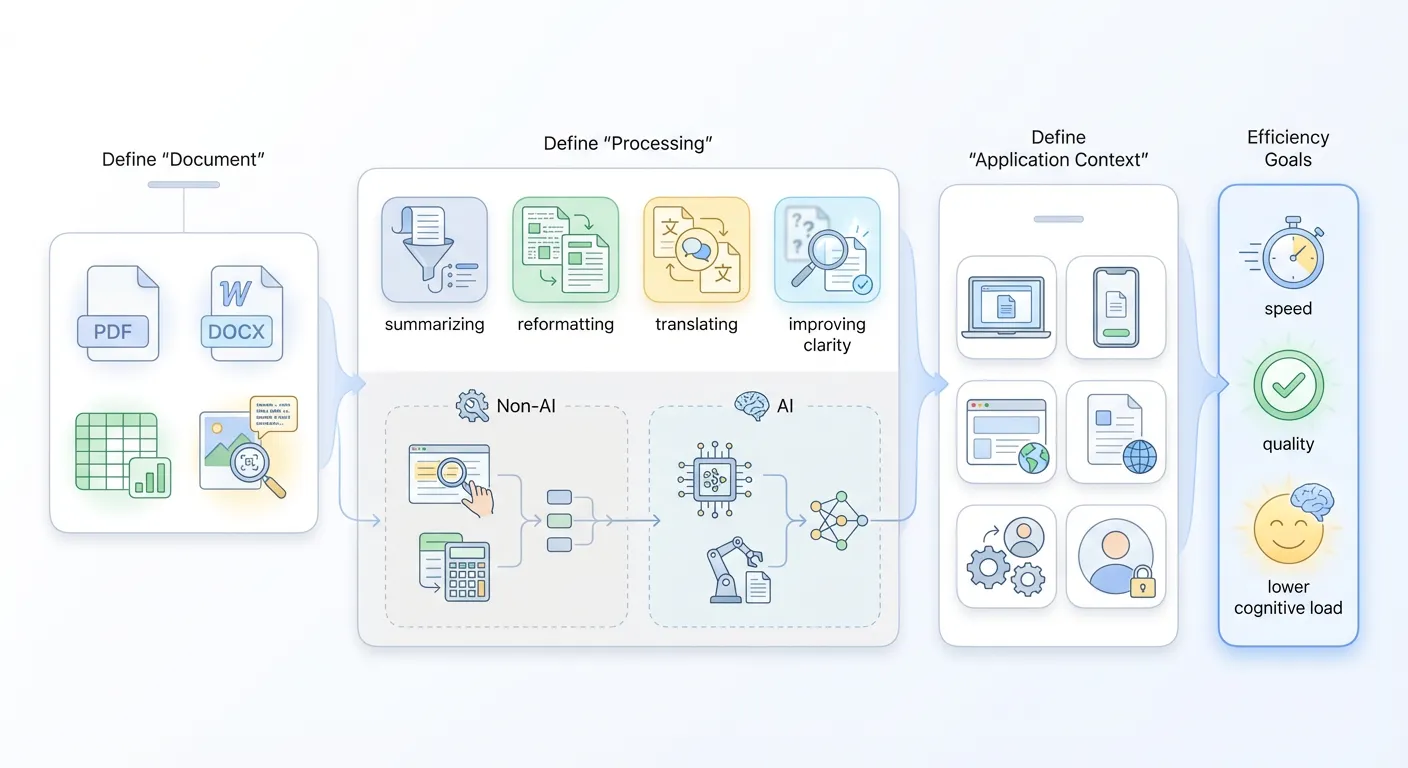
First, define what “document” means. It can be spreadsheets, Word reports, PDFs, Markdown notes, TXT files, scanned image-based documents, even papers with charts/formulas. Different document types imply different processing methods. If image-based, OCR may be required first. If spreadsheet-oriented, data extraction/analysis may be core.
Second, define what “processing” means. Processing into what state counts as processed? Some want 50 pages into a 5-page digest. Some want multi-format normalization. Some want translation/rewrite/polish for publish-ready output. Ask directly: does “processing” mean faster reading, better editing, or easier transfer?
Third, define what “application” means. A personal tool, or a product for broader users? Web app, mobile app, or embedded function in existing systems? Personal desktop usage can start with rough web/CLI at low cost. Team usage may require account system, permission, and collaboration entry. At decomposition stage, answer one plain sentence: on what device and in what scenario will this be used?
Then return to the phrase itself: “improve document-processing efficiency.” Decompose key words:
- Improve with what? Must AI be used? Not always. Some efficiency gains come from rules/templates/shortcuts (for example one-click report cover generation).
- What exactly is efficiency? Only speed? Or speed + quality + error rate + cognitive load?
For example, reading 20 pages from 30 minutes down to 5 is speed. Quickly spotting logical inconsistencies is quality. Helping non-experts understand jargon-laden reports is reduced cognitive threshold.
Ask one direct question: if this app succeeds greatly, what is the biggest user change? “Half the time on documents,” or “much less mental fatigue around document tasks”? Once clear, feature priority has a basis.
Second-Layer Decomposition
Suppose first-layer output is:
“I want to build a web app that uses AI to improve speed and quality of converting PDFs into editable text.”
This is much more specific than “improve document-processing efficiency.” It defines document type (PDF), processing method (text conversion), optimization goals (speed and quality), technical path (AI), and carrier form (web app).
But this is still an intermediate goal, not yet truly executable. Why? Because critical details remain broad: what AI, what performance target, which scenarios, which users. So continue decomposing into finer design and technical decisions.
For “AI,” does it mean lightweight OCR only, or adding LLM/multimodal for correction, layout reconstruction, and structure understanding? Different choices lead to very different outcomes in:
- Cost consumption (compute/call cost/latency, one-time vs ongoing)
- Development complexity (simple API integration vs prompt/context/evaluation systems)
- Product shape (quick text extraction tool vs smart document platform with headings/tables/layout retention)
For “PDF,” what subset do you support? If you limit to text-based copyable PDFs, you avoid immediately handling scans, complex charts, formulas, and extreme layouts. If you promise “any PDF,” complexity multiplies at once.
At this stage, deliberately narrow and write tradeoffs explicitly. Example: current version mainly serves structurally clear text-based PDF reports/instructions, with no guaranteed quality for scans and heavily mixed graphic-text layouts. Then all “speed/quality” goals become controllable and explainable.
For “high-quality text conversion,” quality can be split into at least three discussable dimensions:
- Recognition correctness: typo/punctuation/special-symbol accuracy, avoiding gibberish blocks.
- Paragraph/title structure preservation: preserving chapter hierarchy, paragraph splits, lists, and quote blocks in plain text.
- Editability/reusability: output cleanliness/format regularity and reduced manual cleanup when copying into Word/Notion/code editor.
Pick your top priorities (2-3 dimensions) as quality focus. For example, prioritize clear paragraph structure and basic heading-level preservation, while allowing small recognition errors that can be manually fixed in minutes. Then “high quality” becomes measurable standard, not vague adjective.
For “speed,” define a perceivable target, not only “feels fast.” Hidden tradeoff:
- Support very long documents with longer wait?
- Or target short-to-medium documents with results in seconds to tens of seconds?
If your typical scenario is turning a report/proposal/research abstract (~10 pages) into editable text before meetings, a natural choice is:
- Set per-file page limit (for example text-based PDF up to 20 pages)
- Set rough processing target (for example around 10 seconds)
Once explicitly written, technical decisions (parallel processing, async queues), UI copy (expected time/timeout hints), and expectation management can all optimize around “short-medium docs + quick return.”
Finally, “web app” seems only carrier choice, but also needs narrowing to avoid premature heavy productization. Ask:
- Is this an internal temporary tool for myself/small group?
- Or a stable external service for long-term users from day one?
If closer to the former, cut complexity boldly: no full account/permission system, no early history/project/team modules. Focus on one minimal path:
Open webpage -> upload PDF -> wait -> show editable text -> one-click copy/download
If the target is stable external service, later versions can gradually add concurrency, queue scheduling, quotas, failure recovery, logs/monitoring, and security/permission controls. But at this decomposition stage, you can define it as “browser mini-tool usable without login,” and concentrate all interaction on the simplest core path.
Once tradeoffs behind keywords (“AI,” “PDF,” “high-quality conversion,” “speed requirement,” “web app”) are stated concretely, the original sentence can be tightened into an executable description. For example:
Provide users with a browser-based mini-tool that primarily supports structurally clear text-oriented PDF reports. Through adapted parsing plus lightweight AI cleaning, output an editable text in about 10 seconds, with clear paragraph structure, basic heading-level preservation, and acceptable recognition error rate. No login required.
You can further simplify to one sentence:
Provide a web tool where users upload a text-based PDF of up to 20 pages and receive editable text within about 10 seconds, preserving paragraph structure and heading hierarchy, with one-click copy and
.txtdownload.
This is no longer an empty slogan. It can directly become prompt instructions or execution plan for AI, a design brief for UI prototypes, or an engineering brief for implementation-cost assessment.
When you reach this point, two practical changes occur:
- You are no longer blocked by broad goals like “make an efficiency app”; you have immediate actionable steps.
- Communication cost drops sharply because you now present a concrete initial solution.
From abstract to concrete means turning a big wish into a task list that humans or AI can immediately understand and execute. Once decomposed to atomic tasks, each subproblem has two options:
- I solve this subproblem.
- AI or another expert solves this subproblem.
2.3 Sketch Your App on a Whiteboard: Draw Before Coding
When people think “start building an app,” they often jump to code, backend, database, API, and framework first. Understandable, because we are taught that product building is primarily technical. But if all focus goes to tech at the start, the most important thing is easily missed: what exactly users need to do in your product.
A simple but neglected method is: draw first. No professional software needed. Whiteboard, plain paper, or notes app is enough. The key is sketching the full user path from entry to completion before opening the editor.
You can split the app into three page types first: entry page, operation page, result page.
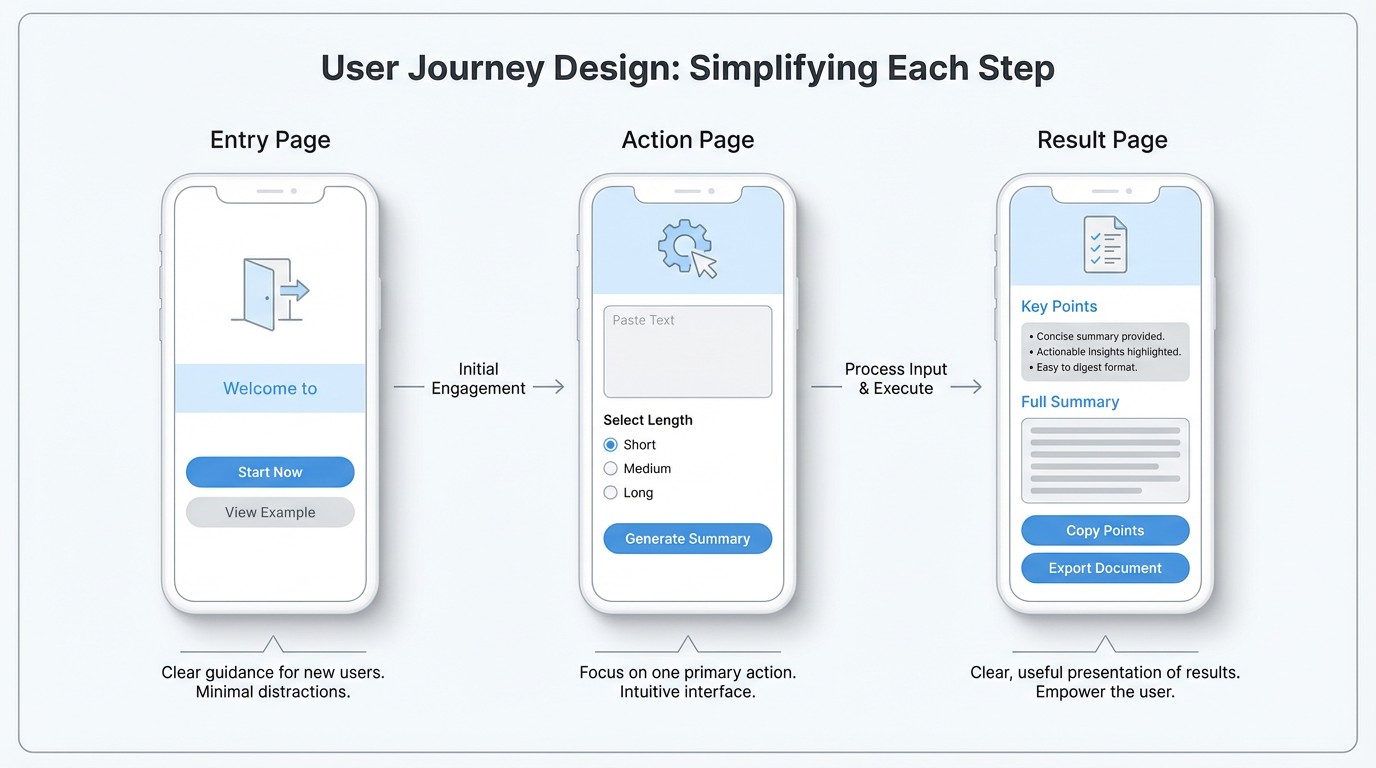
Entry Page: Where Users Enter and What They See First
The entry page is the first contact point. Many people design it as a generic homepage with many modules/buttons/banners to look “powerful.” But if you draw it and pretend you are a first-time user, a hard question appears quickly: where should I click first?
Think like a guide. Ask concrete questions: how users arrive (shared link, app-store search, QR code)? Different sources mean different expectations. A user from a friend’s link may already know your value, so entry can drive straight to core trial. A user from app store may know nothing, so entry needs one clear sentence explaining what this is.
Practical sketch method: draw a phone frame, write page title on top, sketch main content area. Mark clearly: what this page tells users, and what choice you want next (start button, quick sample result, basic input form).
The simpler and more concrete the entry page, the higher the chance new users avoid confusion and start quickly.
Operation Page: What Users Need to Input, Click, or Choose
After users continue, they land on the operation page, the main working area and interaction core. This is also where over-design often happens.
A useful exercise: allow users to do only one thing. Write that one thing in simple form (submit text, record voice idea, choose template, set one parameter). Around that, minimize input fields and buttons.
For a long-text summarization app, the rough but runnable operation page may only need: text input box, summary-length selector, and generate button. You can postpone visual polishing (fonts/colors/icons) and focus on:
- Does users instantly know what to do?
- What must users prepare?
- Will users lose direction mid-process?
Sketching on paper allows very low-cost experimentation. Try a one-page input version and a two-step wizard version, then mentally simulate usage to find which one reduces stuck points. Compared with rewriting flow in code, paper iteration is nearly free.
Result Page: What Users Get and How It Is Presented
Many apps treat result pages casually, assuming “it’s just text/image/data output.” For users, it is the opposite. They input and wait because they expect something clear and useful on the result page.
Design result page from these angles:
- What core information matters most, and is it in the most visible area?
- What should be exportable/saveable/shareable, and where are those entries?
- Should simple explanation be added so users know what result means?
For long-text summarization, a friendly result layout can be: concise key conclusions at top, detailed summary below, original-link reference at bottom, and two visible buttons: copy key points and export document. Sketch regions and annotate expected action of each button.
After entry/operation/result pages are drawn, connect them with arrows and walk the path from first visit to completion. This reveals issues you may miss otherwise, such as: how users return to operation page to adjust details, or whether clear exit/save-draft paths exist when users hesitate mid-flow.
Core takeaway: sketch user operation flow first, then consider technical implementation. Even if you cannot code, a few simple sketches can turn an abstract idea into a visible app prototype. The clearer this step is, the easier later self-implementation or collaboration becomes.
2.4 Learn from Existing Apps: Copy Homework Smartly
When building a first app, many people feel pressure to create everything from zero: structure, interaction, and visual layout must all be original. In practice, this often wastes huge effort on low-value details.
A more efficient and mature attitude is copy homework smartly. Not blind imitation, but selective borrowing of proven patterns so your time stays focused on your unique value.
There are many websites collecting app screenshots and many app-store detail pages. Treat them as a massive reference atlas. Pick several products close to your direction (same tool category or same user segment), and study them page by page as sample analysis.
Do not focus mainly on color beauty. Focus on how they handle key areas:
- Navigation structure: bottom or top, fixed core entries or one primary action.
- Form organization: one-page completion or multi-step wizard.
- Result presentation: whether primary information is truly prominent and secondary information is properly organized.
- First-time onboarding: whether a short guide clearly explains next steps.
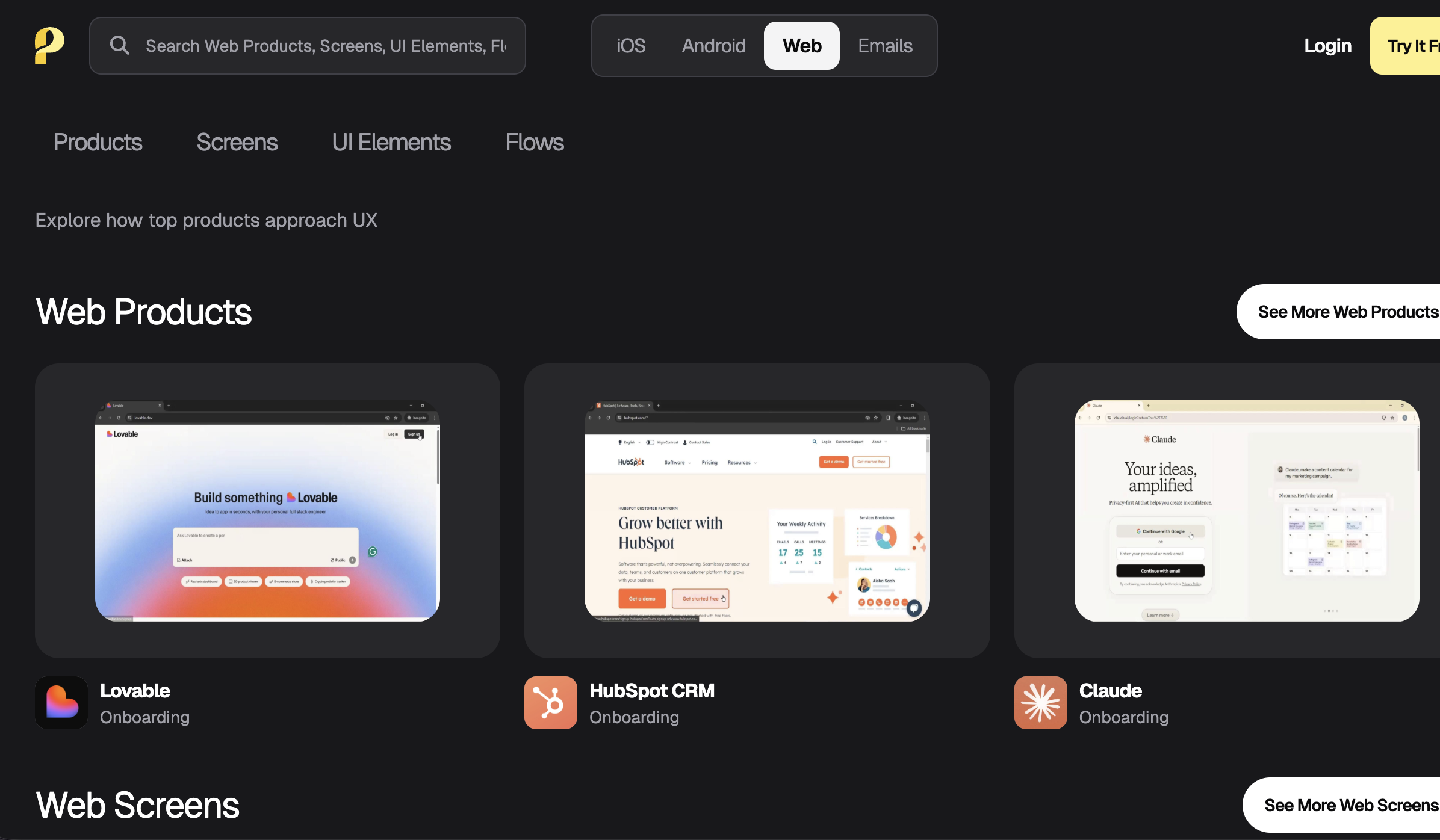
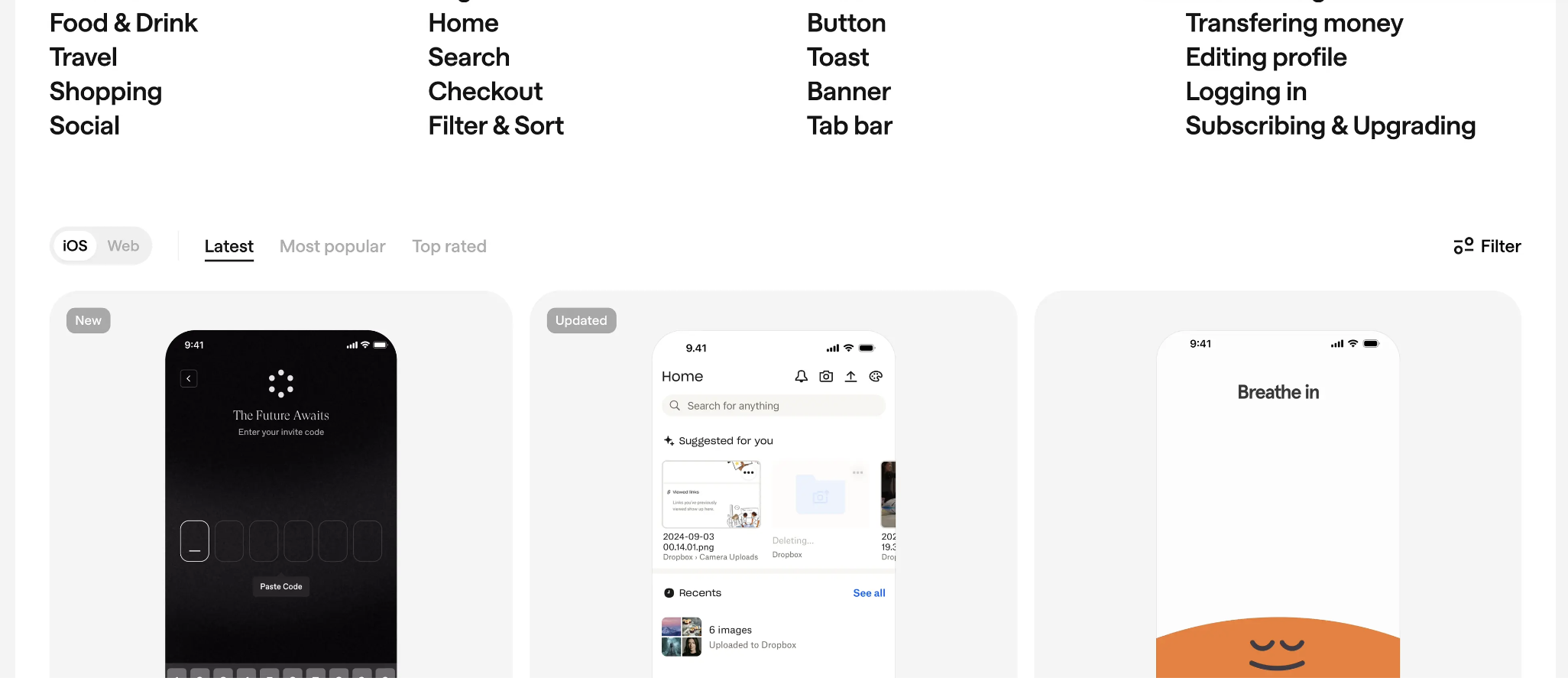
Useful screenshot/reference sites:
- https://www.uisources.com/
- https://screenlane.com/
- https://pagecollective.com/
- https://patttterns.net/
- https://mobbin.com/
- https://refero.design/
- https://scrnshts.club/
- https://godly.website
Beyond existing apps, hackathon-winning demos are also useful inspiration. They are compressed solutions created under extreme time constraints. Even if rough, they show how to compress idea-to-runnable-product process under resource limits. Use them to understand what MVP really means. But because hackathons are short competitions, creativity can outweigh practicality. Awarded demos are not always suitable as long-term product references. Judge by your real context.
You can also learn from simple tool websites (weather lookup, translator sites, Pokedex collectors, game guides, popular vehicle ranking sites, AI-tool directories). Although functions look simple, they may satisfy real needs extremely well. Good ideas are not about complexity but usefulness. Referencing different product forms helps you understand actual market demand.
2.5 Don’t Wait Until Everything Is Ready to Validate User Needs
Many people say they build user-driven products, but in practice they prefer closing the door, building a “complete” version first, and only then showing it to others. This may feel safer and more respectable, but product-wise it is risky.
Reason is simple: the later you contact users, the more detail investment you have already made, and if direction is wrong, losses are bigger. You may code heavily for low-value features while missing the real point where users get stuck.
A simple principle to remind yourself:
ask while sketching, ask while building, don’t ask only after finishing.
Ask While Sketching: Collect Feedback at the Paper Stage
When entry/operation/result pages are first sketched, you already have enough to start user conversation. Find two or three potential target users, show sketches, and observe first reaction.
No complex interview needed. Watch details:
- On entry page, do they naturally say what you intended (for example “this seems for long-document summarization”)?
- On operation page, do they follow the intended order naturally?
- On result page, are they immediately drawn to the key area, or distracted by irrelevant parts?
These observations expose major design issues before you write first line of code. You can revise paper prototype first, then continue building, instead of restructuring after full implementation.
Ask While Building: Let People Try the Half-Finished Version
When you have a half-finished version that can run the basic loop, there is even less reason to test alone. Even with rough UI and missing features, as long as it can complete your defined minimum task, it is ready for real-user trial.
Start with nearby users, then recruit from your previously mentioned reachable communities/public spaces. Send a link, briefly explain what it currently does, and ask them to go from entry to result with minimal guidance from you.
Your role is observation, not defense. Where do they hesitate? Where do they pause? Which button do they stare at but avoid clicking? Afterward ask concrete questions: which step felt hardest, which result felt best, what they expected but did not find.
Testing in half-finished stage has a huge benefit: you have not over-invested emotionally in any one solution yet. You can more easily cut “cool but useless” features and spend time polishing small details that look minor but appear frequently in real usage.
Don’t Be Afraid to Expose Roughness
Many people avoid early sharing because they fear looking rough or unprofessional. In reality, mature product builders rarely feel shame about early versions. They know early exposure has the lowest cost.
Reframe it: you are not presenting an unfinished product; you are inviting others to co-polish it. As long as you clearly state this is an early version and you want direct usage feedback instead of praise, most people are willing to help, especially those already troubled by the problem you want to solve.
At this point, you can use whiteboard/paper to turn abstract ideas into concrete user flows; you know how to decompose broad goals into minimum actionable tasks you can start tomorrow; you know not to greedily pack all ideas into first version, but to switch between divergence and convergence with Double Diamond and pick the MVP worth doing first; you learned to smartly reference existing apps for foundational structures like navigation/forms/results; and most importantly, you know not to wait for perfection before talking to users, but to let users in from demo stage and use their feedback to correct direction early.
With these tools and steps, you can already break an idea into an initially usable product. But you will also find: between “usable” and “truly good,” there is still a gap.
Next we discuss exactly that: what makes a good application, and after the first usable version, how to move it further.
📚 Assignments
Please complete the following assignments based on the above content:
- Use any large language model. For your previous idea, ask AI to generate divergent outcomes with the Double Diamond model, then select one feasible solution.
- Based on your earlier idea, use decomposition/refinement to get executable specification. Example: “Provide a web tool where users upload a text-only PDF up to 20 pages and get editable text within 10 seconds, with clear paragraph structure, preserved heading hierarchy, one-click copy, and
.txtdownload.” - Based on the refined idea, draw your application on a whiteboard, focusing on two parts: UI design and feature layout (what features exist and where each feature is placed).
3. After Building, How to Judge and Polish into a Good Application
When you finally build the first version and put it into the real world for people to use, you'll enter a completely different stage. All previous discussions were still at the idea and design level, and now, the product will be tested by real usage scenarios for the first time. You'll see where users click wrong, where they hesitate, where they get stuck, and also see where they proceed surprisingly smoothly, even unexpectedly lingering a few extra seconds in some corner. These details are far more honest than all your imaginations about the product in your mind.
This chapter wants to solve a core problem: when an application has already been built, and even has a batch of early users using it, how to judge how far it is from a good application, and how to use this information from real usage to polish it step by step.
3.1 What is a Good Application: 4 Core Characteristics
To judge whether an application is good, you can't just look at how much you like it yourself, nor just look at download numbers or one or two days of usage count, but look at whether it has some more fundamental, more stable characteristics. Simply speaking, refer to the following characteristics:
Good Applications Bring Concrete Value
The most direct characteristic of a good application is that it can let people get some real benefit in some scenario. This benefit doesn't have to be grand, nor does it need to be packaged in profound language, but must be specific enough that you can clearly say: what exactly did it help users do less, how much time did it save, or what did it make less error-prone.
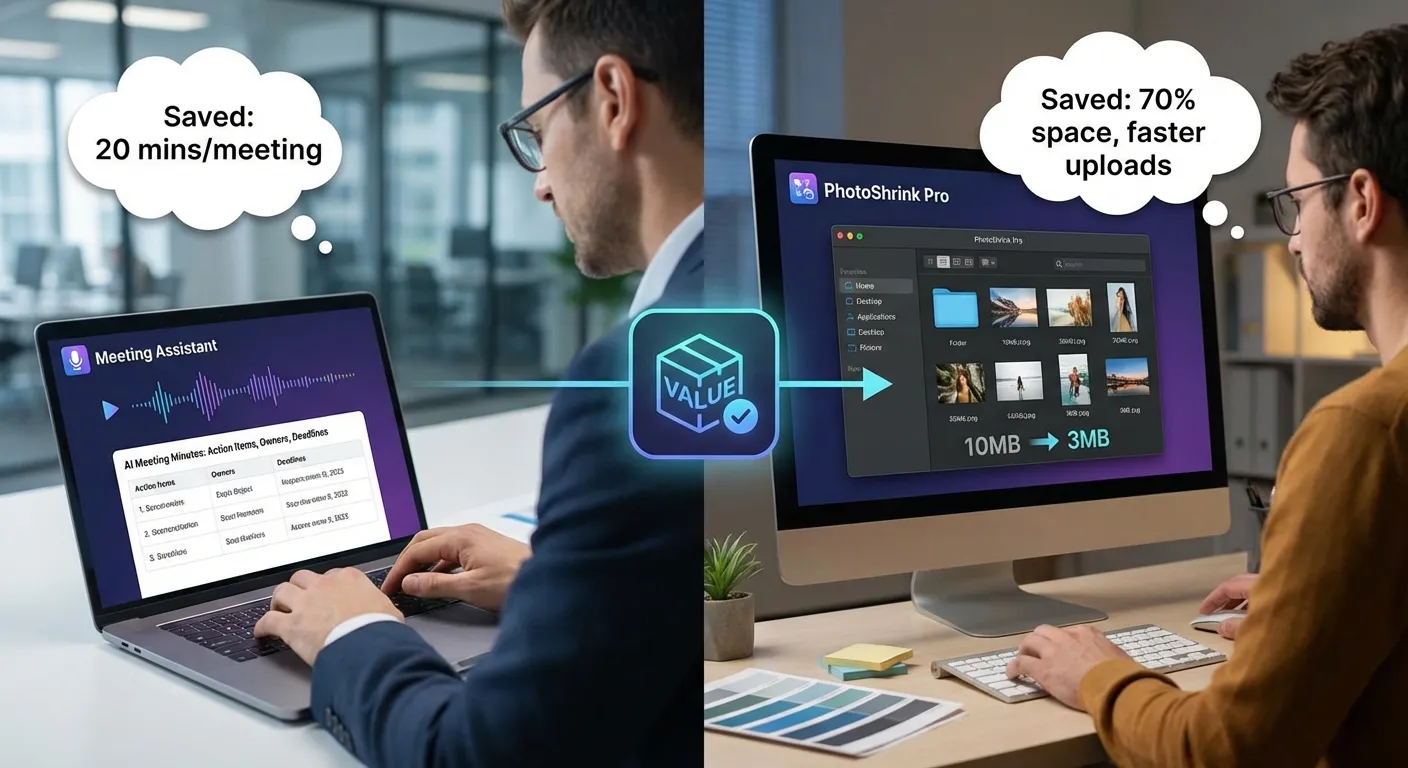
For example, a simple meeting minutes tool, if it can automatically generate a structured meeting minute after uploading a recording or directly recording during a meeting, and clearly list action items, responsible persons, and deadlines, then what it saves users is not just typing time, but the entire mental effort from recording, organizing, screening to formatted output. You can very clearly say that this tool probably saves one person twenty minutes per meeting. And if the entire team has ten such meetings every week, then the total time saved is very considerable.
Another example is a seemingly unremarkable image compression tool, if it can compress a batch of images to one-third of their original size while keeping differences almost invisible to the naked eye, while ensuring one-click export, folder structure not messed up, and naming rules unified, then the value it brings is not just hard drive space savings, but also faster transmission, smoother uploads, and fewer errors when interfacing with other systems. This seemingly ordinary concrete value is often much more reliable than a vague "efficiency improvement."
So, when you say your application has value, it's best to break the value into one or two specific scenarios, explain in language ordinary people can understand: your application makes what users originally needed to spend how long, do how much manual work, bear how much risk, become more effortless.
Users Can Get Started Easily, Almost Without Needing Instructions
Another easily underestimated but extremely important characteristic is that good applications usually don't need much explanation. When users open it for the first time, they can intuitively know roughly where to start, what will happen when clicking what, the largest button usually does the most core thing, the most important entrance is placed in a truly important position, not hidden in the third layer of the menu.

You can imagine a new user who just downloaded your application, they might have opened it casually while queuing, on the bus, or in a coffee shop. The network signal might not be very good at the time, and they don't have patience to read any long instructions. The confusion time they can tolerate is often only a few seconds. If in these few seconds they don't see any clear guidance, don't know what to do next, it's easy to just close it and never come back.
So, when you feel the product logic is smooth yourself, it's best to find someone who has never seen your application, let them explore from scratch without you speaking. You just observe where they pause, where they hesitate, when they show that "what is this" expression. If users are blocked by various splash screen popups, complex options, and account binding right when entering, it's hard to seriously experience the value you truly want to provide.
Being easy to get started is essentially a form of respect for user costs from the product. You're acknowledging one thing: no one has an obligation to spend time studying your application.
In High-Frequency or Key Scenarios, Users Naturally Think of You
Good applications often have a stable usage rhythm, either high-frequency or key. High-frequency means it integrates into users' daily lives, for example, messaging apps opened several times a day, commuting tools used every day to and from work, check-in apps recorded daily. Key means even if not used every day, once encountering certain scenarios, users will think of you first, like tax filing tools, renovation budget calculators, interview question management tools, visa document checklist assistants.
You can ask yourself a few questions: when exactly and in what situation will users use you; if they miss you, will they really feel inconvenience; in similar scenarios, what method are they currently using to get by. If there's an alternative, even if very troublesome, but already habituated, then what you need to do is not just feature parity, but make them feel that switching to you is indeed more worthwhile.
A common misconception is directly binding usage frequency with application quality. Actually, it's not necessary. For example, making annual reports, processing certain documents, making a large transfer - these things themselves aren't high frequency, but once they happen, for users, they're among the most important things at the moment. If your application can handle this type of key scenario steadily, quickly, and with confidence, then it can also be called a good application.
What really needs vigilance is that type where users neither use you frequently nor actively think of you at any key moment, and even if your application disappeared from their phone, they'd only vaguely remember having installed such a thing months later when clearing memory. This situation often indicates your application hasn't deeply bound with any real scenario, just piled some weak presence at the functional level.
Altruism
Many people when starting to make products, simultaneously calculating several things in their minds: how to charge after building, how to raise prices, how to make users pay for a bit more usage, how to lock data to prevent users from migrating away. Business calculations themselves aren't problematic, but if the thinking completely revolves around these from the start, it's easy to make applications full of wariness at first glance: asking for various permissions right away, charging traps everywhere, feature design clearly not for letting users smoothly complete tasks, but trying to guide users to some payment button.
In contrast, truly good applications all carry a relatively simple altruism. It indeed thinks clearly about how to survive, and also sets reasonable charging methods, but when designing paths and experiences, the priority is always: how to make it easier for users to smoothly complete this matter, not how to add a step to create extra obstacles. You'll see it uses more user-friendly methods in many places, like giving clear prompts at key steps, not overly setting barriers for export and migration, letting you experience at least some real value before charging.
This altruism is often reflected in some tiny design details. For example, that form field doesn't randomly ask for a bunch of data unrelated to the task just to collect more information, the tutorial sequence is designed around the goal users want to complete, not around feature modules themselves. You can feel this application is seriously helping you accomplish one thing, not treating you as an object to be squeezed.
There's another important point: good applications don't have to be big applications. They can be very small, only serving one type of person, one scenario, one task, but doing it very well in that small piece. For example, specifically helping designers export drafts to formats required by print shops, or specifically helping freelancers organize personal project cases - these ranges aren't large, but the value inside isn't small at all.
3.2 Insight into Needs: Maslow's Hierarchy of Needs Theory
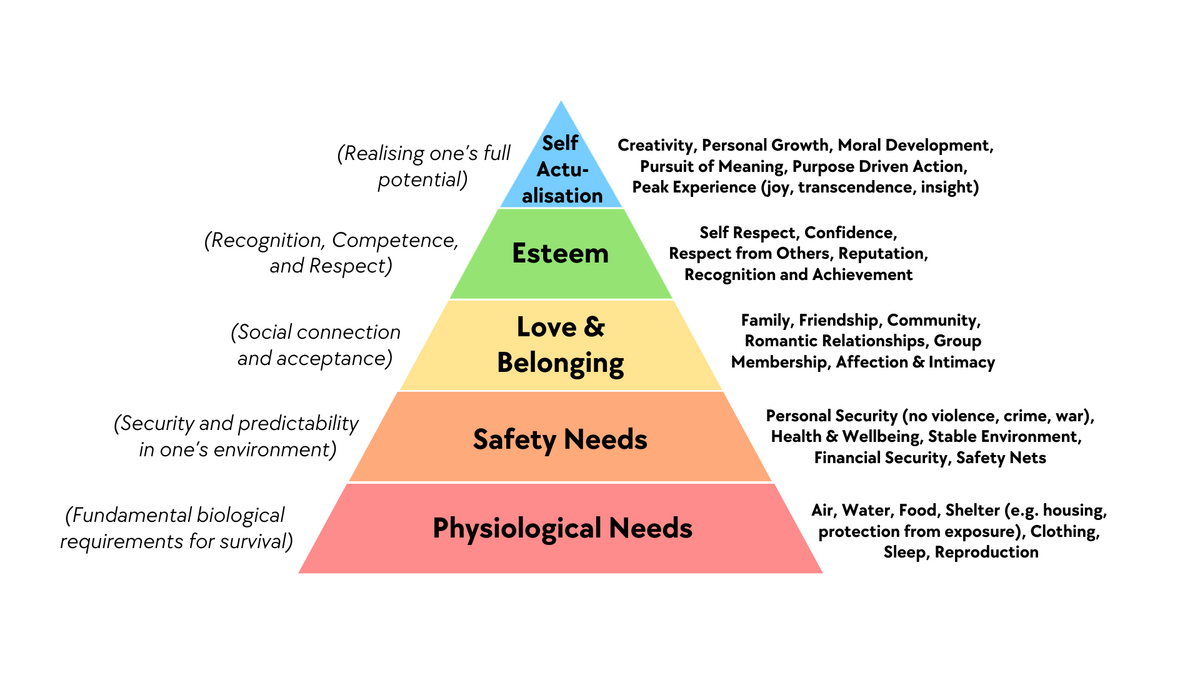
Before making an application, many people jump directly to the functional level thinking: can something more be done here, should a button be added there. What truly determines whether an application can survive is which level of human needs you've stepped on, and how accurately you've stepped.
The reason Maslow's hierarchy of needs theory is repeatedly mentioned in so many fields isn't because it's very rigorous, but because it provides a sufficiently usable observation framework. You don't need to treat it as a strict psychological conclusion, just treat it as a simple framework: helping you hang users' various motivations on several relatively clear levels, convenient for you to judge which type of need your application is satisfying. The more needs you can satisfy, the better the application.
Maslow's hierarchy of needs theory is usually divided into five levels, from bottom to top: physiological needs, safety needs, belonging and love, esteem needs, self-actualization.
Physiological and Survival-Related Needs
This level is most basic, directly related to eating, sleeping, survival state itself. Sounds like it might be far from internet products, but actually quite a few applications play a role at this level.
For example, food delivery, grocery shopping, errand running, hotel booking, ride-hailing - these typical home and travel services are essentially helping users solve most basic problems like eating, going out, and resting with lower time costs. Another example is fitness tracking, sleep monitoring, diet check-ins - although appearing more health management-oriented, for many people, they're trying to maintain a body state that won't spiral out of control, which can also be seen as an extension of the physiological and survival level.
If your application works at this level, one characteristic is: users will be particularly sensitive to stability, reliability, and predictability. Food delivery not arriving, ride-hailing not getting a car for a long time, hotel booking information errors - the emotional reactions brought by these problems will be very strong, because these problems directly interrupt the basic rhythm of life.
Safety and Certainty Needs
Safety needs include physical-level safety, as well as economic, information, and psychological security.
Many tool-type applications actually mainly work at this safety level. For example, accounting, asset management, insurance assistants, contract template tools, password managers, backup tools, privacy protection tools, cloud drive sync, data recovery. The core promise of these applications is often: help you reduce error probability, help you have backup plans when things go wrong, or at least let you have confidence.
A typical type is various anti-loss, anti-forget, anti-error small tools: schedule reminders, medication reminders, important document expiration reminders, key node memos. This type of application even if it only reminds you a few times a day, as long as it saves you once or twice at critical moments, it will quickly be classified by you as a must-keep type of tool.
When designing this type of product, you can ask one more question: what type of risk exactly are you helping users reduce, is it financial, time, relationship, or compliance and legal. If even you can't explain clearly, then users will find it hard to truly trust you.
Belonging, Connection, and Being Seen
Going up another level is the need for belonging and love. Simply put, I don't want to be alone, I want to be connected with certain people. This level is the home base for social, community, and interest group applications.
Moments, group chats, interest forums, hobby communities, online book clubs, guilds in games, even some tools centered around specific identities, like new parent groups, international student mutual aid, industry internal anonymous complaint platforms - essentially all provide some sense of belonging: there's a group of people similar to me, we're looking at similar topics, complaining about similar difficulties, sharing similar experiences.
Some tools appear to be functional applications on the surface, but what truly retains users is often this level of need. For example, in accounting apps where everyone shares their saving progress, ranking and check-in circles in running apps, mutual supervision groups in learning apps. These seemingly value-added social modules are actually letting users bind your application with their own group identity.
If your application tries to stand at this level, having content alone isn't enough, you need to think about: why would users feel this is their own people, are they willing to leave traces here, have some slight but real interaction with others. Otherwise, what you're making is just a one-way broadcast tool.
Esteem, Self-Worth, and Achievement
Going up another level is esteem and self-esteem needs. People don't just want to be accepted, at some stage they'll start caring: am I considered a pretty good person here, have I been seen, recognized, does anyone know about the things I've accomplished.
Large amounts of check-ins, badges, leaderboards, titles, achievement systems are actually playing a role at this level. Learning apps give you a title after completing certain course hours, exercise apps give you a certificate after reaching goals, creation platforms give authors different level identity markers, communities have obvious highlighting for quality content authors.
A common mistake here is thinking that adding a bunch of badges, points, and titles will stimulate users. What users want isn't flashy decorations, but that my real effort is recorded and taken seriously. If your achievement system is completely disconnected from users' real investment, like getting a "senior" title with just a few random clicks, then this incentive will quickly fail, even make people feel cheap.
So at this level, the key isn't whether you've made an incentive system, but: has your application provided a stage where users can accumulate, letting them clearly see their change from beginner to proficient, and at key nodes, giving them a ritual sense that "this step is worth remembering."
Self-Actualization and Self-Transcendence
The top of the pyramid points to what kind of person I want to become, and what part of myself I want to contribute. This sounds abstract, but when it falls into specific scenarios, it often has very practical manifestations.
For example, creation tools: writing, painting, music production, video editing, programming project management - on the surface they're providing technical capabilities, but behind they carry users' desire to create something of their own. Another example is some long-term learning platforms, career planning tools, habit formation tools - they serve not just single skills, but some longer-term self-growth goals.
There's another type: the need to make others better. Many people use knowledge sharing platforms, Q&A communities, public welfare applications, collaborative creation tools not just to earn some points or traffic, but because when helping others and pushing a project forward, there's a feeling that I'm doing something meaningful, which also belongs to self-actualization.
When your application truly touches this level, it often has a very strong stickiness: even if the interface isn't the prettiest, features aren't necessarily the most complete, users will still stay here, because it has established a deeper connection with who I am and what kind of things I'm doing.
A benefit of treating Maslow's pyramid as a product perspective is that it can help you avoid two common biases.
The first bias is only staring at some wrong level. For example, you're making a tool to help users safely store files, essentially standing at the safety level, but you blindly imitate social products, piling various likes, comments, leaderboards on the interface, resulting in neither grabbing social product users' mindshare nor making people who just want a reliable storage tool feel you're not doing your job.
The second bias is ignoring the sequence between levels. When a person can't even get the most basic stable usage experience guaranteed, it's hard to seriously pursue self-actualization here. For example, if the app crashes frequently and data is occasionally lost, no matter how many badges and growth curves you give, users won't genuinely invest. Conversely, if you do solidly at the basic level, then gradually stack higher-level value, users will more easily follow you up.
In actual design, you can self-check like this:
- First ask yourself: which level is my application mainly and most core satisfying, only allowed to choose one level
- Then ask: above this core level, do I have opportunity to naturally extend to the next level, not hard-sticking a concept on
- Finally, take a look: in those levels lower than my target level, do I have obvious shortcomings, even dragging users down
When you can answer these questions clearly, your understanding of what users really want is no longer just staying at the vague level of "feeling they might like it," which helps you make better applications.
3.3 Classify by User Type: Differences Between C-End and B-End Applications
After an application is built, you'll quickly discover another important thing: facing ordinary individual users versus facing enterprise or institutional users are two completely different games. They both look like users, but care about completely different priorities.
- C-End (Consumer End): refers to "consumer end," the core is ordinary individual users. For example, WeChat, Douyin, Meituan food delivery that we use daily - the users of these Apps are individual persons one by one. This type of scenario serving individuals is C-End business.
- B-End (Business End): refers to "enterprise end," the core is enterprise, institution, or organization users. For example, DingTalk (enterprise collaboration tool) used in companies, financial software (like Yonyou, Kingdee), POS systems in retail stores - the users of these products are enterprise employees, teams, or entire organizations, serving enterprises' operation, management, production and other needs. This type of scenario serving organizations is B-End business.
C-End Applications: Facing Ordinary People's Lives, Emotions, and Habits
C-End applications face individual users, embedded in everyone's daily life. Common types include content, tools, entertainment, social, learning, etc.
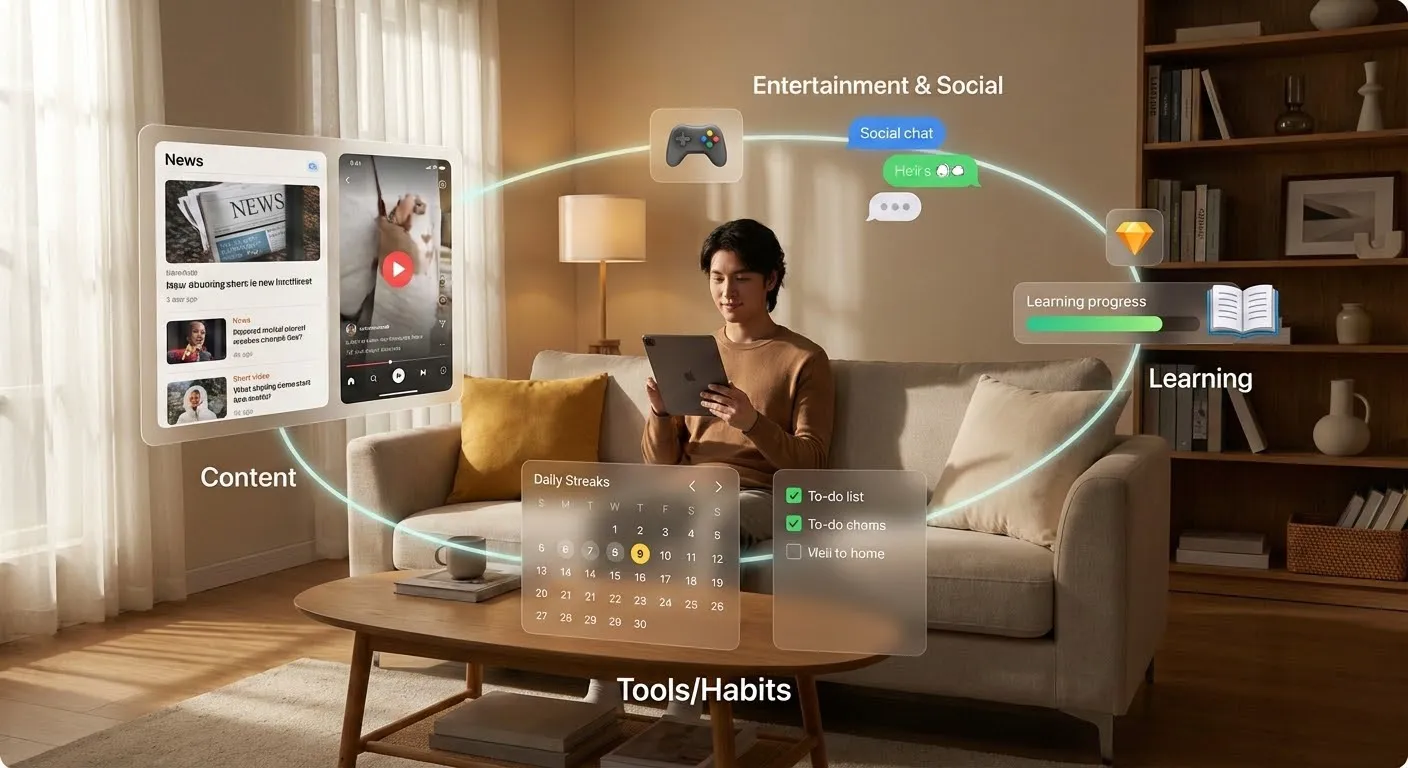
Content applications, like news reading, short video platforms, podcast tools. Their core task is usually to screen out content users are interested in from massive information within limited time. Also need to ensure there's constantly new things attracting users back.
Tool applications, like accounting, to-do items, file management, calendar scheduling. They often provide a handier solution than the original way on some specific task, belonging to one of the infrastructure users use daily.
Entertainment applications, including games, light interaction, fun small tools. They provide users with emotional relaxation and pleasure. The standard for measuring good or not is more about whether users are willing to continuously spend time on it.
Social applications revolve around connection and interaction between people. Learning applications revolve around improvement of some ability, like vocabulary memorization, question practice, reading check-ins, course management.
Although these applications have different types, they have several common concerns.
First, user growth. That is, how to let more people try your application for the first time. This involves channels, communication copy, user incentives, but the premise is always: you first need to have a clear enough usage scenario. Otherwise, even the most powerful growth methods can only bring a wave of short-term curiosity.
Second, retention and return visits. Not about whether people have come, but whether they're willing to stay and come back. A content application, if it can't guarantee continuously producing content users are interested in, will soon be replaced; a tool application, if it doesn't help users truly complete tasks in several key uses, it's also hard to establish long-term usage habits. You can judge how many people have truly incorporated you into their life rhythm by observing retention on day 1, day 7, and day 30.
Third, conversion and payment. Why users are willing to pay usually isn't because you made the free version very bad, but because after they've already obtained some value from you, they see that paid features can bring higher-level convenience. For example, higher usage quotas, stronger collaboration capabilities, more professional templates, more stable performance.
Fourth, shareability and spread. Many C-End products can quickly spread because they naturally have sharing attributes during use. For example, generating an image, a video, a piece of text - users themselves need to send the result to others to complete their own goals. In this process, as long as you make brand exposure natural and not annoying, you can gain some word-of-mouth spread.
A simple way to judge whether a C-end need is real is to see whether users are willing to build small habits around it: are they willing to open it every day, tie it into their life rhythm, and let it participate in recording important moments. In contrast, if users only come in because of a campaign or ad, use it once, and almost never return, then you are likely solving temporary curiosity rather than a long-term need.
B-End Applications: Organization-Oriented Efficiency, Cost, and Risk Control
B-end applications serve enterprises, teams, institutions, or specific departments. Common categories include ERP (resource management systems), CRM (customer relationship management), collaborative office tools, different SaaS tools, and internal industry management systems.

The biggest difference from C-end is that B-end apps must satisfy multiple roles at once. The direct user may be a frontline employee, while the decision-maker is a manager or owner; data ownership may belong to the organization; and approval flows may involve multiple departments. You need to make users feel it is easy to use, help decision-makers see the ROI, and also give the organization a sense of security in risk and compliance.
B-end applications usually have several especially critical focuses.
First, improve efficiency. This is not only about shortening one person’s time, but reducing total process time, lowering collaboration cost, and reducing communication links. For example, if an order used to pass through five systems from creation to shipment, and now can flow through one unified entry, that improvement is very concrete for a business.
Second, reduce cost. This includes labor cost, training cost, and system maintenance cost. If a system looks powerful but requires heavy training and maintenance just to run, many SMEs will find it cost-ineffective. In contrast, SaaS tools that look lighter but can be learned quickly and show results quickly are more likely to survive in the real world.
Third, control risk and ensure compliance. In many B-end scenarios, compliance and traceability requirements are high, such as finance, healthcare, manufacturing, and government services. A good B-end application often gives up some freedom in operation to gain clearer permission control, stricter logging, and clearer approval chains. For individual users that may feel less flexible, but for the organization that is often exactly the value.
Fourth, permission management and responsibility boundaries. Who can see what, who can change what, and who is accountable for which result are core design questions in B-end systems. If this part is weak, later auditing, disputes, and accountability become very costly. So when judging whether a B-end app is good, you cannot only look at whether the interface feels smooth; you also need to see whether the permission model is rigorous, understandable, and maintainable.
From industry to application, you can think this way: pick an industry you know to some extent, such as education, e-commerce, manufacturing, finance, or healthcare, then break down daily operations: which workflows depend heavily on manual work, which information is scattered across multiple systems or private chats, and which links have high error rates but are hard to detect quickly. Around these points, you can often design focused small tools.
For example, in education/training, a very concrete entry point is course scheduling and classroom utilization optimization. It does not need to replace the full academic affairs system. As long as it helps staff schedule teachers, classrooms, and course times more easily, automatically avoid conflicts, generate better combinations, and export a timetable everyone can understand, that alone can save a lot of repeated communication and revisions.
In e-commerce, a common need is multi-channel order management. Merchants may run stores across different platforms, with order data scattered everywhere. If you can provide a small tool that aggregates orders from multiple platforms and handles after-sales and logistics in one place, you have already solved a huge repetitive pain point.
In manufacturing, many companies still rely on paper records or Excel to track production progress. You can start with a simple work-order tracking tool so site managers can directly see the status of each process instead of relying on constant calls and manual check-ins.
In finance or healthcare, your entry point does not have to be front-office business. It can be a compliance-check assistant, a document template generator, or an approval-material checklist manager. As long as you can clearly state which role’s task in which workflow becomes more controllable because of your tool, it is already a direction worth trying.
Many products in the industries above are already promoted by mature companies. This is actually a useful reference path: you can actively search keywords like “industry + core need + product” (for example, “education scheduling system” or “e-commerce multi-channel order management tool”). You can find official sites and feature pages, plus user reviews, case studies, and demo videos. These help you quickly understand how mature products solve similar problems and reduce trial-and-error from scratch.
3.4 Polish with User Data: From “I Think It’s Good” to “Users Think It’s Good”
After an app is built, one common illusion is: you get more and more used to it, feel everything is reasonable, and assume users feel the same. In reality, the more self-built the product is, the easier it is to ignore other people’s problems. To turn an app from a self-satisfying project into a truly good product, you must bring real user feedback into the loop.
Design Simple Feedback Mechanisms So Users Have a Way to Speak
You do not need to start with a complex customer service system or data platform. Start from simple methods.
Group chats are the most direct method. If you already have a small user group, invite them to post issues and ideas from daily usage. Your job is to reply seriously, record, and summarize regularly, not defend yourself in chat. The more you can build an atmosphere where people can speak honestly, the more valuable your feedback becomes.
Surveys are suitable when you need to collect relatively more structured information at one time, for example after one version iteration when you want opinions on a few specific features. If you want a high completion rate, keep it short and ask specific questions: which feature did you use most recently, where did you get stuck most often. Avoid overly broad questions like “what do you think overall.”
Post-task popups are another common way. After users finish one task, use a very short rating plus suggestion box to ask whether the experience was smooth. Sometimes a simple numeric rating is enough to identify obvious process problems.
One-on-one interviews are higher cost, but often higher return. You can pick several users of different types and invite 20 to 40 minutes each to discuss their actual habits in detail. Let them operate while speaking what they see and feel. I once saw a founder scheduling more than ten user conversations per day. Spending time to understand user needs is never wasted.
Learn to Extract Three Types of Information from Messy Feedback
User feedback is usually mixed together and hard to read at a glance. You can classify it into three categories: bugs, experience issues, and new needs.
A bug means behavior that should happen does not happen, or wrong behavior occurs in some cases. For example: upload failures, crashes, buttons not responding, or obviously incorrect outputs. For this type, you should reproduce quickly, fix quickly, and proactively notify affected users after the fix, so they know you take these issues seriously.
Experience issues mean the flow length, operation placement, or copywriting has not found the smoothest path. For example, users hesitate on one button because they are unsure whether the action is irreversible; an important function is hidden in an obscure corner; default settings go against common habits so users need extra adjustments every time. This type needs judgment based on both data and observation: whether to change and how far to change.
New needs mean users begin proposing functions or scenarios you did not originally consider. Some are worth serious consideration, such as more export formats, team collaboration, or integration with common tools. But you should not do everything users ask. The key is to identify whether these requests share a common underlying problem and whether they align with your target user group and core task. Otherwise, you will be pulled into many directions and end up with a product that wants to do everything but does nothing deeply.
Build a habit: tag each feedback item as bug, experience issue, or new need. Aggregate tags regularly to see which type concentrates in which features or flows. Then you are not only patching passively; you are iterating around high-frequency problems with intention.
Use Three Simple Metrics to Decide Whether to Keep Investing
With limited resources, you still need simple but effective metrics to judge whether the app is worth long-term investment.
First is retention. Retention is not “how many opened on one day,” but how many users continue to use over a period of time. You can measure roughly: how many used at least once within one week after install, and how many returned within one month. If most users use once or twice then never return, it means they did not see enough value early on, or the usage threshold is too high.
Second is revisit frequency. For users who did not uninstall, how often do they come back? A daily-use tool and a quarterly-use app have different positioning and need different yardsticks. But in either case, you should define a reasonable expected rhythm and compare to actual data. If frequency is higher than expected, value may exceed expectation; if much lower, rethink whether scenario targeting is off or some part of the experience feels tiring.
Third is willingness to recommend. Are people willing to proactively recommend your app? You can observe this in several ways: after a particularly smooth task completion, provide a natural share entry and see how many people use it; check whether people spontaneously recommend your product in groups; or in user interviews ask: if someone around you has a similar problem, would you recommend this tool? Recommendation willingness often says more than plain satisfaction scores, because recommendation carries personal credibility. Users only recommend when they truly feel helped.
When you combine these three metrics with user feedback, you can roughly judge your current product state. Maybe the feature set is not complete yet, but if a group has stayed and repeatedly uses you in specific scenarios, that product is worth continued investment and polishing. On the other hand, if you fixed many bugs and added many features but retention and revisit stay low and almost nobody recommends you, then you should calmly reconsider: should you narrow scope, return to the original core scenario, or even change direction.
4. At Which Step and How Should You Use AI to Amplify Value?
Once you seriously start building an application, you quickly meet a common temptation: can we add more AI. This temptation is strong because every day you see messages like “AI empowers industry X,” “AI fully reconstructs workflow Y,” “AI one-click solves everything.” Over time, it is easy to turn a simple practical question into a slogan full of hype, then pile model calls into your stack and watch your account cost burn.
Although this tutorial is about AI-native application development, and saying this may sound like going against our own topic, for a small app or an early product, the biggest danger is not not using AI, but using AI for AI’s sake. You might have built a simple but reliable tool first, but get distracted by new capabilities, keep adding “smart-looking” features, and end up making a potentially viable direction expensive and complicated without obvious value gain. The core question of this chapter is: at what stage, in which links, and in what way can AI genuinely amplify your product value.
4.1 Don’t Use AI Just for the Sake of AI
A practical way to check whether you are unconsciously doing “AI for AI” is: before adding any AI feature, force yourself to answer two questions seriously.
Question 1: Without AI, does this application still stand? In other words, temporarily remove all AI capability. Is this itself still a valuable thing? Is there real user demand? Are users willing to spend real time on it daily, weekly, or monthly?
This sounds counter-trend because almost all product pages now put AI in the spotlight as if without AI it is not modern. But if your app completely fails without AI, often the problem is not that your tech is not advanced; it is deeper: the need you selected may not be painful, maybe not even real.
Imagine you are building a to-do organizer. If your main differentiation is model-generated hints on to-do items (auto-title, auto-categorization, auto-completion), but users never felt writing titles was painful and only want to capture tasks quickly, then no matter how fancy these smart features are, they are hard to create sustained value. In contrast, if you step back and ask what the simplest value is without AI, you may find a more solid direction: unify scattered tasks from different channels, help users see what can actually be completed in a day, and surface risks before the day ends so they can prioritize and subtract. Building these basics well is often more important than adding smart labels at the beginning.
Question 2: After adding AI, what exactly improved? Broad conclusions like “higher efficiency,” “upgraded intelligence,” or “better experience” are not enough. You need one or two dimensions that even users can clearly perceive.
You can ask yourself:
- Did task completion speed improve significantly? For example, a one-page copy that previously had to be written from scratch now only needs five minutes to review and edit.
- Did output quality clearly improve? For example, users produce more structured, more professional, and more audience-fit content within the same time.
- Did the process become smoother or easier? For example, turning a boring form flow into a conversational Q&A.
- Did real costs go down? For example, fewer outsourcing tasks, shorter manual support hours, shorter training cycles, or shorter decision cycles.
If your answer is still at “it feels a bit more convenient” or “it looks cooler,” then in most cases this AI feature has not found its most critical leverage point.
These two questions have a clear order: first ensure the app makes sense without AI; then ask where exactly AI makes it better.
4.2 Think Clearly About What Role AI Is Playing
When you confirm the app still works without AI and you have identified a clear improvement point, the next step is to think more concretely: what exactly AI does inside your product. Many products fail here because they treat AI as an abstract “power” instead of a role with clear responsibilities. The result is feature pile-up with blurry purpose: users feel everything is “a bit smart,” but cannot name any part that is truly indispensable.
A clearer approach is to treat AI as different components: it can be the brain, the eyes, or the hands. Decide which part it should handle based on your product goal. If possible, choose one or two roles first and do them well instead of stuffing everything in at once.
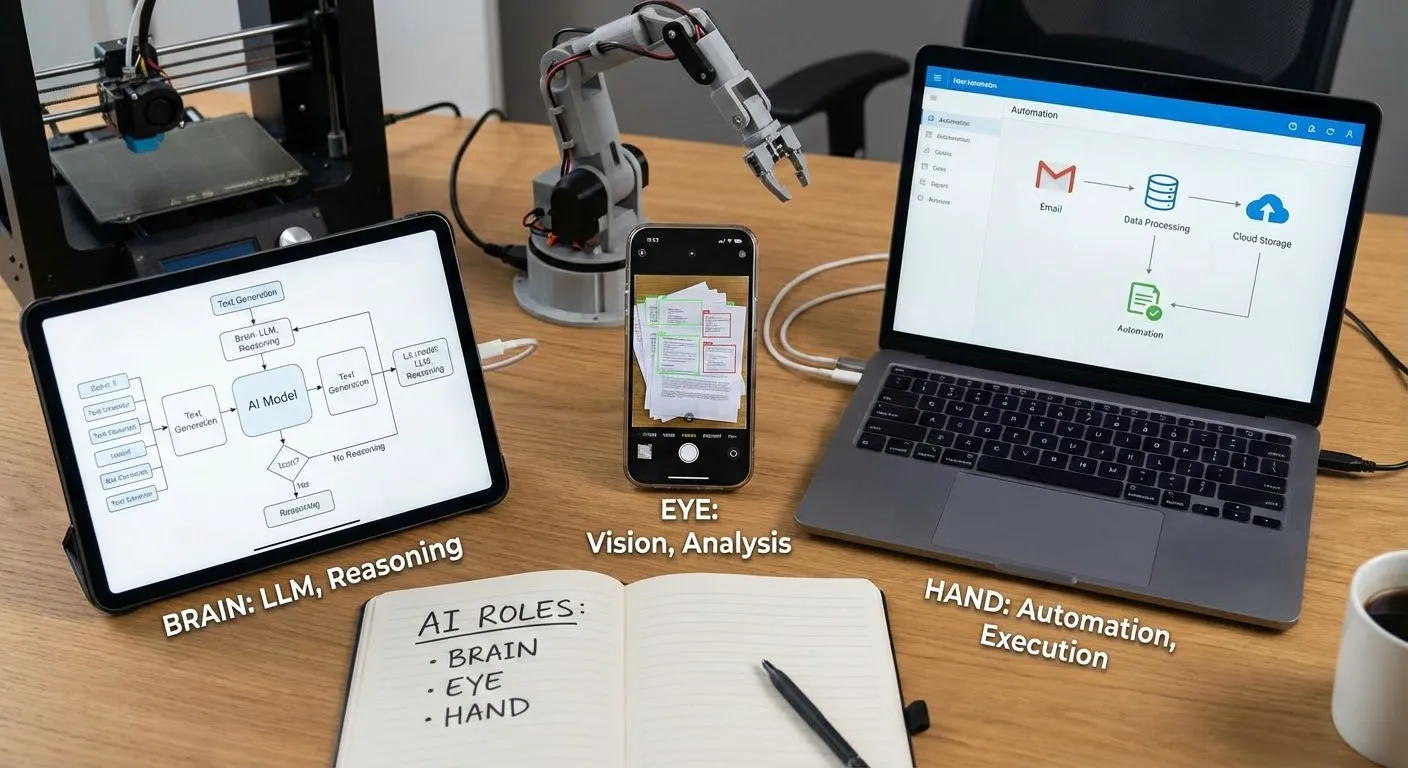
When AI acts as the brain, it mainly handles language understanding and generation, or reasoning across complex information. For example, in a meeting-minutes assistant, it should extract truly core discussion points from a long recording rather than just list by timeline. In a learning app, it should judge whether a user misunderstood a concept or just made a careless step error, then give different feedback. In these scenarios, AI’s value is understanding what users say, understanding provided material, and generating structured, logical output. Your job is to help users ask clear questions and feed accurate context so this “brain” has enough information to judge.
When AI acts as the eyes, the focus is processing non-text content such as images and video, converting them into machine-understandable descriptions and then taking further action. For example, a paper-document organizer can recognize photos of invoices, contracts, and manuals into searchable text. A drawing-learning app can interpret a user’s sketch and point out composition or line issues. A home-organization advisor can analyze uploaded room photos, recognize current layout and item distribution, and suggest practical improvements. Here AI is like analytic vision: your app no longer only handles typed text and can start engaging with physical-world inputs.
When AI acts as the hands, it starts executing a chain of concrete actions, not just giving text suggestions. For example, in automation platforms you can chain a workflow: read email attachments, summarize key points, post to a group, save originals to cloud drive, then create follow-up tasks automatically. Here AI’s role is making dynamic next-step decisions based on context, such as identifying whether an email is a complaint or whether a form is complete, then triggering different follow-up actions.
Beyond this simplified framing, in real products AI roles are often more concrete and diverse:
In text processing, AI may do translation, summarization, Q&A, continuation writing, or sentiment analysis. Examples include auto-classifying customer inquiries in support systems, extracting contract clauses in legal assistants, and grading essays in education apps.
- The technical foundation is mainly Large Language Models (LLMs) in deep learning. They learn language patterns and world knowledge from massive corpora, enabling both long-context understanding and coherent generation.
- On the “understanding” side, LLMs can identify intent, extract key information, and judge sentiment tendencies. On the “generation” side, they can write summaries, answer questions, rewrite/continue text, and translate across languages, automating or semi-automating large amounts of reading, synthesizing, and drafting work.
- Take an online customer-service bot as an example: the system first roughly classifies a user’s one-sentence input as inquiry, complaint, or after-sales; extracts key fields like order number, time, and product name; then lets an LLM generate a natural, complete response with context and enterprise knowledge-base support. This reduces human workload and keeps service quality stable during peak periods.
In image processing, AI may do recognition, classification, generation, restoration, or enhancement. Examples include lesion localization in medical imaging, automatic background removal and replacement in e-commerce, and text-to-image support in design tools.
- Image understanding usually relies on visual deep-learning models such as Convolutional Neural Networks (CNNs), learning edges, textures, and structural features from massive images for object detection, segmentation, and fine-grained classification.
- Image generation and restoration rely on generative models such as diffusion models and GANs, which can generate new images from text/reference images and restore low-quality or missing details with super-resolution enhancement.
- Many systems combine LLMs: first understand user text intent in natural language, then auto-generate visual prompts, style tags, and composition constraints for the vision model, closing the loop from “understand what you want” to “draw what you want.”
- Example: an e-commerce “smart hero image generation” feature. The system first uses detection/segmentation models to cleanly extract the product, then uses an LLM to parse merchant copy (for example, “minimal Nordic living-room setting with soft natural light”) into scene/color/style parameters, then calls diffusion generation to produce matching background and lighting, auto-filters poor compositions or style mismatches, and outputs listing-ready hero images.
In audio/video processing, AI may handle generation, transcription, denoising, editing, or subtitle creation. Examples include auto-generating intro/outro narration in podcast tools, auto-synthesizing explainer videos from scripts, and real-time transcription/translation with multilingual subtitles in meeting software.
- On the understanding side, systems use speech-recognition models to convert speech to text and analyze speaker, language, speaking rate, and rough emotion; visual models parse scenes, people, and key objects in video.
- On the generation side, LLMs parse and rewrite scripts/meeting content/instructions, then drive Text-to-Speech (TTS) for natural narration and video-generation/editing models for auto-composition, background replacement, shot insertion, and subtitle alignment. Audio generation models can also produce background music/ambience, combined with deep denoising and enhancement.
- Example: “text-to-short-video” products. Users enter one paragraph, the system uses an LLM to split it into natural sections and scenes, generates narration and shot descriptions, uses TTS for voiceover, then uses templates/generation models to select or generate footage, align subtitles with audio on a timeline, and one-click export a publishable short video.
In voice interaction, AI may do recognition, synthesis, emotion detection, or dialogue management. Examples include understanding commands in smart speakers, route broadcasting in voice navigation, and pronunciation correction in language-learning apps.
- Front-end uses deep-learning speech recognition to convert user speech into text and extract tone, volume, and speaking-speed signals for emotion/state hints.
- Back-end uses TTS to output natural voice replies, while emotion-recognition models adjust response tone and pace according to the user’s current speaking style so interaction feels closer to real conversation.
- Example: with a smart speaker, when a user says “I’m tired today, play something relaxing,” the system transcribes speech, uses an LLM with playback history to infer what “relaxing” means for this user, chooses a calmer playlist, and after detecting a fatigued emotional state, TTS lowers speed and softens tone so the system both “understands” and “sounds comfortable.”
The content above is only a basic introduction to major AI directions and techniques. In real business scenarios, you usually need to integrate multiple latest AI APIs and run broader testing across different tasks. You also need to gradually understand how strong current AI really is, what problems it can solve, where it is likely to fail, and what its boundaries are. Only with that understanding can you design features and processes reasonably instead of burying risks through capability misjudgment.
Next, we will discuss this more systematically: how to understand AI capability and boundary, and what to consider when building real products.
4.3 Get Familiar with AI Capabilities and Boundaries
When you actually integrate AI into products, you quickly see a reality: the “all-powerful” messaging in promotion and the constraints inside specific features are often far apart. To avoid over-promising and under-delivering, you need basic awareness of major AI capability directions and clear boundaries for each. You need lots of testing and Bad Case review, avoid scenarios where AI is highly likely to fail, and add warning explanations where needed.
Current models still hallucinate in many scenarios, especially when asked to freely improvise or when not given reliable references. They can output confident but wrong answers, and even fabricate files, data, or events that do not exist. Therefore, for consequence-sensitive scenarios such as financial statements, legal documents, and medical suggestions, you should explicitly add human review or multi-step checks in your design. Do not treat model output as directly executable instructions.
At the same time, privacy and data security must be handled head-on. You need to be very clear about which data can be sent to models, which must be anonymized, and which should never appear in third-party systems. For sensitive content such as contracts, medical records, and personal identity information, explicitly state handling methods in UI and agreements, and where possible choose safer, more controllable deployment approaches for these cases.
To make this more concrete, let’s use an Agent-related example to explain what it means to truly understand AI boundaries. Note: this is not teaching you to build an Agent from scratch or asking you to chase one architecture now. The point is a thinking method: for the same “Agent” topic, some people treat it as a buzzword, while others break tasks and boundaries clearly.
Barret Li Jing, a long-term AI application practitioner, gave a summary I strongly agree with on building Agents and deciding where to use AI. It reflects a mature method: break the problem first, then discuss where AI fits.
Agent has two variables: workflow, which controls task direction, and context, which controls content generation.
If both workflow and context are highly deterministic, such tasks are easy to automate, similar to traditional RPA. In tasks like invoice processing or form filling, AI is more of a glue layer with limited room to contribute.
If workflow is deterministic but context is uncertain (fixed process, variable input), Agent needs to fill semantic understanding gaps, such as in customer-service Q&A or contract parsing. External retrieval, knowledge graphs, and tools can fill information gaps so reasoning aligns better with expectations.
If workflow is uncertain but context is deterministic (clear input, multiple possible paths), Agent needs autonomous path planning, such as in market-analysis report generation or personalized recommendation. Many end-to-end RL Agents are good at this because training exposes them to many planning patterns.
If both workflow and context are uncertain, this is the most complex case. It requires both reasoning and exploration, such as innovative-solution design or cross-department information gathering. This leans toward general-purpose Agents, where execution quality depends on tool richness and especially broad programming capability, for example enabling GitHub repo search/clone/code modification to solve tasks like a human operator.
Therefore, to build Agent well, first clarify the scenario. In essence, automation solves “deterministic” problems, while intelligence solves “uncertain” problems.
The value of this decomposition is turning “build an Agent” from a vague concept into judgeable questions: where is determinism and where is uncertainty in your task? When both process and information are deterministic, traditional programs may be enough. Only when uncertainty appears do AI capabilities in semantic understanding, pattern recognition, and reasoning/planning become useful. But at the same time, the more uncertainty, the larger the new risks AI introduces. In scenarios where both dimensions are uncertain, each AI step can drift, and you cannot predict choices in advance. That is why many teams start from quadrant 2 (workflow fixed, context uncertain): it uses AI understanding strength while keeping risk bounded by fixed process.
Back to the core question of this section: what does it mean to truly understand AI boundaries?
First, understand that different scenarios need AI differently. As the workflow/context example shows: when both are deterministic, AI has limited room and classic automation may suffice; when workflow is fixed but context varies, AI’s value is understanding and completion; when workflow is uncertain, AI needs planning and exploration. The essence is identifying source and degree of uncertainty. AI’s core strength is finding patterns and relationships under uncertainty. This way of thinking applies beyond Agents, including image recognition, content generation, and recommendation systems. For example, in an AI background-removal tool, input is deterministic (an image), while edge precision and complex-background handling are the uncertainty.

But while AI solves uncertainty, it also introduces new uncertainty. Its output is probabilistic: it can misunderstand, reason off-path, or hallucinate. Different scenarios and user groups have very different tolerance for this uncertainty. So you must ask:
Can users and the system tolerate the new uncertainty introduced by AI? In customer service, if AI misreads intent, users can often correct it immediately, so uncertainty is controllable. But in automated financial approval, one misjudgment can cause severe consequences, so uncertainty is unacceptable. Likewise in image generation, for avatar beautification users can regenerate at low cost; for architectural construction drawings, a small detail error may cause real engineering risk.
Can AI accuracy reach the passing line for this scenario? And that passing line depends on what users do with it. For image recognition, 80% may be acceptable for personal photo album sorting because users can manually adjust a few. But for security monitoring, missing 20% suspicious targets is a major risk. For text generation, 60/100 creativity may be enough for social copy because users can polish. But for legal contract clauses, 95/100 may still be insufficient because one wrong phrase can trigger legal disputes. Different users and use cases have very different sensitivity to error rates; you must know the tolerance window of your target scenario.
When AI fails, do you have a remediation path? In fixed-workflow scenarios, you can place human review at key nodes and localize uncertainty. In scenarios where workflow is also uncertain, every AI step can drift and intervention timing becomes hard to judge, causing steep cost and risk increase. For example, in old-photo restoration, if output is not realistic users can immediately reject it; in medical imaging assistance, if AI marks abnormality in the wrong location, doctors may not easily detect it and consequences are much heavier.
Can you measure and optimize AI performance? If the task itself has no clear right/wrong criterion, how do you know whether AI did well? If feedback comes very late, how do you iterate quickly? Without measurable signals, AI uncertainty becomes a black box. For example, in recommendation systems you can use click-through rate and dwell time for fast feedback. But for creative ad-copy generation, “good” is subjective and real conversion may only be known after campaign launch, making iteration cycles long.
A mature judgment is not “there is uncertainty, so we can use AI,” but “AI can handle this uncertainty, and I can manage the new uncertainty AI introduces.” You want to build this judgment capability: on this feature point, to what extent can AI help, is it worth investment, and what investment path has the best ROI. With this capability, you avoid many detours when designing features and evaluating solutions in the future.
5. After You Have an App, How Do You Find the First Real Users from 0?
After you finally build an app, the next challenge becomes: how to make the first real users appear.
At this stage, many teams have an illusion: since the product exists, all that remains is promotion, exposure, and traffic buying, and once enough people see it, growth will come naturally. But if you rush into large-scale exposure immediately, you often fall into a classic trap: you burn precious time and budget, data shows people came, but you still cannot verify whether anyone is willing to keep using it.
The most important thing at this stage is only one thing: prove at the smallest possible cost that some people are willing to use it, and willing to come back after using it. In growth/product language, this step is usually called “cold start.”
Cold start means pushing a brand-new product to real operation when almost everything starts from zero. You have no user base, no word of mouth, no search volume, no brand awareness, and almost all metrics are near zero. In such a cold environment, you must make the first real willing users appear and build the first usage loop around them.
This is fundamentally different from later optimization on products that already have users and data. A simple way to move forward is through these four steps:
- First understand growth has 0–1 and 1–N stages, and know what you currently need to solve.
- Clarify who exactly you need to reach; do not stare only at end users.
- After clarifying target objects, choose one or two cold-start paths that fit your resources.
- In the reality of limited resources, learn tradeoffs and focus effort on the most critical small part.
5.1 First Distinguish Two Stages: 0–1 and 1–N
Before discussing how to find users, you need to clarify one thing first: growth is staged. If you mix all growth work together, you won’t know where to focus now. The simplest and most practical split is 0–1 and 1–N.
0–1: How to Cold Start When Nobody Is Using It
0–1 means the period from zero users to the first small batch of users who are truly willing to use. The “cold” in cold start is that almost all initial indicators are zero: no downloads, no search, no word of mouth; your app is almost nonexistent in the world.
At this time, you cannot rely on organic traffic or luck. You must act proactively and build the first foundation. Specifically, several things are mandatory:
Find a small group of seed users who are truly willing to use it, not just acquaintances opening once out of favor or curiosity.
Prepare initial usage experience and supply, so users do not see an empty shell after entering. Even if features are incomplete, they should at least complete one full core operation and feel the value.
Explain clearly in simple language what the product does and what problem it solves. Without brand trust, users give you only a few seconds of patience. You must let them quickly understand “what’s in it for me.”
Get the first reachable channels to place this message in front of potential users. It could be a small community, a forum, or a personal network. Scale is less important than accurately reaching real need.
In 0–1, what truly matters is bringing in the first people with real needs and getting them through a closed loop of entry, usage, and feedback. Once this loop runs, you have proved the product is not an “in-the-air concept” but something people actually need and will use.
1–N: How to Scale After People Are Already Willing to Use It
When you gradually accumulate a group of users willing to repeatedly use the product, the question changes to: how to expand from dozens/hundreds to thousands/tens of thousands and beyond. This is what people traditionally call growth, expansion, and scale.
In 1–N, you start to care about a more complex set of topics: mechanisms, organization, monetization, brand, and team. For example:
Whether you have found relatively stable acquisition channels, and can estimate roughly how many new users each unit of budget/time brings. At this stage, you need repeatable, predictable growth paths rather than luck.
Whether you have started building service mechanisms, such as customer support, operational activities, and user education. As users grow, you can no longer handhold one by one as in early days; standard service systems become necessary.
How this product will make money, such as subscription, one-time payment, value-added services, or other models. You do not need to finalize business model at day one, but once entering 1–N, you must seriously think about sustainable operation.
What brand impression you want to leave. Early on you may only spread within small circles; as scale expands, you need to think about how more users remember you, trust you, and recommend you proactively.
Which capabilities your team still lacks and which links need long-term ownership rather than full outsourcing. One person or a small team may carry 0–1, but 1–N usually requires more role coordination.
These problems are all important. But if you rush to solve them in 0–1, you often enter empty spinning. Before you even know whether people truly want to use and stay, discussing business models and brand strategy only distracts from what matters most.
Why Focus on 0–1 First?
For solo developers and small teams, compared with 1–N, 0–1 is what you should focus on most. The reason is simple: if you cannot find the first batch of real users, all later discussions about scaling, commercialization, and branding are empty talk.
The 0–1 phase is the most fragile and most critical moment in the whole product lifecycle. It determines whether you can prove product value, build initial trust, and lay the foundation for later growth. Only after you truly run through 0–1 are you qualified to discuss 1–N.
Next, we further focus on 0–1: first clarify who exactly to find, then discuss concrete cold-start paths.
5.2 Cold-Start Targets: Seed Users, Supply Side, Traffic Side, and Channel Side
Different application types usually cannot avoid several key target groups: seed users, supply side, traffic side, and channel side.
Type 1: Seed Users
Seed users are the earliest users you reach. Their typical traits are small in number but highly aligned with your target profile. What you need from them is not only registration and usage numbers, but first-hand direction and experience feedback.
- For personal productivity tools, seed users may be people with long-standing pain in one problem: content creators who often need to organize long-form writing, professionals frequently preparing reports, or students dealing with large amounts of material daily.
- For education apps, seed users may be a small group preparing the same exam or parents in a specific grade segment.
During cold start, set a clear seed-user goal for yourself, for example finding 20 to 50 cooperative users first and spending one to two weeks using and talking with them. The focus is not quantity, but using high-density communication to refine product logic.
Type 2: Supply Side
In some two-sided or multi-sided platform products, having only demand-side users is not enough. Without enough supply-side participants, users may enter and quickly leave because there is nothing to use.
Supply-side participants may be content creators, course instructors, service providers, merchants, drivers, landlords, etc. They determine platform richness and attractiveness.
- If you build a design-assets platform, you need to first convince some designers to upload works, even if it is only a small free subset. Otherwise users enter and see only a few sample images with low stickiness.
- If you build an online booking tool, without pre-connecting merchants or institutions willing to use it, ordinary users still cannot find actual bookable targets.
In cold start, you must be very clear whether you solve demand side first, supply side first, or both simultaneously. Many platforms faced this tradeoff in early stages. Simply realizing this is a structural problem you must address already puts you ahead of teams that only think about end-user acquisition.
Type 3: Traffic Side
Traffic-side partners are people or organizations that can, within a relatively short time, direct a meaningful amount of user attention to you. They may be influencers, vertical accounts, media outlets, community operators, or tool platforms with large user bases.
- For a workplace productivity tool, if you can persuade a few career-development creators to naturally introduce your app in content, you can quickly reach users sensitive to workplace efficiency tools.
- For a topic-assistant tool for Xiaohongshu creators, if you cooperate with several mid-tier creators and let them show practical usage, that creator group naturally becomes potential seed users.
In cold start, you do not need to rush for the biggest traffic players, nor immediately pursue top-tier partnerships. Often, small-to-mid traffic sources with high audience overlap are more willing to try customized collaboration with you. Your task is to find those people/institutions and provide a clear proposal so they understand what you do and what benefit they get.
Type 4: Channel Side
Channel-side partners are organizations or entry points that help you reach target users consistently in specific scenarios. The difference from traffic-side is: traffic-side is more one-off attention import, while channel-side is more long-term, structured connection.
- Schools, training institutions, companies, industry associations, and software service providers are all typical channel-side partners.
- If your app can concretely help a certain institution improve efficiency, reduce cost, or improve service quality, they are motivated to introduce your product to many users inside their own system.
During cold start, do not fantasize about winning large channels all at once. Start with small pilots, such as one or two classes, one small company, or one local community using the product internally for a period, then decide whether to scale based on feedback.
A direct benefit of splitting cold-start targets this way is avoiding putting all effort into end-user acquisition while ignoring other critical links in product structure. You can draw a simple role map based on your product form: define who each role is, current size, and short-term goal for each. Once this object map is clear, then discuss concrete cold-start paths.
5.3 Cold-Start Methods: Three Main Paths for Different Targets
After you know who to find, the next question is: through which paths do you find and serve them.
In practice, you do not need to stick to only one path. Choose based on your resources and product characteristics. Most of the time, one path is the main line while one or two others support.
Path 1: Break Through with Seed Users, Prioritize Your Private Reach
This path mainly targets seed users and part of supply side.
For most early solo developers, small teams, and even startups, the most realistic, lowest-cost, and easiest-to-control rhythm is usually to start from your existing private reach.
“Private reach” is not a complicated operations concept. It is simply people you can proactively reach now: your friend circle, industry communities you participate in, interest groups where you have voice, readers of a public account you maintain, and so on.
There are roughly three key actions in this path:
- Actively invite a small number of highly matched users to try. The key is not volume, but fit with target profile. If you build a resume tool for early-career users, prioritize fresh graduates and students preparing internships, not acquaintances with ten years of work experience. In invitation messages, try to clearly state three things:
- Which kind of users this app serves and what problem it solves.
- Roughly how long you hope they spend trying it.
- How you will handle the feedback they provide.
- Collect feedback intentionally and optimize quickly. The value of seed users is not helping you pad numbers, but helping you see product blind spots. Use one-on-one chats and short surveys to ask: in what scenario they think to use it, where they get stuck, and which part is most useful or completely useless.
- Let seed users generate the first batch of content/cases. Real usage traces are content: reviews, comparison screenshots, usage stories. These are all materials for external communication later.
In this process, control the impulse to chase large-scale spread too early. If you cannot serve even these dozens of users well, pushing more people into the same pit with bigger exposure only amplifies problems, not solves them.
Path 2: Drive with Content or Benefits, Give a Clear First Reason
This path mostly targets seed users plus traffic-side partners, especially common in highly competitive tracks.
When users have many alternatives, a simple “new product, please try” is hard to persuade. You need a clearer and more attractive first reason that makes them willing to spend time taking the first step.
Two common entry methods:
- Use real benefits directly as a hook.
- A newly launched course platform can release several high-quality free courses early or provide limited-time discounted seats.
- E-commerce apps often use subsidy red packets, low-price group-buying, and discount coupons so new users feel the first trial is low risk.
- Attract continuously through vertical content. On platforms like Douyin, Xiaohongshu, public accounts, and podcasts, consistently publish valuable content around vertical themes your target users care about, such as workplace tips, coding skills, emotion management, food tutorials, and learning methods. People attracted by content may not convert immediately, but at least they already have baseline trust in you. When you introduce your tool/app at the right time, they are more likely to take it seriously.
If you choose content-driven growth, accept that it is slower to warm up but longer-term in return. Keep investing effort to make content solid, and avoid being dragged by vanity metrics like plays or reads at the beginning. What truly helps cold start is the small group that resonates with your content, not the short-lived burst traffic. Whether benefits or content, eventually it comes down to one thing: smoothly guide users into your app and let them complete one full experience.
Path 3: Leverage Big Platforms and Find Entry Points in Existing Ecosystems
This path mainly targets supply side, traffic side, and channel side.
In many fields, building your own ecosystem from zero is extremely expensive for a new app. But if you first position yourself as a new store/account/plugin inside larger platforms, cold-start difficulty can drop significantly.
- In e-commerce, new stores entering Taobao, Pinduoduo, JD, etc., do not need to build payment, logistics, and review systems from scratch. Common cold-start methods include influencer sales, in-platform promotion/activity slots, and livestreaming.
- Tool/content apps can build plugins or mini-tools for mature platforms and publish services in open marketplaces, making it easier for users with explicit needs to discover you.
The logic behind this path is recognizing that big platforms have already concentrated users in specific scenarios, and your job is to find the corner in those scenarios that matches your product. Leveraging does not mean giving up independence; it is a more realistic way to open the game during cold start.
5.4 Tradeoffs with Limited Resources: In 0–1, Do Only the Most Critical Small Piece
When you have confirmed you are still in 0–1, clarified who to serve, and roughly chosen a cold-start path, but find resources clearly insufficient, you need disciplined focus.
Resources here are not only money, but also time, energy, manpower, attention, connections, and channels. In cold start, if you try “multiple paths at once,” the common outcome is: busy every day, many tasks done, but no path deeply executed. In the end, you get neither convincing results nor real user understanding.
At this stage, you need deliberate narrowing. The goal is not “do more,” but “do the most critical small piece solidly.” You can reconstruct your actions from three angles.
From Goals to Concrete Tasks
Many people set goals like “see market response first,” “build up users first,” or “pull one wave of trial users first.” These are too broad; you cannot judge whether daily work is truly approaching the goal.
A more pragmatic method is to tighten goal into one concrete small task. For example: in the next four weeks, let 20 real users matching target profile complete your app end-to-end multiple times in real scenarios, and collect sufficiently concrete feedback from them.
A “segment” is not “anyone who might use this kind of tool,” but a group you can describe with specific labels. For example, if your tool helps generate work reports, your target may be “internet operations practitioners with 1–3 years of experience,” not generic “office workers.” They share concrete, continuous problems: monthly reporting requirement, limited time, and desire for professional-looking outputs.
“Complete usage task” must also be explicit. For this reporting tool, one complete task may be: user organizes one week of operation data/material, imports into tool, generates first draft, revises 2–3 rounds based on recommended structure/key points, then exports PPT/doc and actually presents it in department meeting. If users click randomly twice and close it, that is not complete usage.
Feedback should be specific enough, for example:
- During data import, is there any step users cannot understand, cannot find, or frequently misclick?
- Does generated structure match their company’s reporting style, such as the “background–goal–process–result” framework they need?
- Which pages are truly used and which are always deleted?
- After using it, does preparation time clearly drop from three hours to one, or only feel “somewhat more convenient but hard to quantify”?
Don’t Try Everything Once
After defining the “small goal,” the next question is: which method should you use to find these 20 users and accompany them through real scenarios.
Cold-start methods are many: content creation, communities, ads, influencer partnerships, institutional partnerships, platform listings. Under limited resources, what you need is not knowing all methods, but which one is most natural for your current state and easiest to sustain continuously.
If you already write long-form content and have readers who finish your articles seriously, prioritize content. For example, write a concrete real-use case of how you prepared an actual monthly report with this tool: from raw data collection to structure design, draft generation, refinement, and final meeting presentation. Insert before/after screenshots to show differences in time, clarity, and output quality. At the end, do not just place a cold download link. Say clearly: if you also do operations reporting and want to polish this tool together, add me or fill a simple form; I will select 20 people for one-on-one follow-up.
If you manage several stable communities (for example an operations discussion group or an alumni workplace group), private reach may be better. Be transparent in group: “I’m building a report-generation tool. It works but is rough. I’m looking for people with real reporting needs to use and polish it with me.” From volunteers, choose best matches by role/work content, create a small group, ask them to try, share screenshots, complain, and propose suggestions, while you follow up daily.
If you have relationships in a vertical industry (for example several training instructors or one SME business lead), pilot in one class or one small team. A concrete approach: propose a clear trial plan such as “for the next month, this team uses my tool for all weekly reports; I provide real-time support and adjustments; in return, we hold a ten-minute weekly sync where you tell me what felt smooth and what felt painful.”
Polish Only the Most Critical Part
Once you have a small goal and a chosen main path, the next thing is to impose a hard constraint: only do this small part.
A common trait of teams in cold start is anxiety. Once anxious, they easily chase new actions: should we create a short-video account, make tutorial clips, allocate some ad budget, contact media for a report? Each item seems reasonable alone, but together they make you change direction every day and sink into none.
Set a concrete stage constraint, for example: in the next four weeks, focus only on two things:
- Around those 20 users, repeatedly optimize real-scenario experience so they move from “barely usable” to “generally smooth.”
- Along your chosen main path, keep finding a small number of new users and record behavior/feedback, then compare commonalities and differences with the first batch.
During these four weeks, for any new idea or opportunity, ask first: can this significantly improve usage for those 20 users in this period, or clearly help me find the next batch of similar users?
The logic behind this is acknowledging cold-start reality: your information is limited, so you cannot make good judgments across many directions simultaneously. Instead of doing a little in ten places, do repeatable, verifiable improvement in one concrete scenario and one concrete group. For example, you can clearly observe that for this batch of junior operations practitioners, the tool really cuts report prep time and really improves clarity.
You need to run through one loop: find users -> guide usage -> collect feedback -> improve experience -> users keep using. Only after this loop is running can you know what users to find, what language to use with them, where conversion breaks most often, and what adjustments bring them back. Only then does it make sense to add a new channel or test a new partnership type.
Summary
Back to the initial question: if I want to build an application, where is a reliable starting point?
Everything in this article follows one main line: first clarify what an idea is, then understand its relationship with user needs, and then step by step break it into a full path that can be built, used, polished, amplified by AI, and connected to users.
In Chapter 1, we started from ideas themselves. An idea is no longer just “this feels cool,” but must target a clear user group, sit in a specific scenario, help complete a specific task, and offer a better method than the status quo. You learned to examine ideas from four dimensions: gameplay, user journey, what is being done, and what problem is being solved. You also saw the often-overlooked gap between ideas and user needs. You restrained self-indulgence, learned to distinguish real from fake needs, and recognized that good and bad ideas diverge in fate early. Then instead of waiting passively for inspiration, you learned to proactively mine clues from your own life, your reachable groups, public spaces, and existing products; then to summarize an idea in one sentence, use AI for brainstorming, and find your own user/scenario differentiation in common directions.
In Chapter 2, you moved from thinking to doing. You learned to switch between divergence and convergence: spread ideas with the double-diamond approach, then tighten to one feasible route based on user value, feasibility, and time cost. You practiced going from abstract to concrete, breaking vague wishes (like “I want an efficiency app”) into minimal executable actions until each step became today’s doable task. You used whiteboards/paper to sketch before building, split an app into entry page, operation page, and result page, and map full user flow from entry to outcome. You also stopped treating references as copying homework and instead analyzed others’ navigation, forms, result display, and guidance flows to borrow mature experience. At the same time, you stopped waiting until “fully finished” to ask users. Even at prototype and half-finished stages, you asked while drawing and asked while building, bringing real users into design early.
In Chapter 3, you gradually built your own judgment criteria to distinguish merely usable from truly good. You stopped saying vaguely “this app is okay” and started evaluating concretely whether it saves time, reduces errors, lowers communication cost, and reduces cognitive load. You understood a good app should be almost self-onboarding, naturally recalled in key scenarios, and grounded in real altruism. You also learned to map pain points to marginal costs (time, money, effort, risk). Meanwhile, you formed an initial understanding of C-end vs B-end differences: the former cares more about emotional value and spread, while the latter cares more about efficiency, cost, risk, and compliance. You stopped only trusting your own preference and built simple feedback mechanisms, using retention, revisit, and recommendation to decide whether continued investment is justified, polishing from “I think it’s good” to “users think it’s good.”
In Chapter 4, you expanded perspective from pure product to AI capability. You first restrained the impulse of “AI for AI,” and asked two serious questions: does this app stand without AI, and what exactly improves with AI. You became familiar with AI’s basic capabilities and boundaries across text, image, video, and automation; knew where to delegate to models and where human review is mandatory. You also looked beyond feature implementation and watched deeper indicators: is task time reduced, is output quality improved, is usage frequency higher, and are users willing to pay specifically for AI features.
In Chapter 5, everything returned to one practical reality: even if your app is decent, even with AI, without users its value is still zero. You learned to separate 0–1 and 1–N, temporarily put aside large topics like scale, brand, and organization, and focus on one thing first: get 20 real users to start using and come back. Instead of blind casting wide nets, you cold-started along three main lines: accumulate seed users from your nearby communities and peers; attract early tryers through content and limited benefits; and leverage existing platforms/channels where traffic already exists. You also learned to split strategy by object: seed users, supply side, traffic side, and channel side each need different approaches. With limited resources, you stopped trying everything once and instead picked the path best aligned with your strengths and easiest to start, then went deep on that one path rather than laying out ten half-finished channels at once.
Putting all this together, the method is not mysterious: start from a reliable idea rooted in real need; use drawing, writing, and decomposition to converge it into a minimum viable application; use real users and explicit metrics to polish it into a good application; introduce AI at key points to amplify value; and finally, under limited resources, use appropriate cold-start methods to find the first users willing to pay.
Next, what you need is to drop excessive fantasies, choose one direction, build it, and launch it so it enters the real world for validation. All discussions about ideas, methodology, AI, and growth must eventually land on one concrete person, one concrete scenario, and one concrete task.
For this reason, rough beginnings are fine: incomplete features, rigid flows, and simple interfaces are all fine. Even if you launch and nobody responds, and no one wants to register or pay, that is still fine. These are process states, not final conclusions. They simply tell you what to modify next. What matters is real progress: continuously review, summarize, raise your limits, and meet more people willing to give practical feedback.
At this stage, the author believes one thing is enough: enjoy the process. As the well-known narrative game To the Moon says:
"The ending isn't any more important than any of the moments leading to it."
The ending is never more important than the process.