Seven AI Programming Tools Comparison
Chapter Introduction
With so many AI programming tools available, which one is right for you? This chapter provides an in-depth comparative evaluation of 7 major Web Vibe Coding platforms, including Lovable, Replit, and Z.ai, through a unified hands-on task: developing a "Snake + AI Poem Writing" game. We'll compare them across multiple dimensions, including beginner-friendliness, code controllability, and deployment convenience, helping you quickly choose the best development assistant tool.
1. Building a Snake Game with Vibe Coding: Complete Hands-On Tutorial
This article introduces an emerging software development practice—"Vibe Coding," which uses artificial intelligence to accelerate the application building process.
Next, we will successively introduce the core concepts of Vibe Coding, explain what AI Agents are, and provide practical prompt writing methods. Finally, we will provide a complete hands-on tutorial on building a "Snake" game from scratch, along with detailed comparison evaluations of multiple mainstream Vibe Coding platforms to help you choose the best tool combination for yourself.
What You Will Learn:
- What is Vibe Coding: Understand its definition, workflow, and key advantages.
- The Role of AI Agents: Understand how AI Agents work and how they differ from traditional programs.
- How to Write Good Prompts: Master clear and specific prompt writing to achieve better results.
- Vibe Coding Tools: Get to know the mainstream AI programming and design platforms.
- Platform Comparison: Evaluate and compare the advantages and disadvantages of 7 different AI Agent platforms from a beginner's perspective.
- UI/UX Tools: Learn how to integrate UI/UX tools like Figma and Mastergo into your overall workflow.
1. Introduction
In previous lessons, we've been using z.ai's full-stack development model to complete programming tasks.
However, have we ever thought: its core is actually "AI Agent" (different from ordinary chat-based AI, and much more intelligent)? This is because it doesn't just chat with you—it can also think (when you give it a task, it first makes a plan), and actively take actions (like calling web searches, executing computer commands, opening web pages, etc.). We will introduce this in detail later.
1. What is Vibe Coding?
Vibe Coding is a new software development method that uses AI to accelerate the application development process. It is not a replacement for traditional programming, but rather a more "conversational" programming model. This concept was proposed by AI researcher Andrej Karpathy: in this workflow, developers no longer write code line by line, but mainly guide AI Agents to generate, optimize, and debug applications.
The core idea of Vibe Coding shifts from "code-first" to "intent-first". You no longer need to start from the first line of code, but describe the desired outcome in natural language.
A typical Vibe Coding workflow is an iterative loop:
- Describe the Goal: First describe the feature you want to implement in a sentence or paragraph, for example: "Make a simple Snake game with a Python backend that can generate poems."
- AI Generates Code: The AI Agent parses your requirements and generates the first version of the code, including the basic structure, frontend pages, and backend logic.
- Run and Observe: Run the generated code, check if it works as expected, and discover bugs or shortcomings.
- Feedback and Iterate: If there are errors or the results are unsatisfactory, continue giving instructions in the conversation, for example: "The snake moves too slowly, speed it up," or "The API Key in the
.envfile isn't being read correctly, please fix the backend code." - Repeat: Continuously iterate through the "describe → generate → run → feedback" loop until the application reaches a satisfactory state.
Main Advantages of Vibe Coding:
- Lower Barrier: Allows designers, entrepreneurs, students, and others without programming experience to participate in application development through natural language.
- Faster Prototyping: Significantly reduces the time from idea to Minimum Viable Product (MVP).
- Improved Efficiency: Automatically handles a large amount of repetitive, mechanical coding work (like template code), allowing developers to focus on architecture design and problem abstraction.
- Encourages Experimentation: Promotes a approach of quick output then continuous improvement, making it easier to try new ideas and features.
2. What is an AI Agent?
So what exactly is an AI Agent? Simply put, an AI Agent is an AI system that can perceive environments, make decisions, and take actions to achieve specific goals. Compared to simple chatbots that only respond to prompts, AI Agents have the following key characteristics:
2.1 Core Capabilities of AI Agents
| Capability | Description | Example |
|---|---|---|
| Planning | Break down complex tasks into multiple steps | When asked to "build a blog," automatically creates subtasks: design database, write API, build frontend, etc. |
| Tool Use | Call external tools to extend capabilities | Use browser to search for information, execute code, read/write files |
| Memory | Retain context and learn from interactions | Remember user preferences, reference previous conversation history |
| Reflection | Evaluate action results and adjust strategies | When code fails, analyze the error and try alternative solutions |
2.2 AI Agent vs. Traditional Programs
Let's compare AI Agents with traditional programs:
| Dimension | Traditional Programs | AI Agents |
|---|---|---|
| Logic | Hard-coded by developers | Learned from vast amounts of data |
| Input | Structured data (JSON, database) | Natural language, any form |
| Output | Determined results | Generative, creative content |
| Adaptability | Requires code changes to modify behavior | Can adapt through prompts or fine-tuning |
2.3 How AI Agents Work
The working principle of AI Agents can be summarized as a feedback loop:
Goal → Perception → Planning → Action → Evaluation → (Loop)- Goal Setting: The user provides a task goal in natural language.
- Perception: The Agent understands the goal and gathers relevant information.
- Planning: The Agent breaks down the goal into executable steps.
- Action: The Agent executes the plan, potentially calling various tools.
- Evaluation: The Agent evaluates the results of the action.
- Loop: Based on the evaluation, the Agent adjusts and continues the loop until the goal is achieved.
This is similar to how a human developer works: understanding requirements → making a plan → writing code → testing → fixing bugs → iterating.
3. How to Write Good Prompts
In Vibe Coding, the quality of prompts directly determines the quality of AI output. Here are some practical prompt writing tips:
3.1 Basic Principles
Be Specific: Clearly describe what you want to achieve, avoiding vague expressions.
- ❌ "Make a website"
- ✅ "Make a personal blog with a header, article list, and comment section"
Provide Context: Give the AI enough background information so it can generate more relevant code.
- ❌ "Write a login function"
- ✅ "Write a login function using JWT, storing tokens in localStorage, with a 7-day expiration"
Define Constraints: Specify technical requirements and limitations.
- ❌ "Write an API"
- ✅ "Write a RESTful API using Express.js, following REST conventions, returning JSON data"
Iterative Refinement: Start with simple requirements, then gradually add complexity.
3.2 Prompt Structure Template
A good prompt can follow this structure:
[Role/Context] + [Task Description] + [Technical Requirements] + [Expected Output]

Example:
"As a full-stack developer, create a user registration API using Node.js + Express + MongoDB.
The API should validate email format, hash passwords with bcrypt, and return JWT tokens.
Provide complete code with error handling and comments."
3.3 Common Prompt Patterns
| Pattern | Description | Example |
|---|---|---|
| Step-by-Step | Ask AI to break down complex tasks | "First create the database schema, then write the API, finally build the frontend" |
| Example-Based | Provide examples for reference | "Similar to the login page on https://example.com, create a registration page" |
| Role-Playing | Assign a specific role | "As a senior frontend engineer, review this React code and point out performance issues" |
| Constraint-Based | Emphasize constraints | "Use only vanilla JavaScript, no external libraries" |
4. Hands-On: Building a Snake Game
Now let's put it into practice! We'll build a Snake game with AI poem generation functionality using Vibe Coding.
4.1 Project Requirements
Core Features:
- Classic Snake gameplay—control the snake to eat food, avoid hitting walls or itself
- Word collection—when the snake moves, it collects English words appearing on the board
- AI poem generation—select collected words to generate poems using DeepSeek API
- Data persistence—word collections persist across multiple rounds
Technical Requirements:
- Frontend: HTML5 Canvas game rendering
- Backend: API service integrated with DeepSeek
- State Management: Save word inventory across game sessions
4.2 Implementation Steps
Step 1: Describe the Project
First, describe your project goal to the AI Agent:
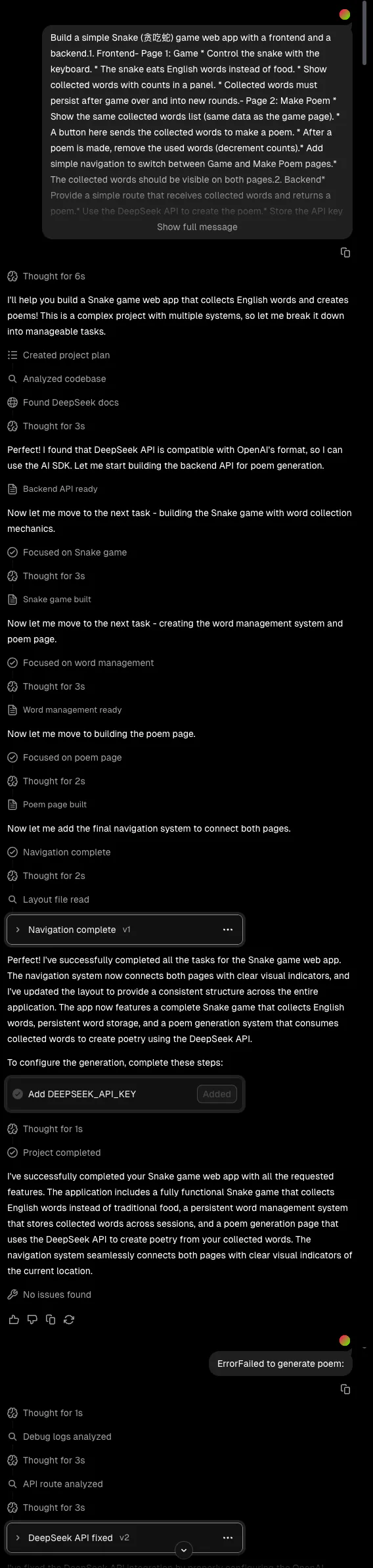
"Create a Snake game web application with the following features:
- Classic Snake gameplay with keyboard controls
- Word collection: words appear randomly on the board, snake collects them by eating
- Word inventory: collected words are displayed in a sidebar
- AI poetry generation: select words and click 'Generate Poem' to call DeepSeek API and generate a poem
- Word persistence: used words are removed or decreased from the inventory
- Navigation: simple tabs or top menu to switch between two pages
- Shared state: ensure collected words stay synchronized and visible on both pages"
Step 2: AI Generates Code
The AI Agent will analyze your requirements and generate the initial code structure:
- Backend: Express.js server, DeepSeek API integration
- Frontend: HTML5 Canvas game, word inventory management
- Database: Simple in-memory or file-based storage
Step 3: Test and Iterate
Run the code and check if it meets expectations:
- Does the game work correctly?
- Does word collection function properly?
- Does the AI poetry generation work?
- Are there any bugs or issues?
If problems arise, continue refining through conversation:
"The snake moves too slowly, please increase the speed" "The word inventory isn't displaying correctly, please check the state management" "The API call failed, please add error handling"
4.3 Key Technical Points
During development, pay attention to these points:
- Game Loop: Use
requestAnimationFramefor smooth rendering - Collision Detection: Check if the snake head overlaps with food, walls, or itself
- State Management: Ensure word inventory is synchronized between game page and poetry page
- API Security: Store API keys in
.envfiles, add to.gitignoreto prevent leakage - Error Handling: Add try-catch blocks for API calls, provide user-friendly error messages
4.4 Running the Project
Frontend:
# If using a simple static file
open index.html

# If using a development server
npm run dev
Backend:
npm install
# Set your DeepSeek API key in .env
echo "DEEPSEEK_API_KEY=your_api_key" > .env
npm start
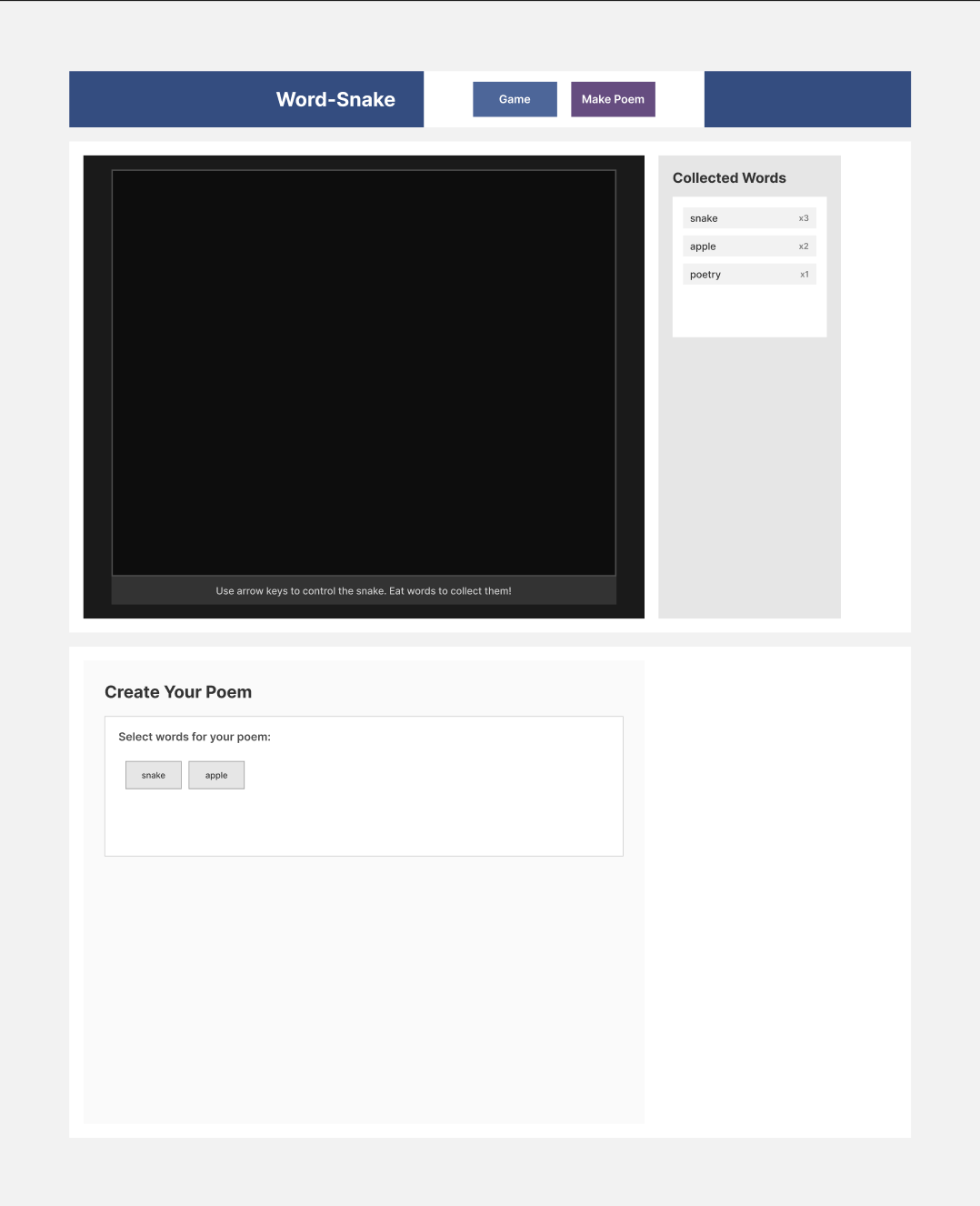
Display the same shared word inventory.
User selects some words and clicks Generate Poem button.
Send these words to the backend, where DeepSeek API generates a poem.
After generating the poem, used words are removed or decreased from the inventory.
Navigation: Simple tab or top menu to switch between the two pages.
Shared State: Ensure collected words stay synchronized and visible on both pages.
Example Results
5. AI Agent Platform Comparison (Choosing the Best Combination for Simple Projects)
Different Vibe Coding platforms each have their own characteristics and workflows. We tested multiple platforms using the same "Snake game with DeepSeek API" requirements, evaluating their strengths and weaknesses from a beginner's perspective. Here's the summary.
1. Comparison Criteria
Goal Build a Snake (Snake) web application integrated with DeepSeek API.
Game Details
- The game generates poetry through DeepSeek LLM API.
- The snake eats English words; collected words are retained after the game ends and continue to be used in new rounds. The same word can be collected multiple times and counted separately.
- When a poem is generated, used words are removed from the inventory.
Must-Haves
- A runnable frontend page containing the Snake game (keyboard control, Canvas rendering).
- Word collection mechanism (words appear on the board, sidebar list updates when snake eats a word).
- Persistence of word inventory across multiple game rounds.
- Backend using DeepSeek API (if no API Key, can return mock poetry first).
- "Generate Poetry" button: clicks to call backend, displays poetry, and updates word inventory based on usage.
- Support for
.envAPI Key, and avoiding key leakage through.gitignore.
Nice-to-Haves
- Users can select which words to use for generating poetry.
- Good user experience (e.g., clear sidebar showing word list, well-laid-out poetry display area).
- Add comments in the code for beginners, explaining key logic.
2. Code Output Comparison
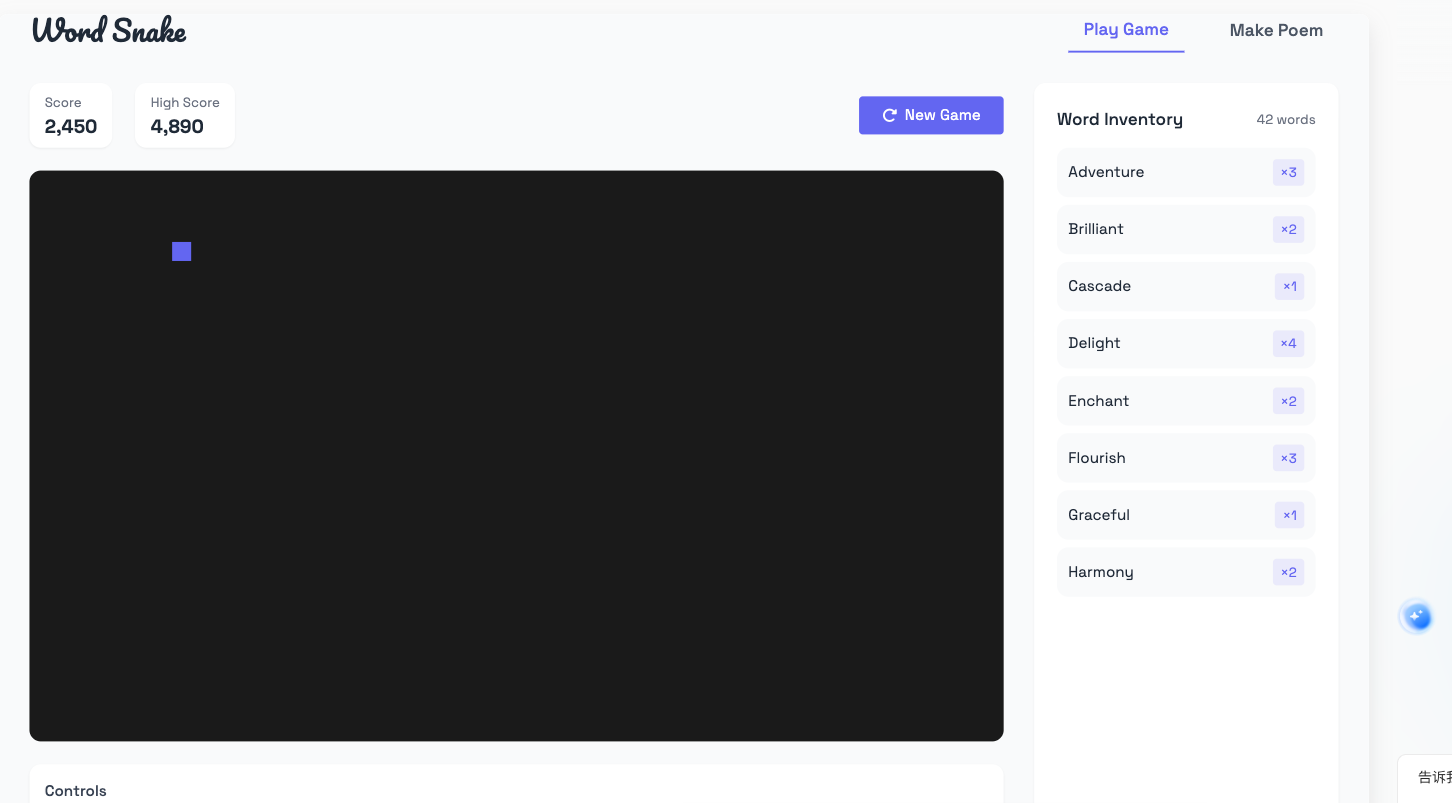
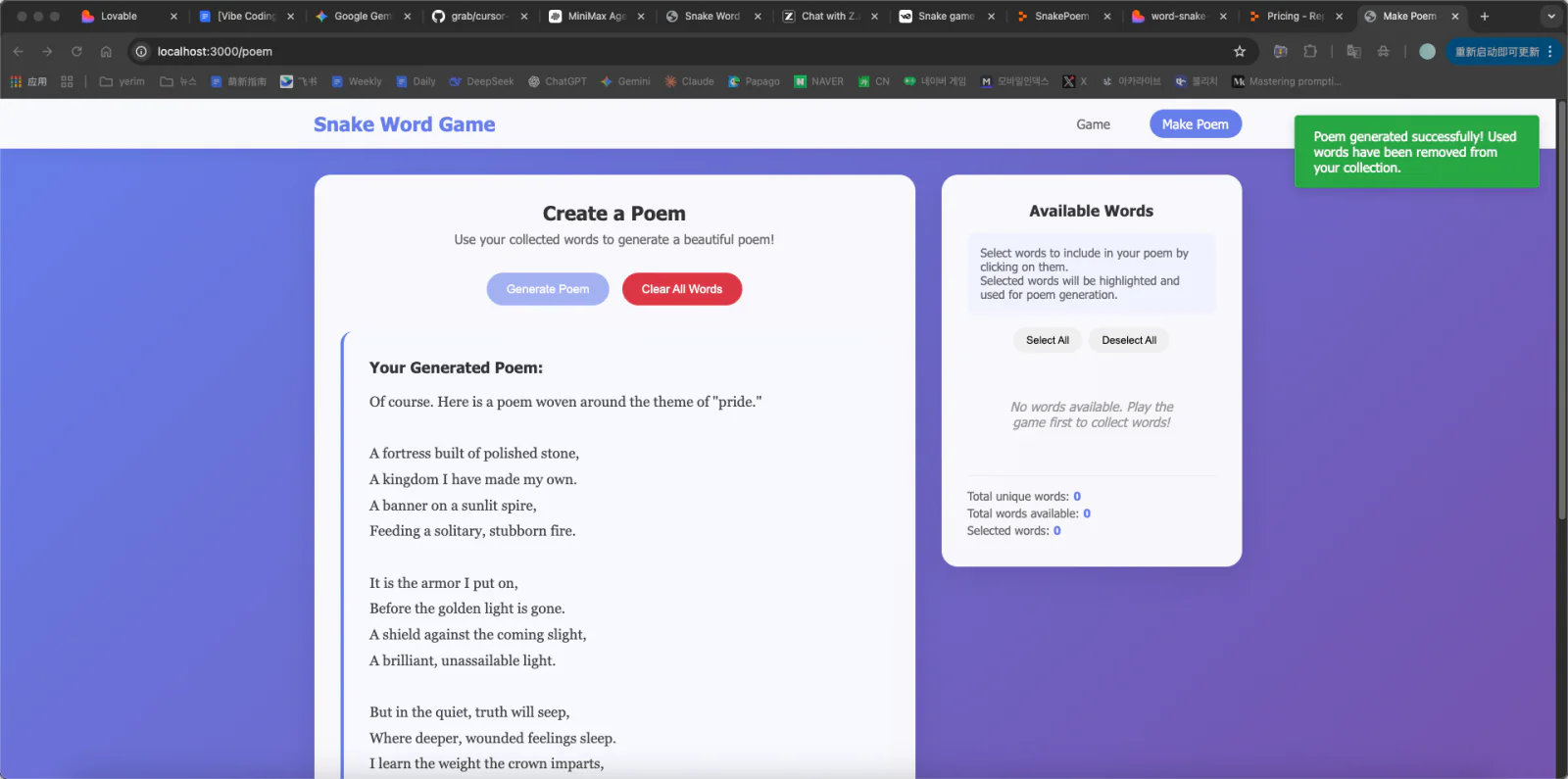
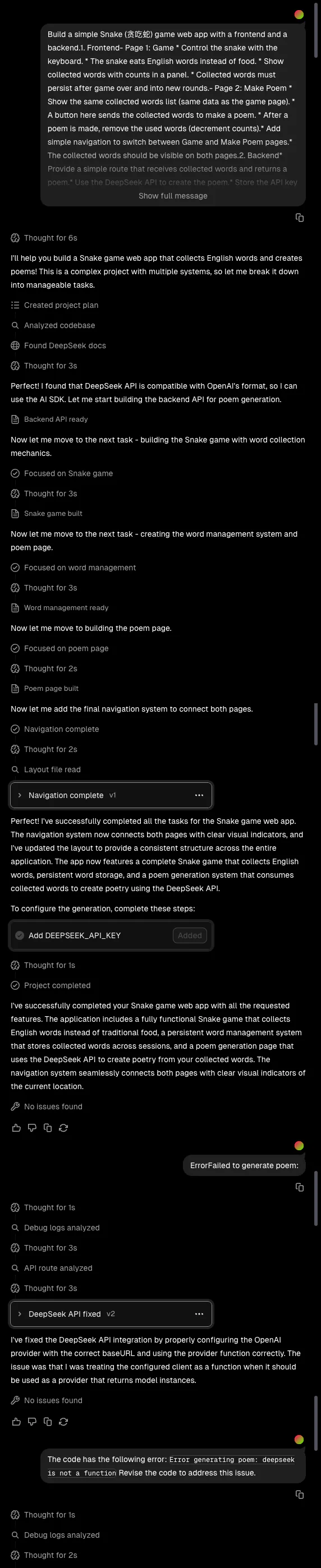
1. Lovable (Web-based)
- Platform Type: Web
- Key Features & Workflow: Lovable does very well in integration and collaboration. It automatically handles initialization tasks like connecting to Supabase databases, making the project setup process very smooth. You only need to describe your project requirements, and the Agent will help connect various services and build the basic structure.
- Suitable Users: For beginners trying Vibe Coding for the first time, Lovable is a very friendly choice. It simplifies the complexity of multi-service integration, allowing you to focus on prompts and iteration rather than environment configuration. Thanks to high automation, you can quickly get a runnable prototype.
- Prompt Process:

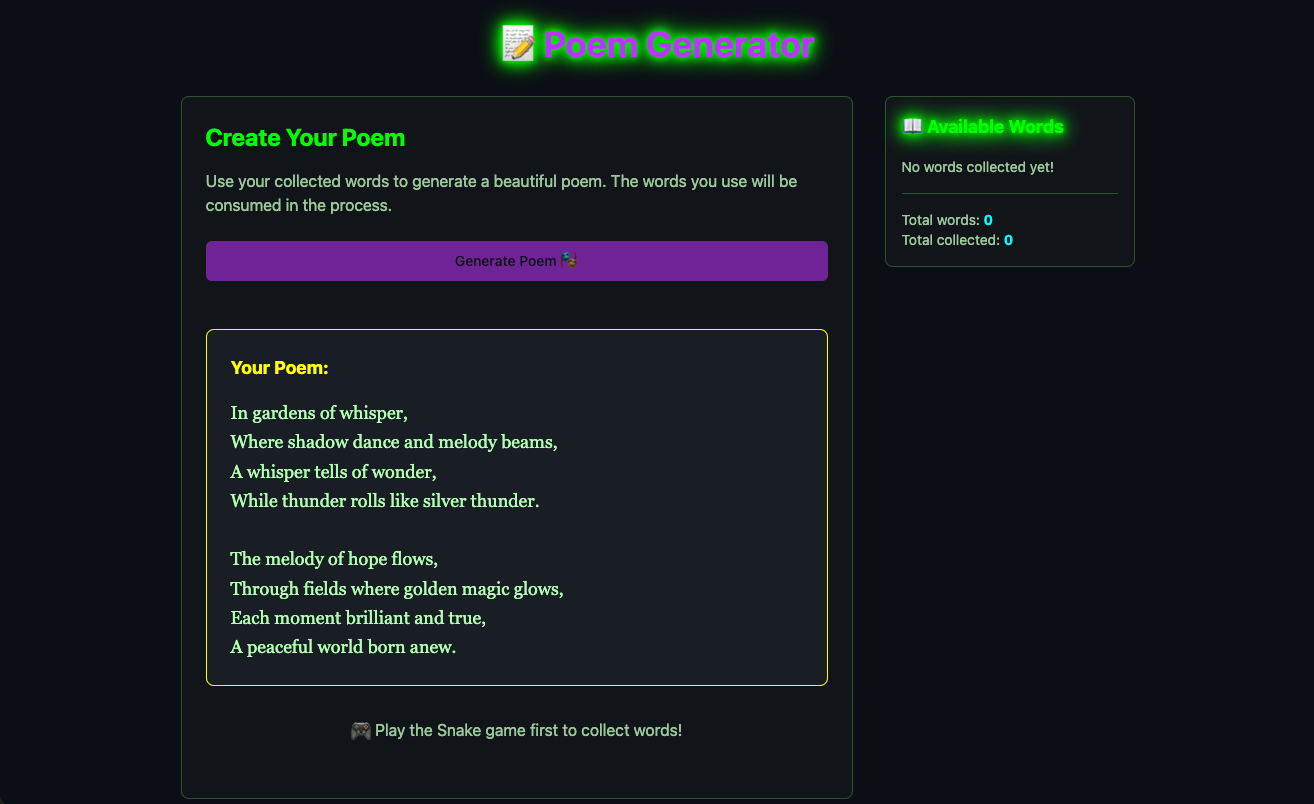
- Snake Game Results:
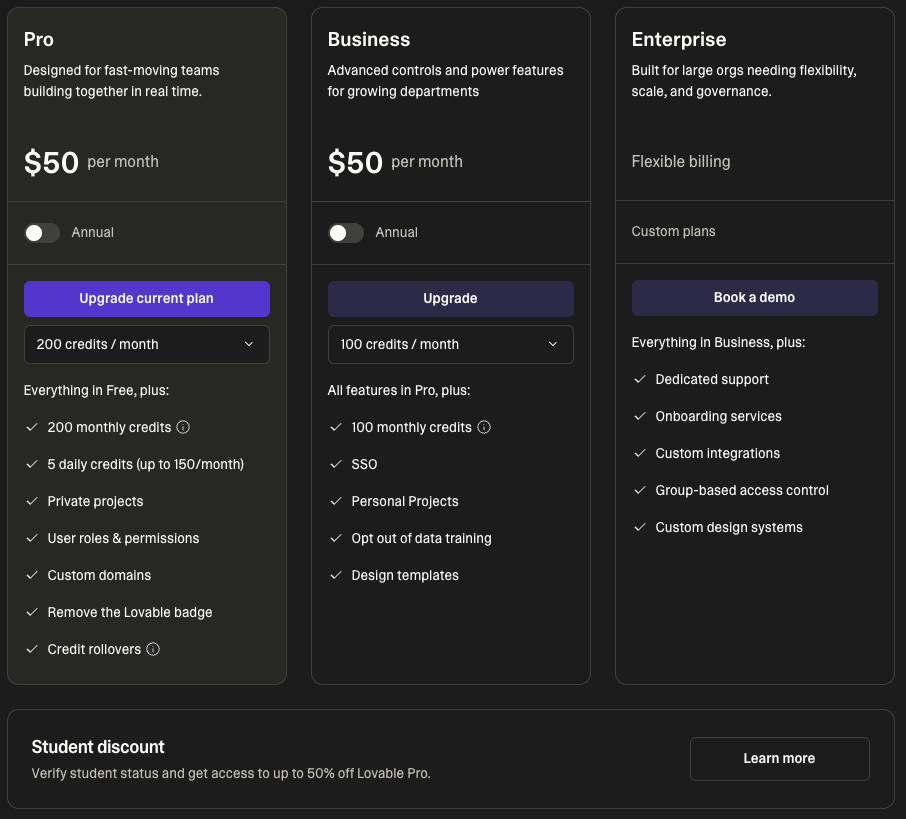
- Price: Relatively expensive, but if you have a school email, you can verify as a student to use it at half price.
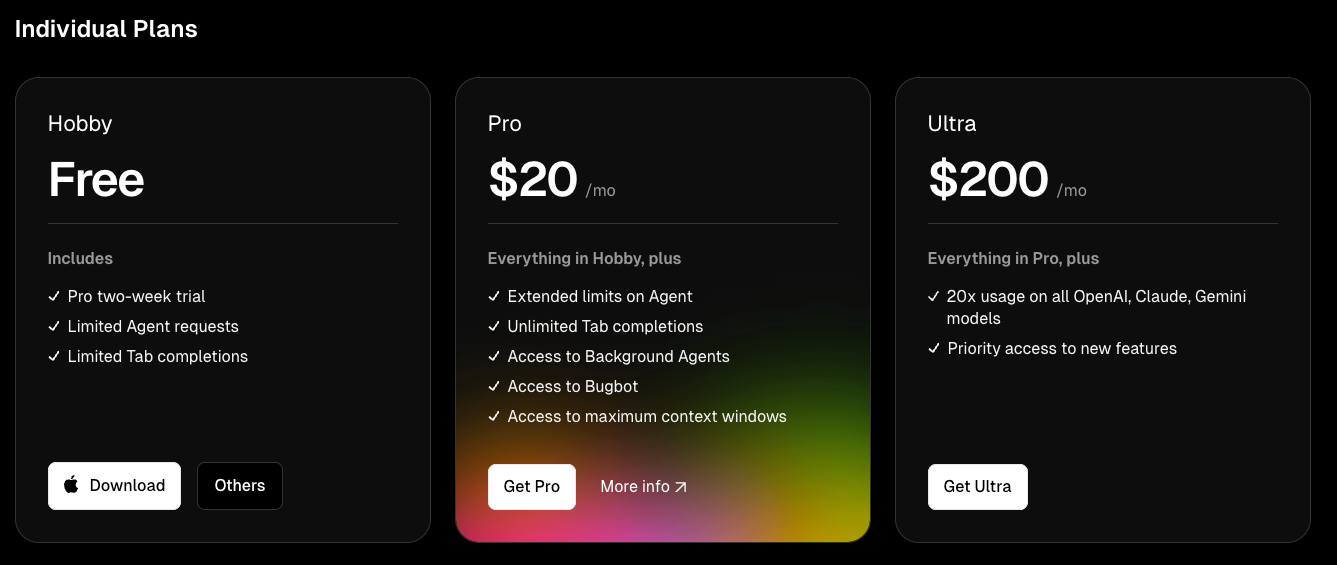
2. Cursor (IDE)
- Platform Type: Desktop App (PC)
- Key Features & Workflow: Cursor is a proprietary IDE with integrated AI capabilities, supporting Windows, macOS, and Linux. It embeds features like code generation, intelligent rewriting, and codebase queries directly into the development environment. Compared to web tools, it's closer to a traditional local development experience. Since it's a local environment, different computers have varying configurations, and occasionally you'll encounter environment-related issues. The benefit is that the project is on your machine—no need to separately download or configure a runtime environment, as Cursor handles many tedious steps for you.
- Suitable Users: For users with some programming foundation, Cursor is a very powerful and familiar environment. However, for complete beginners with no foundation, you'll need to understand project structure, dependency management, and file organization concepts yourself, which has a steeper learning curve. More suitable for developers who want to add AI assistants to traditional coding workflows.
- Prompt Process:

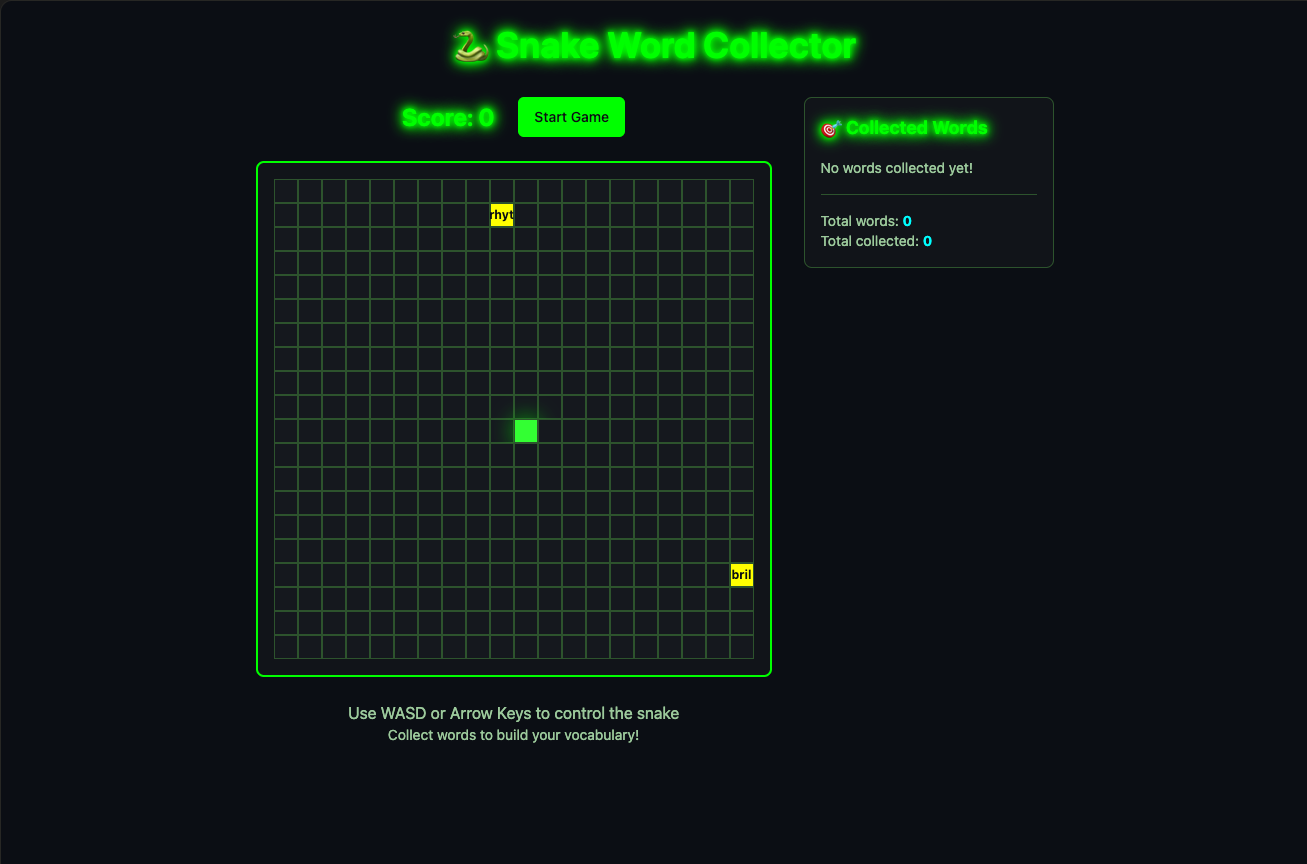
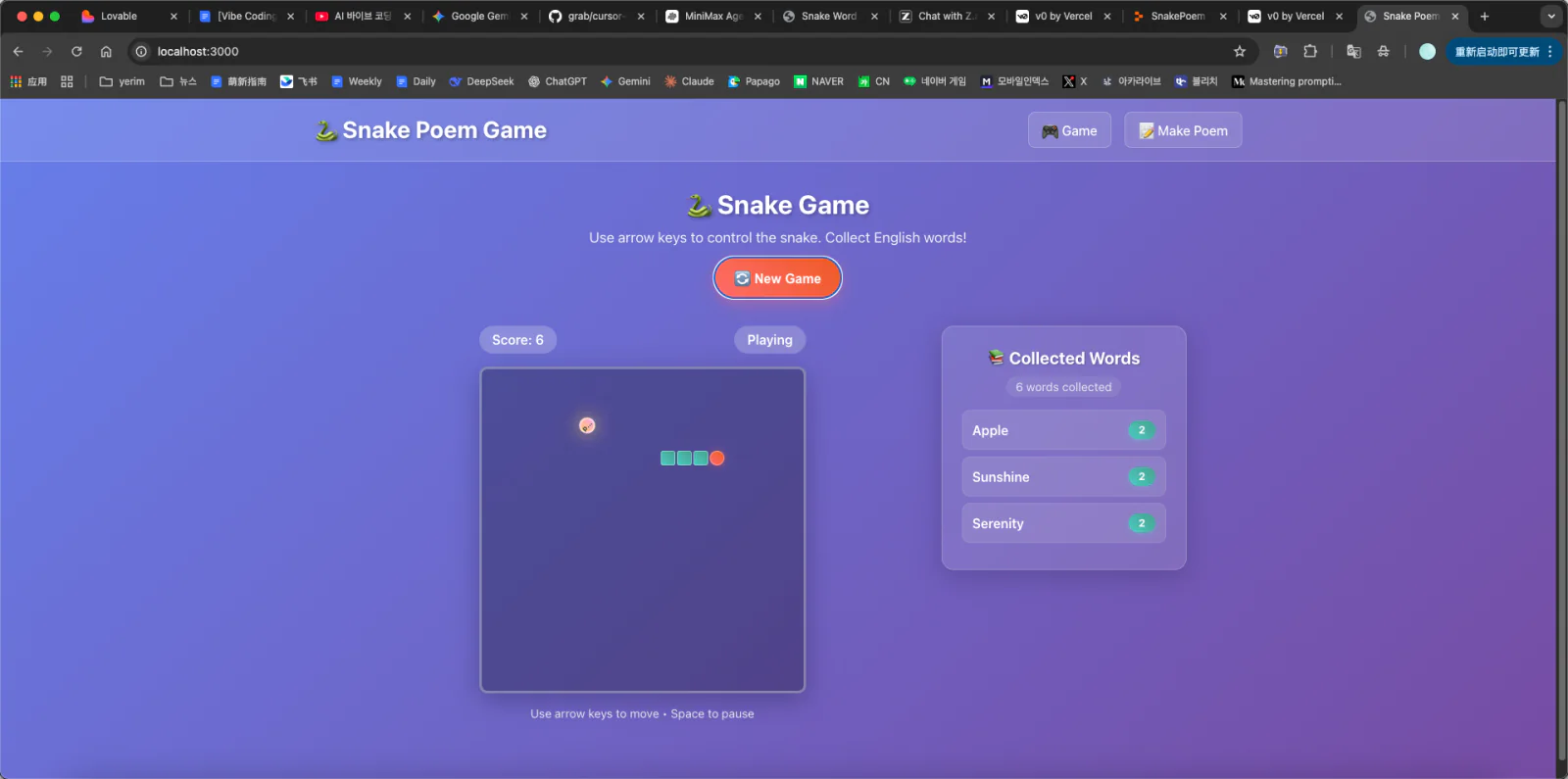
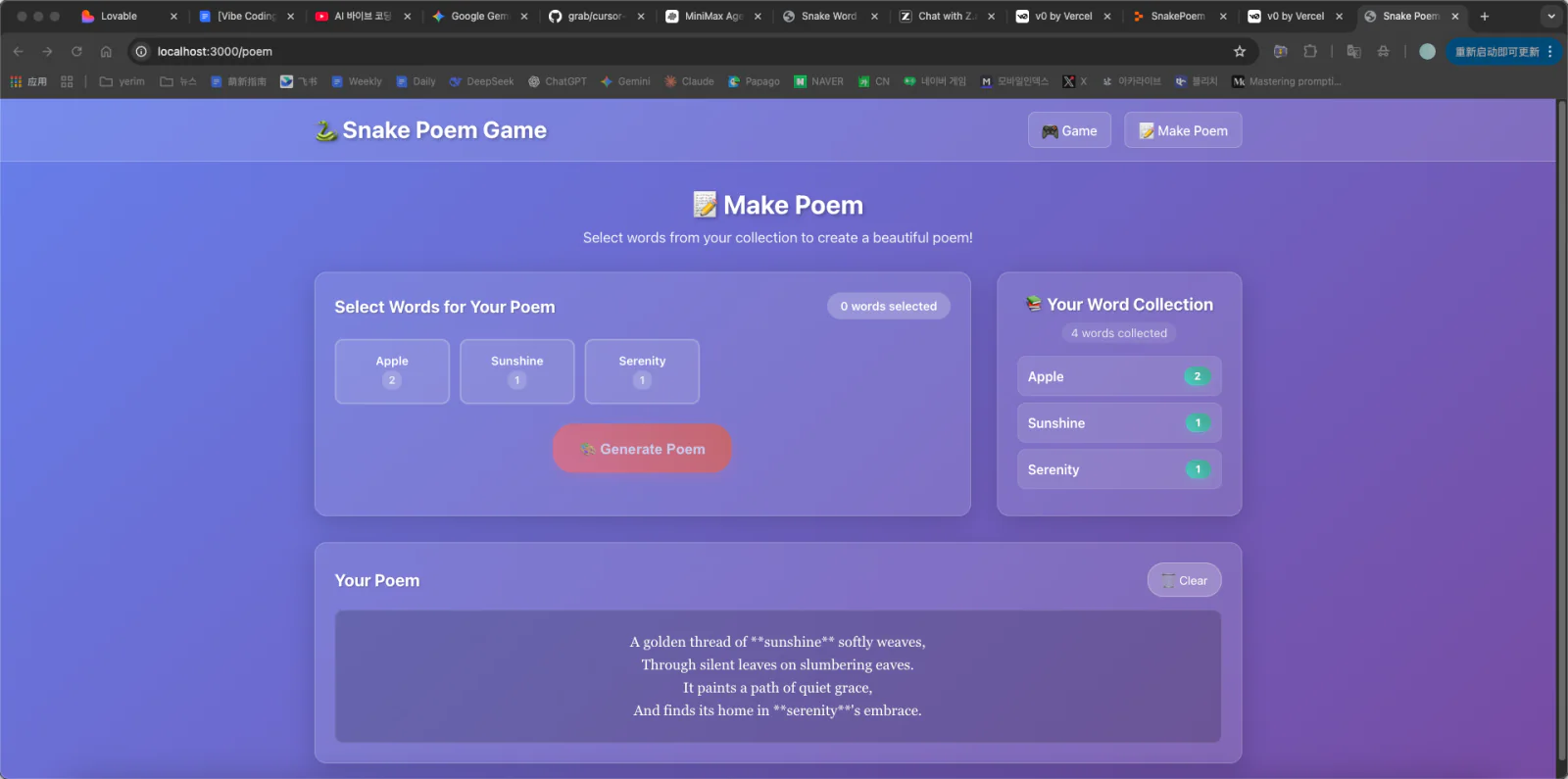
- Snake Game Results:
- Price:
3. Z.ai (Web-based)
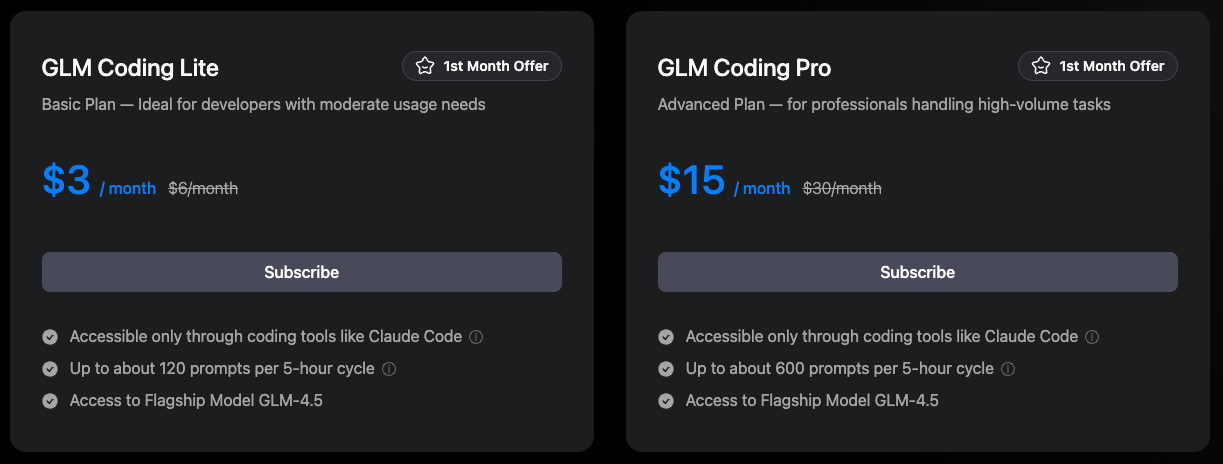
- Platform Type: Web
- Key Features & Workflow: Z.ai's usage is relatively straightforward, but a clear challenge is: you need to manually copy and paste the generated code. The platform lacks a real-time preview window, making it difficult to see the code running effect immediately.
- Suitable Users: This platform requires a more "hands-on" approach to use. The lack of automation means you must interact directly with the code, which can actually be a kind of training for those who want to deeply understand AI output. However, frequent copy-pasting brings efficiency problems and error risks. More suitable for students who want to see "raw AI output code" rather than those seeking a one-click experience.
- Prompt Process:

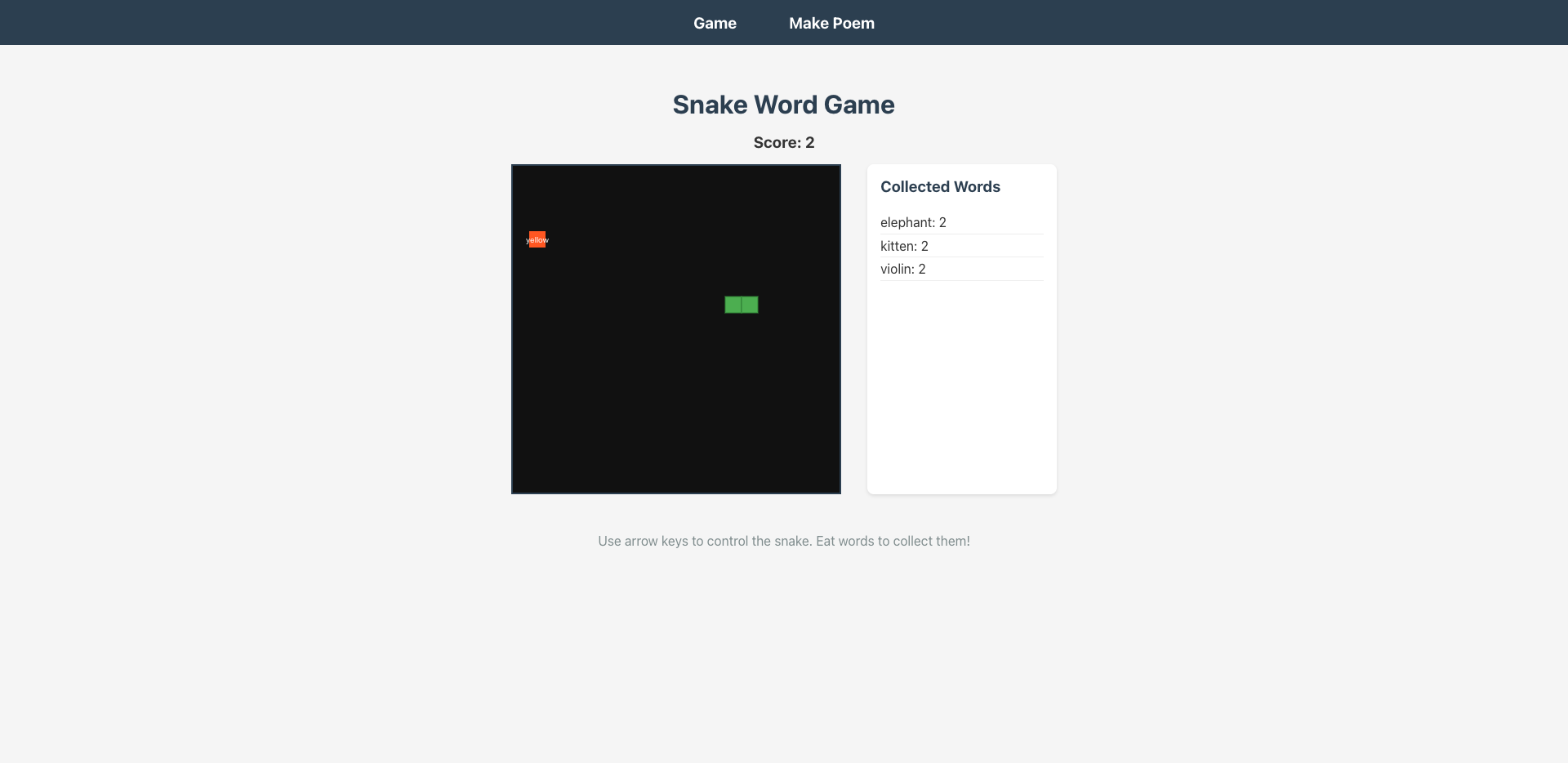
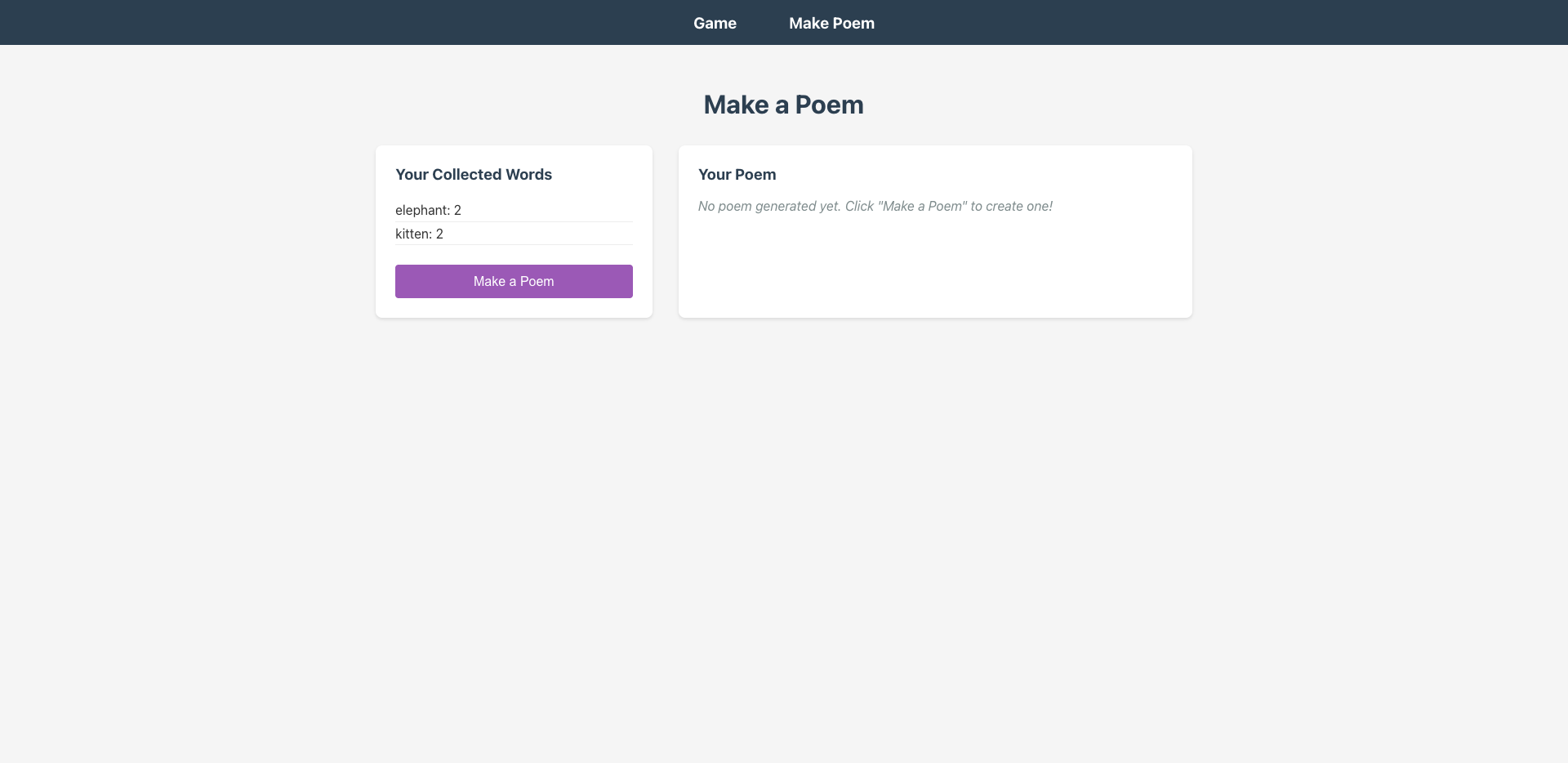
- Snake Game Results:
- Price:
4. Replit (Web-based)
Platform Type: Web
Key Features & Workflow: Replit is an all-in-one online development and deployment environment—you can write code, run programs, and generate online access links directly in the browser. Before starting coding, it gives you a clear action plan; it also provides a visual editor where you can directly modify the UI in the preview window, and the source code automatically syncs. This allows you to verify at any time whether the AI output matches expectations, greatly reducing the number of back-and-forth modifications.
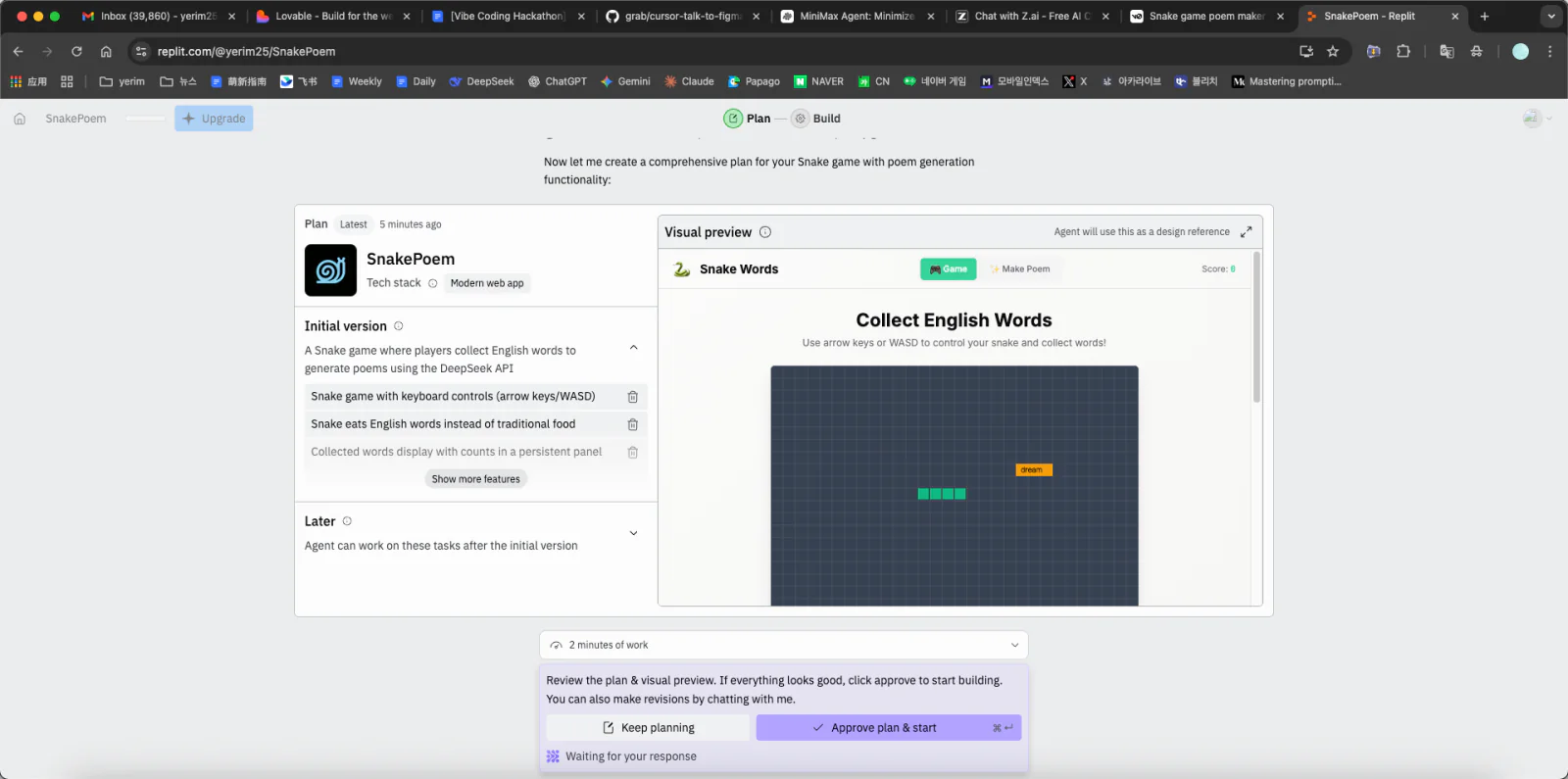
Suitable Users: Replit is very beginner-friendly. It simplifies the complete loop from coding to deployment—no need to separately configure servers or hosting services. Collaboration features are also strong, making it suitable for classmates working on projects together or having others help review code remotely.
Prompt Process: During the build process, the AI didn't fully understand the requirements at first—about 3 rounds of iteration were needed before the final output reached the ideal result.

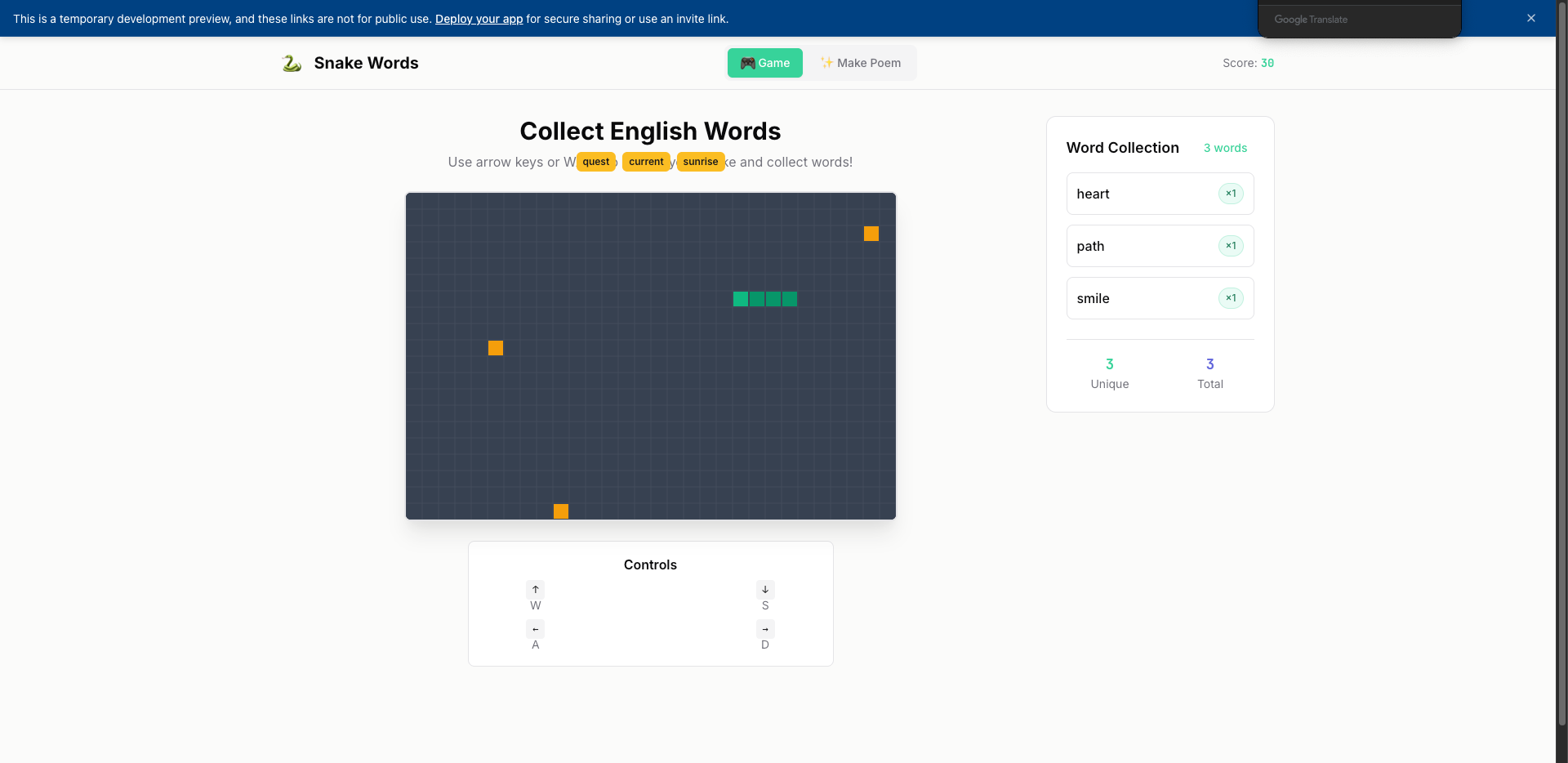
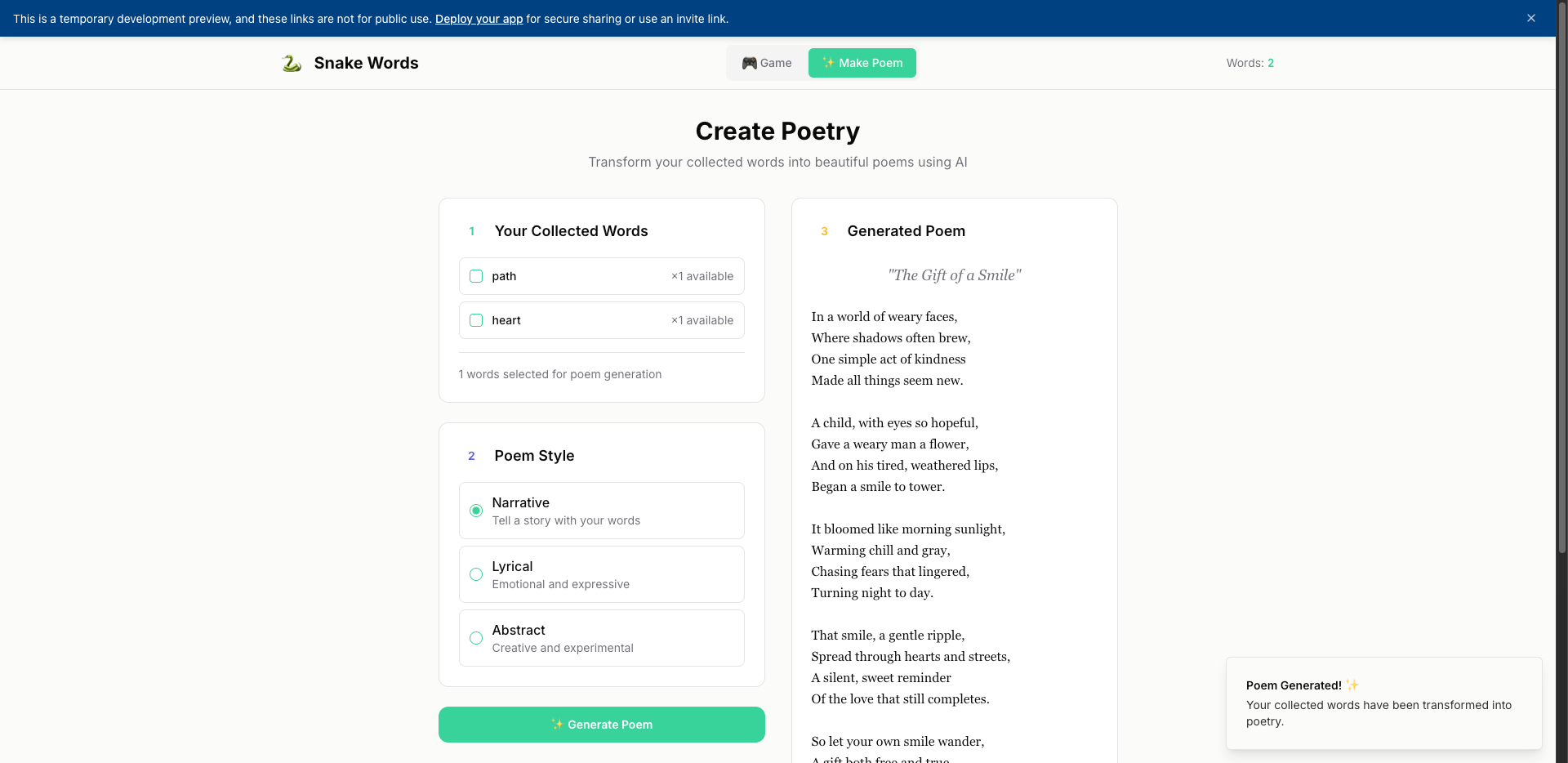
Snake Game Results:
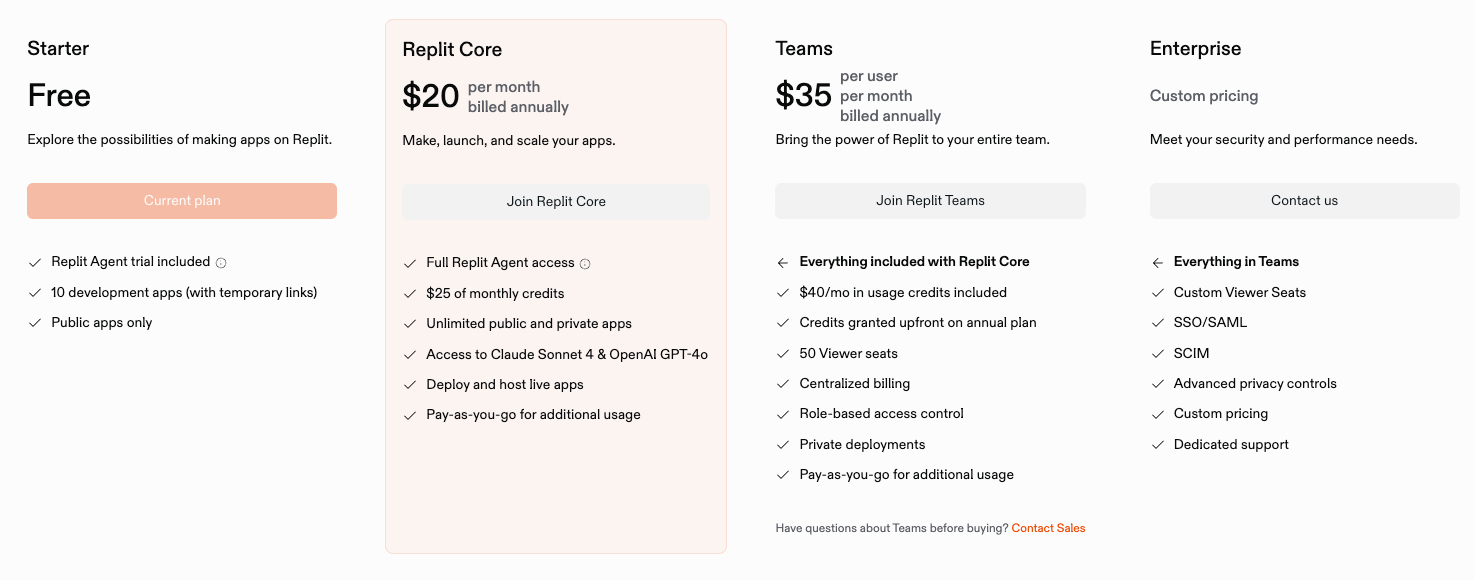
- Price:
5. Bolt.new (Web-based)
- Platform Type: Web
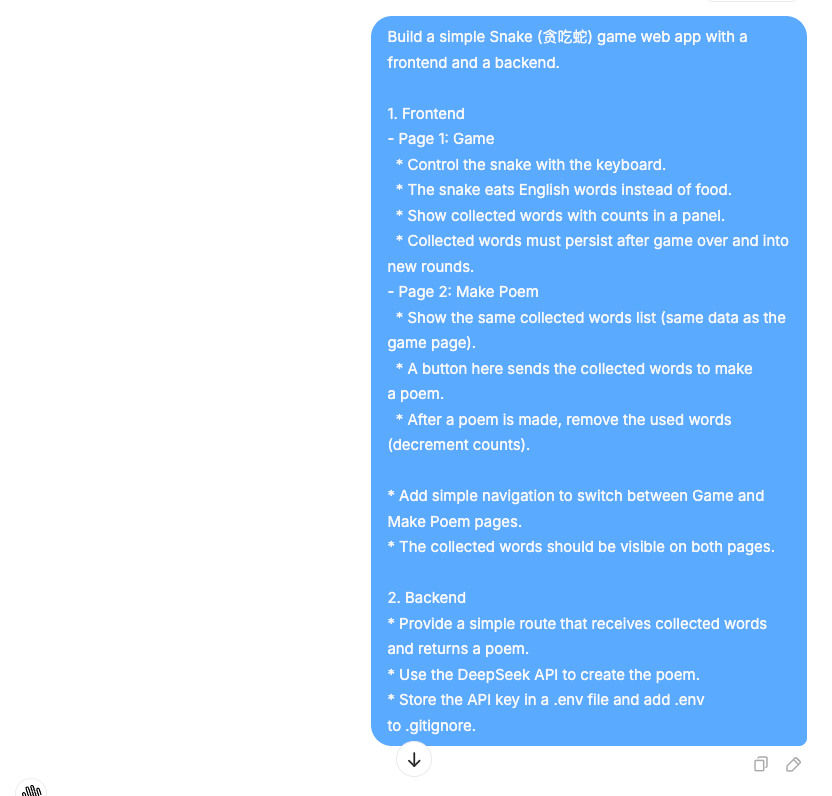
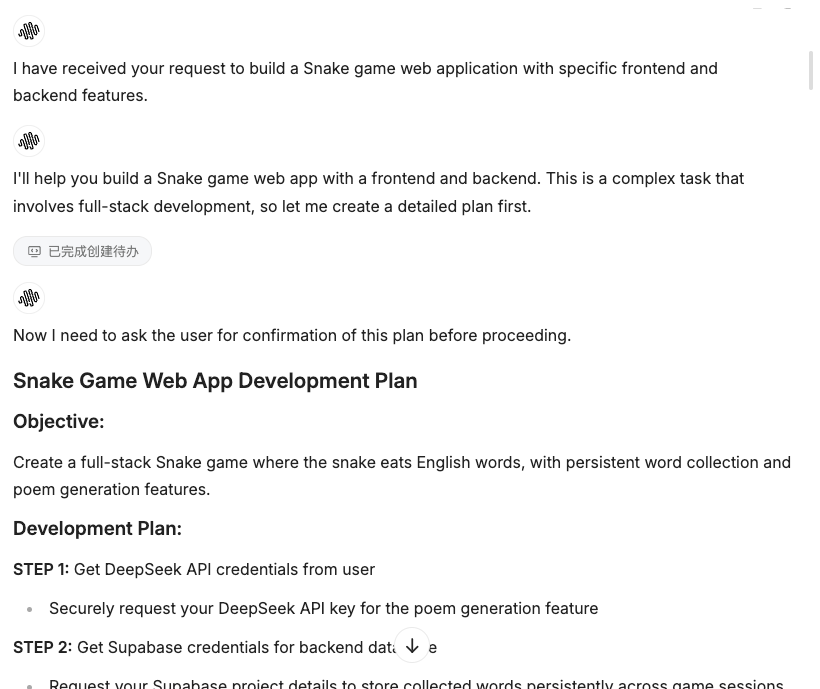
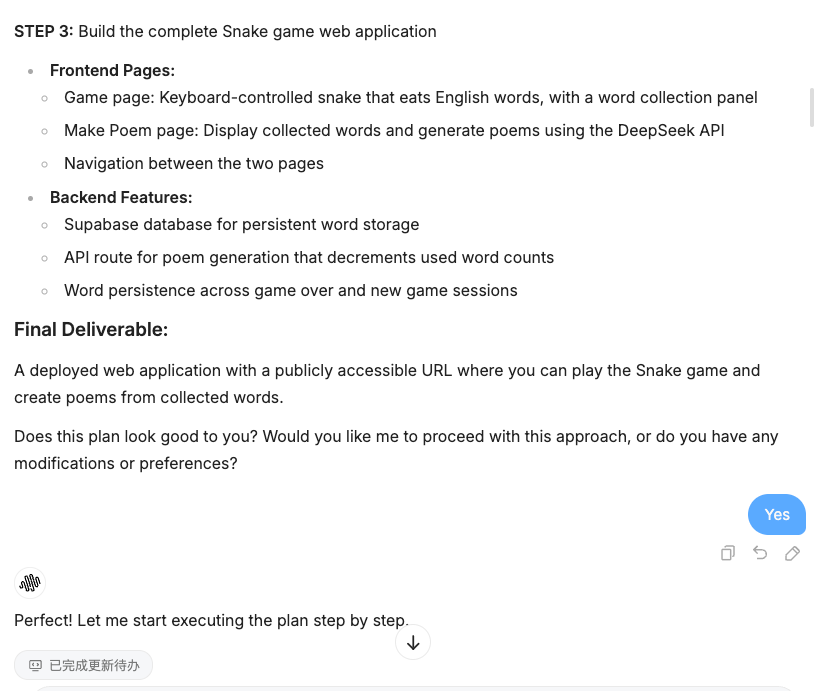
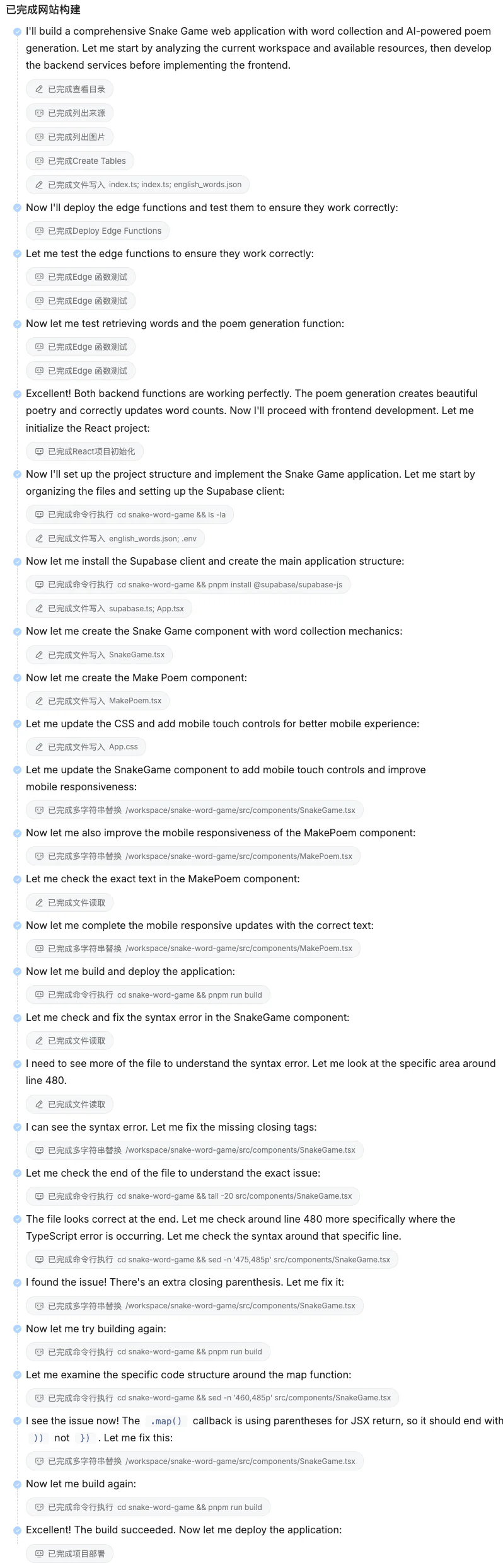
- Key Features & Workflow: Bolt.new is similar to Lovable, featuring a Web + AI development environment. It can automatically generate project scaffolding and offers real-time preview. Compared to Lovable, Bolt.new provides more development control, allowing you to directly modify files in the browser and configure build tools.
- Suitable Users: For developers who want more control but don't want to set up a local environment, Bolt.new offers a good balance. It allows you to get started quickly while having the flexibility to customize configurations.
- Prompt Process:
- Snake Game Results:
- Price:
6. Claude Dev (Web-based)
- Platform Type: Web (VS Code in browser)
- Key Features & Workflow: Claude Dev is essentially a browser-based version of Cursor, providing a full VS Code-like development environment in the web. It supports file management, terminal, and various extensions. The advantage is that you don't need to install anything—just open the browser to start coding.
- Suitable Users: For users who like Cursor's workflow but don't want to install desktop software, or those who need to code on different devices, Claude Dev is a great alternative.
- Prompt Process:
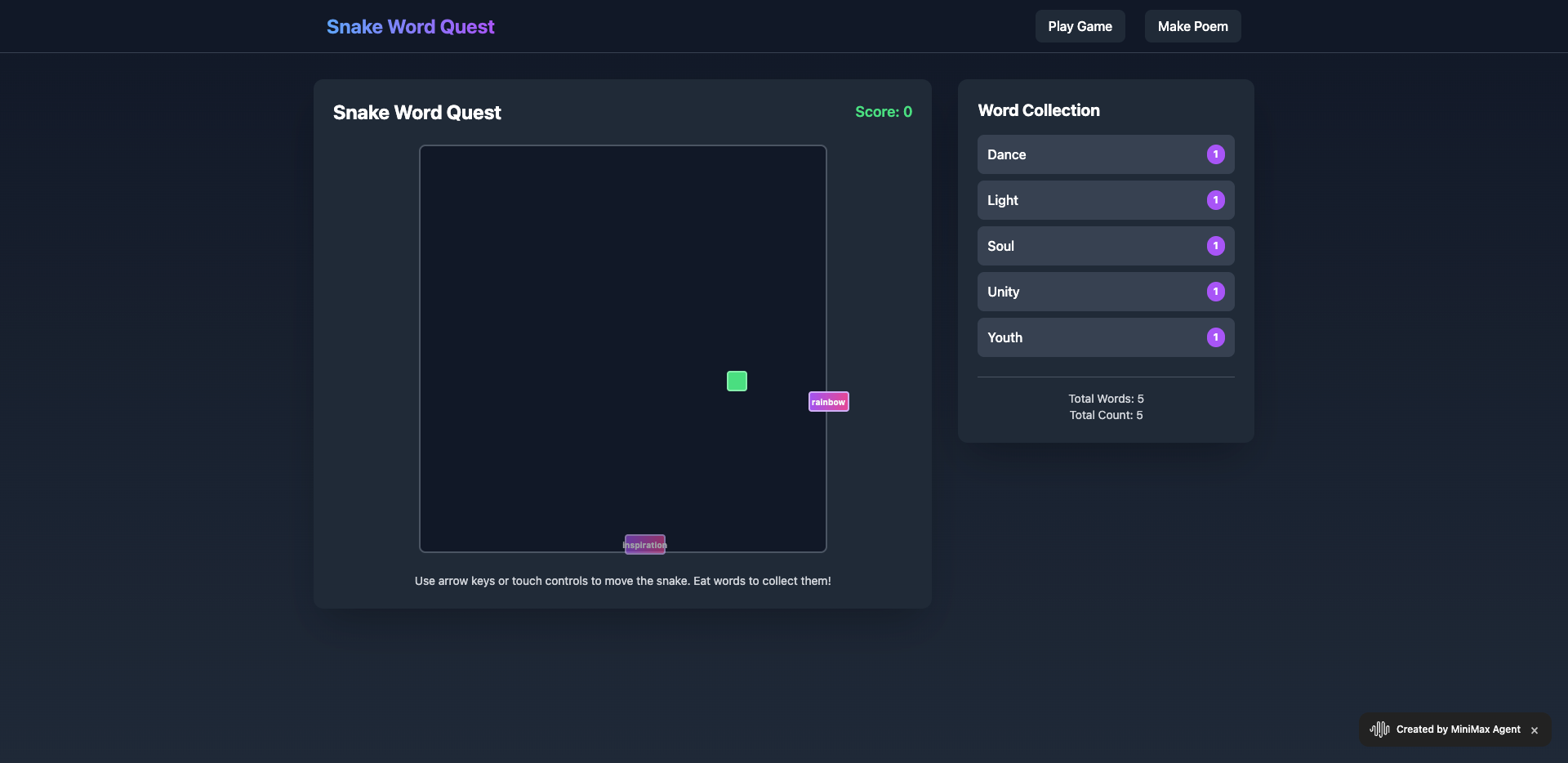
- Snake Game Results:
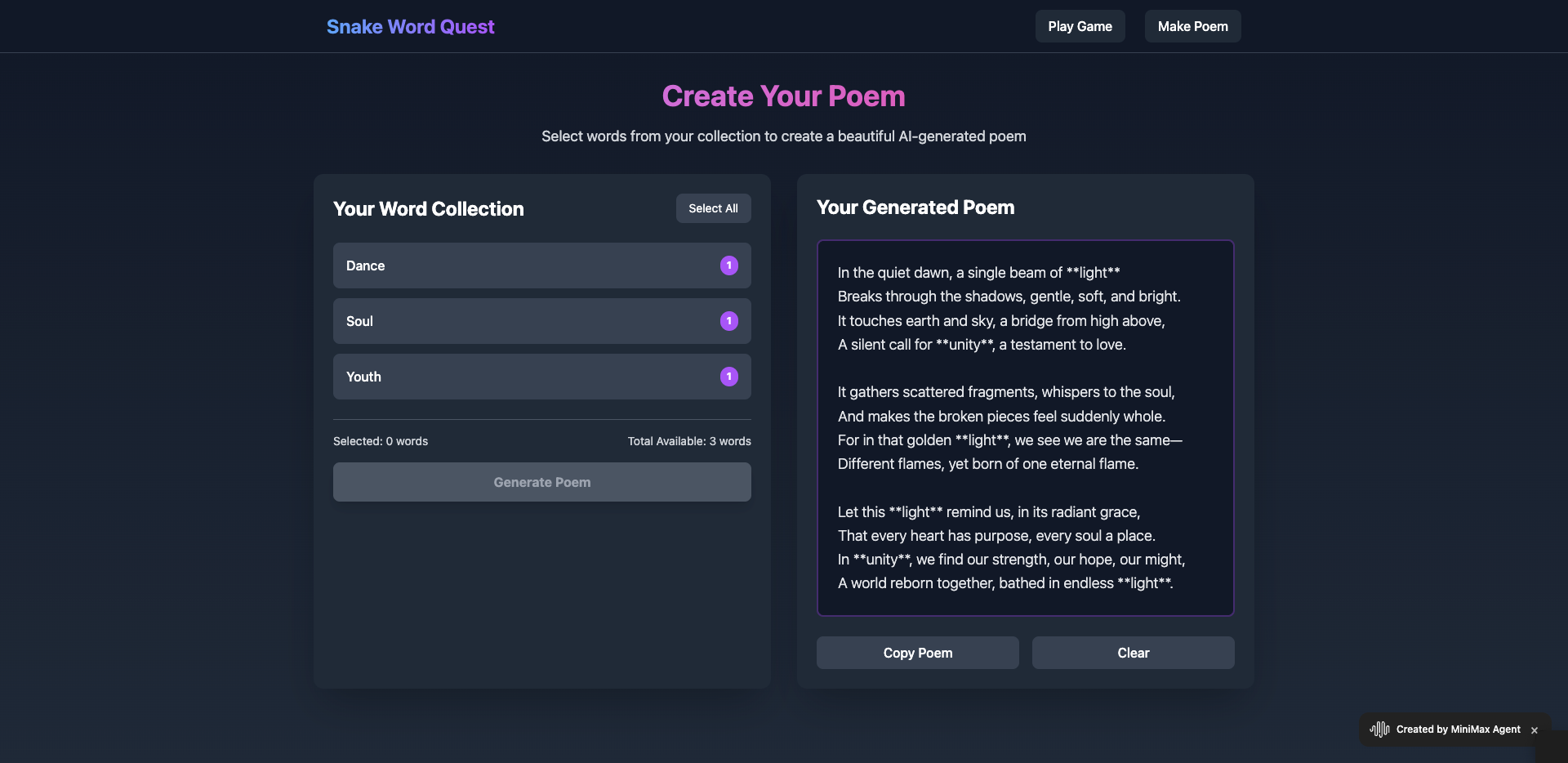
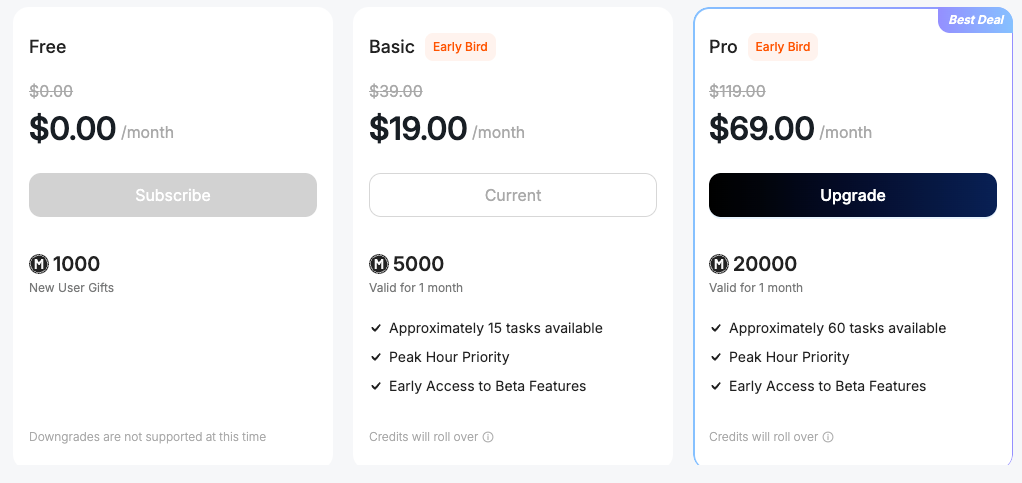
- Price:

7. GitHub Copilot (IDE Plugin)
- Platform Type: IDE Plugin (VS Code, JetBrains, etc.)
- Key Features & Workflow: GitHub Copilot is not a complete development platform but an AI coding assistant that integrates into your existing IDE. It provides code suggestions, auto-completion, and can help explain and refactor code. It works locally without sending code to the cloud, offering better privacy and security.
- Suitable Users: For developers who already have a development environment set up and want to enhance productivity with AI assistance. Not suitable for complete beginners who haven't set up a local environment yet.
- Prompt Process: Copilot works differently—it provides inline suggestions as you type, rather than generating entire projects through conversations. You can write comments or function names, and Copilot will suggest implementations.
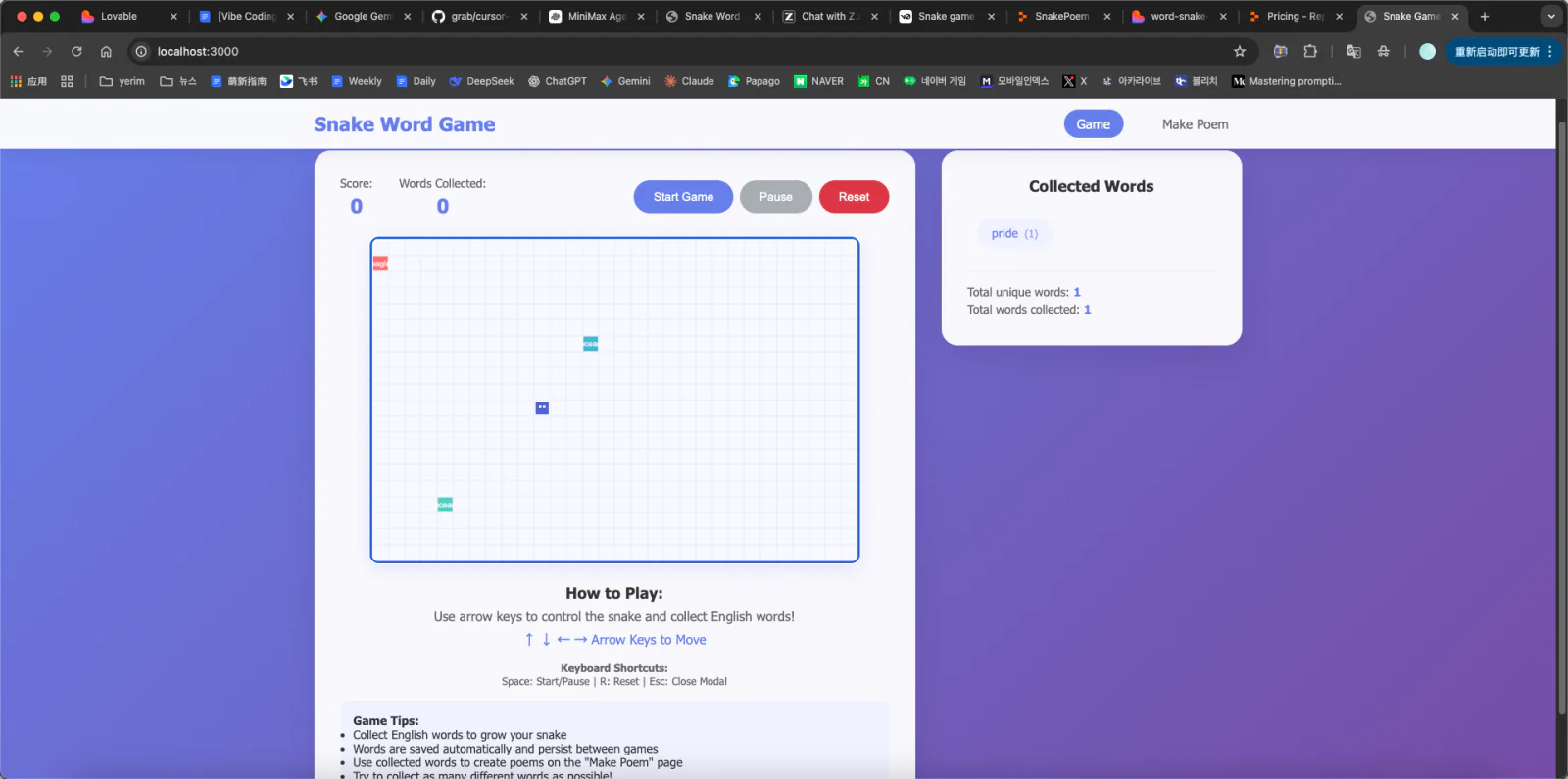
- Snake Game Results:

- Price:
3. Summary and Recommendations
3.1 Platform Comparison Summary
| Platform | Type | Beginner Friendliness | Code Control | Deployment | Price |
|---|---|---|---|---|---|
| Lovable | Web | ⭐⭐⭐⭐⭐ | ⭐⭐⭐ | ⭐⭐⭐⭐⭐ | High |
| Cursor | Desktop | ⭐⭐⭐ | ⭐⭐⭐⭐⭐ | ⭐⭐⭐ | Free/Paid |
| Z.ai | Web | ⭐⭐⭐ | ⭐⭐⭐⭐ | ⭐⭐ | Free |
| Replit | Web | ⭐⭐⭐⭐ | ⭐⭐⭐ | ⭐⭐⭐⭐ | Free/Paid |
| Bolt.new | Web | ⭐⭐⭐⭐ | ⭐⭐⭐⭐ | ⭐⭐⭐⭐ | Free/Paid |
| Claude Dev | Web | ⭐⭐⭐ | ⭐⭐⭐⭐⭐ | ⭐⭐ | Free/Paid |
| Copilot | Plugin | ⭐⭐ | ⭐⭐⭐⭐⭐ | N/A | Paid |
3.2 Selection Recommendations
- Complete Beginners: Try Lovable or Replit—they offer the smoothest experience with minimal setup.
- Those with Programming Foundation: Cursor or Claude Dev provide the most control.
- Students on a Budget: Z.ai or free tiers of Replit/Bolt.new are good choices.
- Those Seeking Balance: Bolt.new offers a good balance between ease of use and control.
3.3 Future Trends
Vibe Coding is rapidly evolving. We can expect:
- More Powerful Agents: Future AI Agents will have stronger reasoning and planning capabilities.
- Deeper Integration: Seamless integration with more development tools and services.
- Lower Barriers: Even non-technical users can create complex applications.
- New Workflows: Emergence of new development patterns beyond traditional coding.
6. AI Design Tools: Integrating Figma into Your Workflow
In addition to AI programming tools, AI-powered design tools are also becoming essential for Vibe Coding workflows. This section introduces how to integrate tools like Figma into your development process.
6.1 Common AI Design Tools
| Tool | Features | Suitable For |
|---|---|---|
| Figma (with AI) | AI-powered design features, auto-layout, component suggestions | UI/UX Design |
| Mastergo | Chinese-localized, AI-assisted design, collaboration features | Chinese market products |
| Uizard | AI-powered wireframe to design conversion | Rapid prototyping |
| Galileo AI | Text-to-UI generation | Quick idea visualization |
6.2 Integrating Design Tools with Vibe Coding
The typical workflow is:
- Design Phase: Use AI design tools to create UI mockups
- handoff: Export design specs or use plugins to integrate with development
- Implementation: AI Agent reads design specs and implements code
6.3 Hands-On: Using Figma with Vibe Coding
Step 1: Create Design in Figma
- Use Figma's AI features to quickly generate layouts
- Or manually design and use AI assistance for improvements
Step 2: handoff to Development
- Use Figma's "Developer Mode" to inspect specs
- Or use plugins like "Anima" to export code
Step 3: Vibe Coding Implementation
- Describe the design to your AI Agent
- The Agent generates code that matches the design
6.4 Practical Tips
- Keep Designs Simple: Start with simple designs, add complexity gradually
- Use Design Systems: Establish consistent component libraries
- Leverage AI Features: Make full use of AI-assisted design features
- Iterate Quickly: Rapidly iterate based on AI-generated suggestions
7. Summary
This chapter covered:
- Vibe Coding Concept: A new development paradigm that uses AI to accelerate application building
- AI Agent Technology: The core capabilities and working principles of AI Agents
- Prompt Engineering: Techniques for writing effective prompts
- Hands-On Practice: Building a complete Snake game with AI poetry generation
- Platform Comparison: Detailed evaluation of 7 major Vibe Coding platforms
- Design Tool Integration: How to incorporate AI design tools into your workflow
Vibe Coding represents the future of software development. As AI technology continues to advance, the barrier to software development will become increasingly lower. We encourage everyone to embrace this new paradigm and start their Vibe Coding journey!
Next Steps:
- Choose a platform and start your first Vibe Coding project
- Practice prompt writing skills
- Explore AI design tools
- Join the Vibe Coding community to learn from others
Happy Vibe Coding! 🚀